Chapter 4. Acquire an Image
A signal needs to be properly connected to a Measure Item in Hardware Space before it can be
available to image. The supplied IHDL files for STM modes will have the output of the Z PI Controller
(Topography) available as an Imaging channel, and the output of the STM Lock In (Current) will be
available as an Imaging channel and as a Spectroscopy channel.
Each measure item has a property that selects when the data from the connected channel is available for
viewing and saved as part of the data file. The choices are:
• None: The data is discarded after display. This would be used for a channel of data that is useful for
experimental set up but not needed to be saved.
• Image: The data will only be available for Imaging.
• Spectroscopy: The data will only be available during spectroscopic measurements.
• Image + Spectroscopy: The data will be available during both the imaging and spectroscopic portions
of the measurement.
Tip
Images can be viewed in real-time as they are acquired.
4.1 Verify the Available Signals
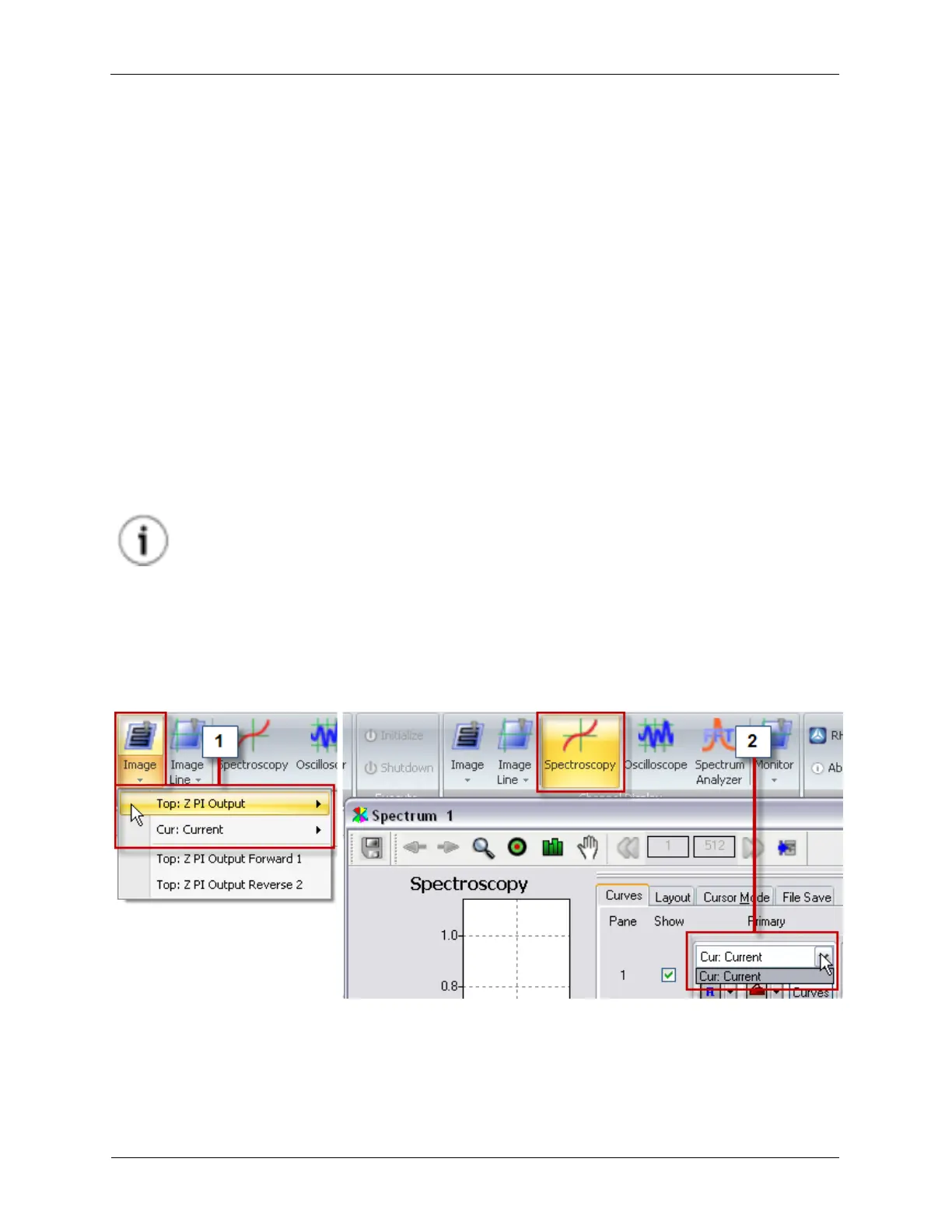
The available signals can be verified by checking the Image toolbar icon and the Spectroscopy window.
Figure 4.1. Checking the Available Signals
1. Both the Topography and Current signals are available for Imaging because the Topography Measure
Item's Measure Type was set to Image, and the Current Measure Item's Measure Type was set to
Image + Spectroscopy .



 To Next Page