Acquire Spectroscopy Data
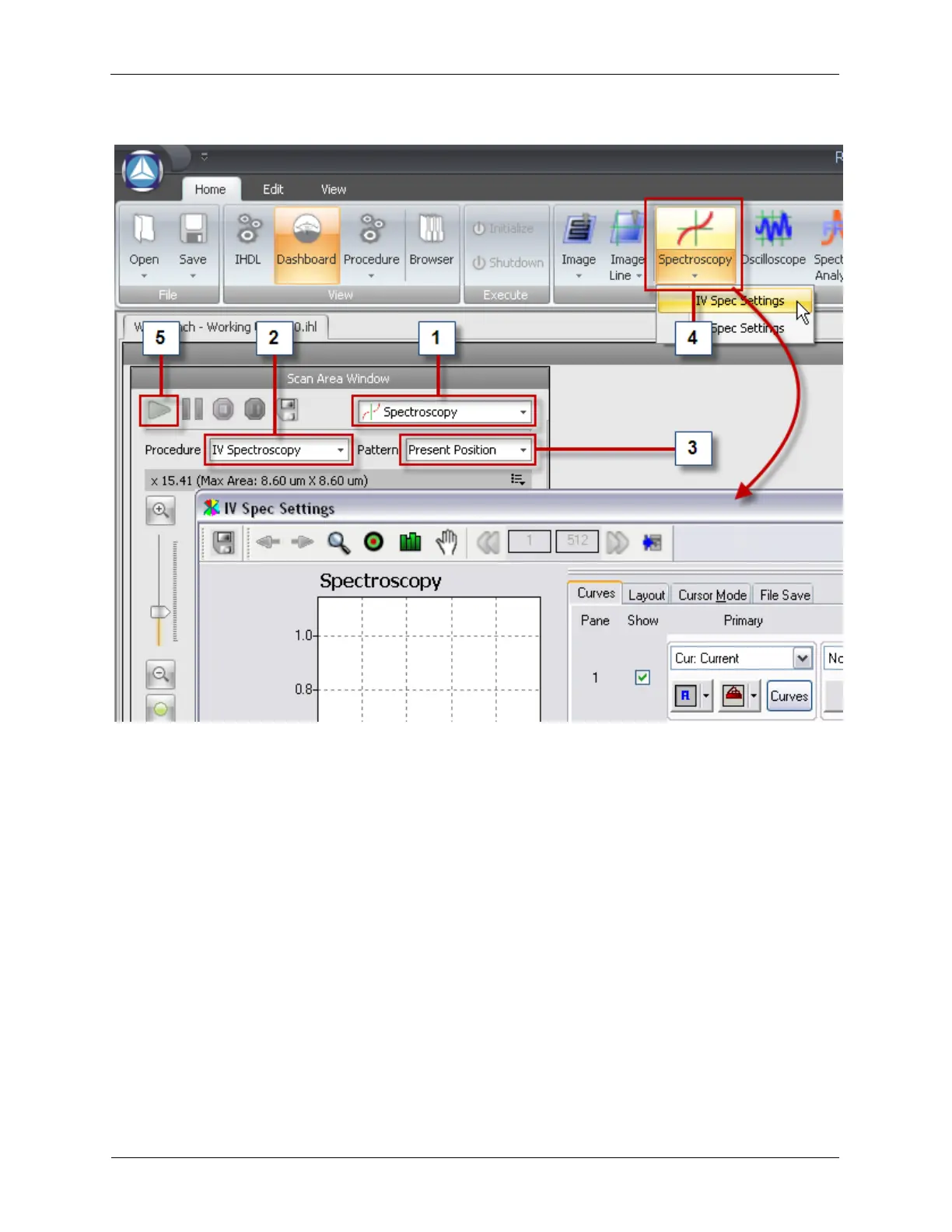
Figure 6.5. Scan Area Window access to Spectroscopy Procedures
The figure above assumes that you have been scanning your sample and found an interesting feature
and you want to acquire spectroscopy at a location (the Present Position). To perform an I/V
Spectroscopy measurement at the Present Position (after you have configured the Spectroscopy
Settings as described above) is outlined in the following steps:
1. In the Mode selection box choose Spectroscopy.
2. In the Procedure selection box choose IV Spectroscopy.
3. Select Present Position from the Pattern selection box.
4. From the Ribbon Toolbar click on the Spectroscopy menu and select IV Spec Settings to open the
IV Spectroscopy XY Graph. This XY Graph is the same as the Oscilloscope, Image Line, and
Spectrum Analyzer XY Graphs.
5. Press the blue Start button at the top-left corner of the Scan Area Window. This will run the IV
Spectroscopy procedure.



 To Next Page