Acquire Spectroscopy Data
Note
When the selected Pattern is Present Position, the spectroscopic measurement will be
performed at the location displayed by the green tip position on the Scan Area Window.
The cursor can be moved to any location on the image by using the Move Tip command.
This can be accessed by right-clicking on the image and selecting Move Tip. The tip will
move to any location in the Scan Area Window that is selected.
6.3 dI/dV Spectroscopy Measurements
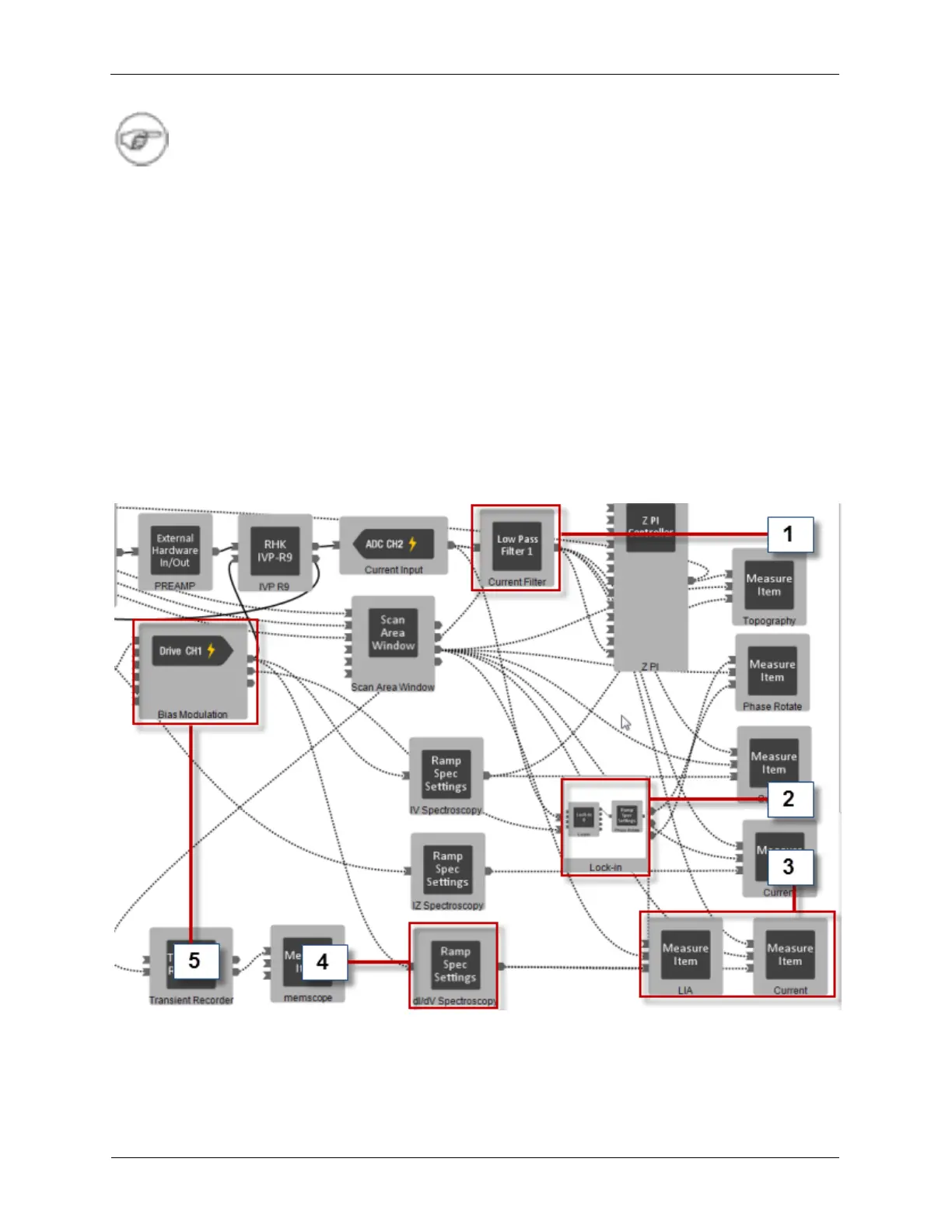
The dI/dV measurement is a type of Ramp Spectroscopy. This measurement can be done from the
preconfigured UHV300 ihl. We will refer to the Hardware Workbench from this IHL in the figure below.
Please note that this IHL uses one of the virtual lock-in amplifiers. Filter 1 (1) is used to bring the Current
Signal into the feedback loop as well as measure the IV Spectroscopy result. A Lock-in Amplifier (2) is
was added to detect the signal at the reference frequency of the Bias Modulation (5). Measure Items (3)
were added to record the Lock-in 0 X output (the dI/dV signal) and the I/V signal simultaneously! The
settings for the dI/dV Spectroscopy measurement can be made on the dI/dV Spectroscopy settings
panel (4).
Figure 6.6. The Preconfigured UHV300 ihl
We will also refer to the Dashboard as shown in the figure below.



 To Next Page