Opening the image in the Browser will display the locations of the changed parameters directly on the
image. Hovering the mouse cursor over one of these locations will display what values had changed.
• No History: All history data is discarded after the time data has been converted to pixels. The files
are minimized along with the amount and type of data being stored. This selection is equivalent to
the original SM4 file format of the RHK SPM1000 control system and XPMPro.
Note
We are storing additional software parameters into the SM4 Page Info to better help the user
see how they had configured a particular measurement. Some additions to the SM4 Page Info
are the Lock-in Amplifier settings such as the Filter Cutoff Frequency, Oscillation Amplitude and
Oscillation Frequency.
6. Default Comment: Any text entered in the Default Comment will be stored in the header of each data
file. Typical information to include would be the sample type and preparation method utilized, special
conditions of the experiment, etc.
K.1.4. Save - dataSAFE
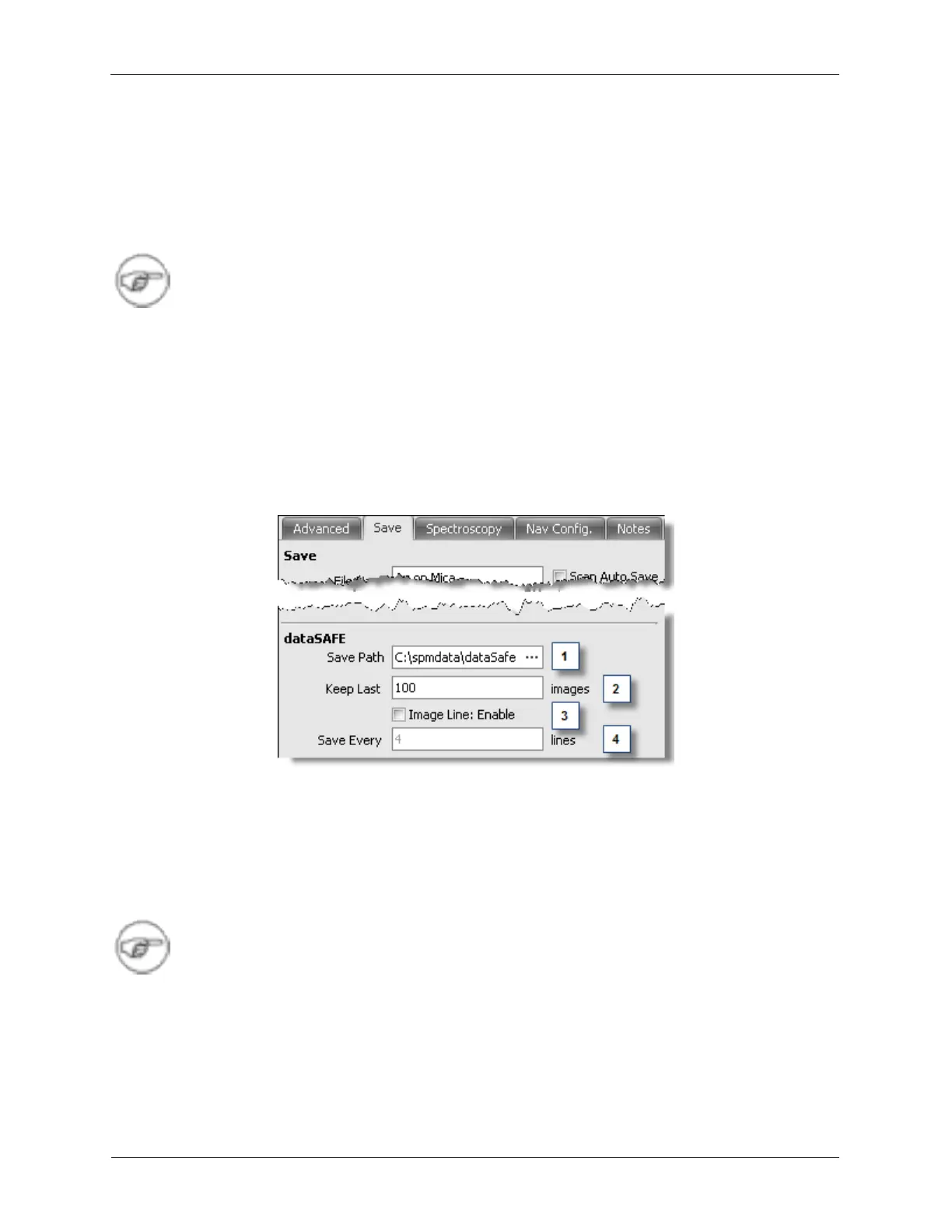
Figure K.11. Scan Area Window dataSAFE Panel
The R9 Software has a safety feature built-in called dataSAFE. dataSAFE automatically saves the last
Keep Last (2) number of images into the Save Path (1) folder if Auto Save is disabled. This is very
useful for data recovery in the event of the user forgetting to save. Enabling Image Line (3) will cause the
R9 Software to save partially acquired images at various times during acquisition based on the Save
Every (4) setting. This can be useful if a lab has unstable power and the users do not wish to lose data if
the power to the computer or R9 Controller fails.
Note
dataSAFE will keep the last Keep Last number of images saved in its Save Path. If Keep
Last is set to 100, and there are already 100 files saved in the dataSAFE folder, the oldest
file will be removed and the new file will be saved.
K.1.5. Navigation Config.



 To Next Page