Networking
Humphrey Field Analyzer II-
i
series User Manual 2660021145640 A
14-20
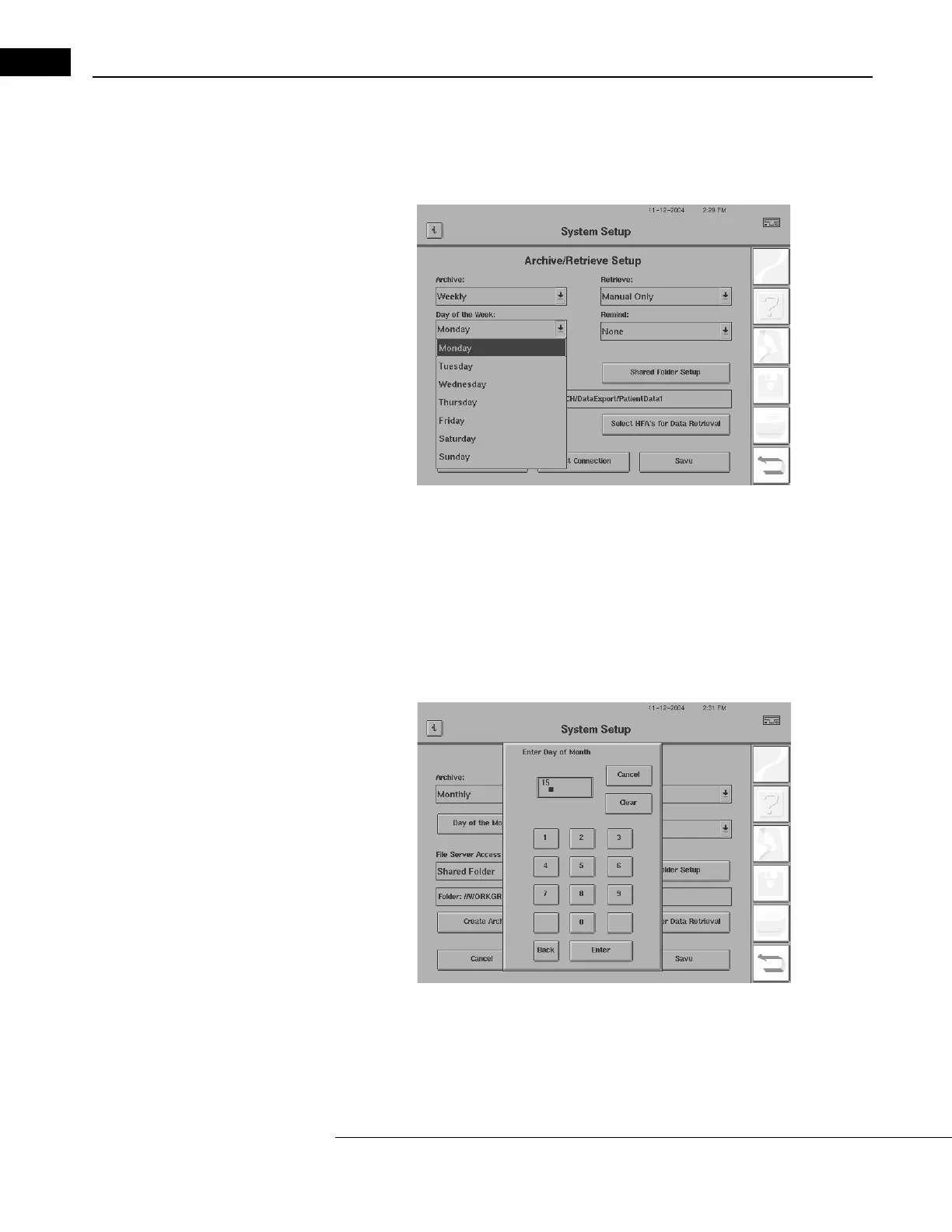
3 If you select WEEKLY automatic archiving, a Day of the Week drop-down box appears below
the Archive drop-down box (Figure 14.17). Select a day from MONDAY to SUNDAY. The HFA II-
i
will archive patient data automatically at instrument startup on the selected day, or on the first
day that you power up the HFA II-
i
after that day of the week.
Figure 14.17 Setting Up Weekly Automatic Archiving
4 If you select MONTHLY automatic archiving, a Day of the Month drop-down box appears below
the Archive drop-down box. Use the numeric keypad to enter a date from 1 through 31. On
your selected date, the HFA II-
i
will archive patient data to the server automatically at
instrument startup on the selected day, or on the first day after that date when you power up
the HFA II-
i
. The archiving process is rapid, depending on how often archiving is performed,
allowing you to use the HFA II-
i
for patient testing after a brief pause—it only takes a couple of
minutes to perform the archive operation
.
Figure 14.18 Setting Up Monthly Automatic Archiving
5 For changing the Retrieval settings for synchronization, follow steps 2, 3, and 4 above to
change the Retrieval-side of the drop-down boxes to the appropriate schedule.



 To Next Page
 Loading...







