Database Management
Humphrey Field Analyzer II-
i
series User Manual 2660021145640 A
11-6
Note: You may not back up or restore an individual Custom test pattern. All Custom test patterns
must be backed up and restored as a group.
Note: The network settings and software licensing that you back up only can be restored to the HFA
from which they originated. Therefore, if you apply a configuration backup from one HFA to several
others, the network settings and software licensing settings will not restore to the other locations.
Note: Configuration Backup is a separate function from the Patient Database Backup.
Note: Any time you change configuration settings, you should back up all your settings to a USB
storage device. That way, should you ever need to restore your configuration settings, you will be
able to restore them to their most recent selections.
Backing Up Configurations to a USB Storage Device
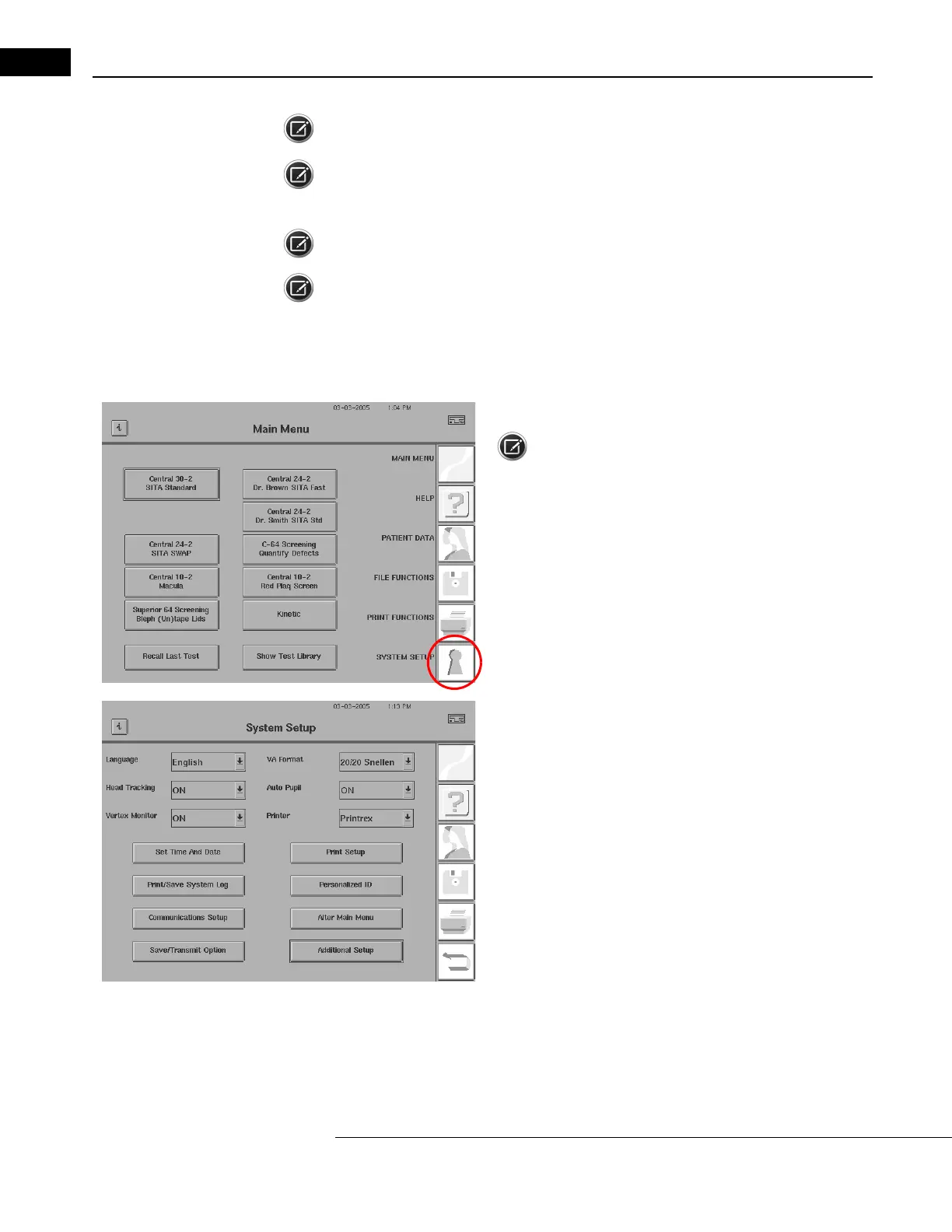
1From the Main Menu screen, press the
SYSTEM SETUP
icon.
Note: This example shows numerous test buttons
on the Main
Menu altered by the user. Refer to “Altering the Main Menu Screen,”
on page 2-26 for the details. Your unique Main Menu configuration
will be saved with this procedure.
2Press ADDITIONAL SETUP.



 To Next Page
 Loading...







