A
B
C
D
E
F
G
H
L
M
N
P
Uso e manutenzione
Use and Maintenance operations
sezione / section
D 5
46 749/749 DARK/749S Aggiornamento/Update - M.Y. 2006 - edizione/edition 00
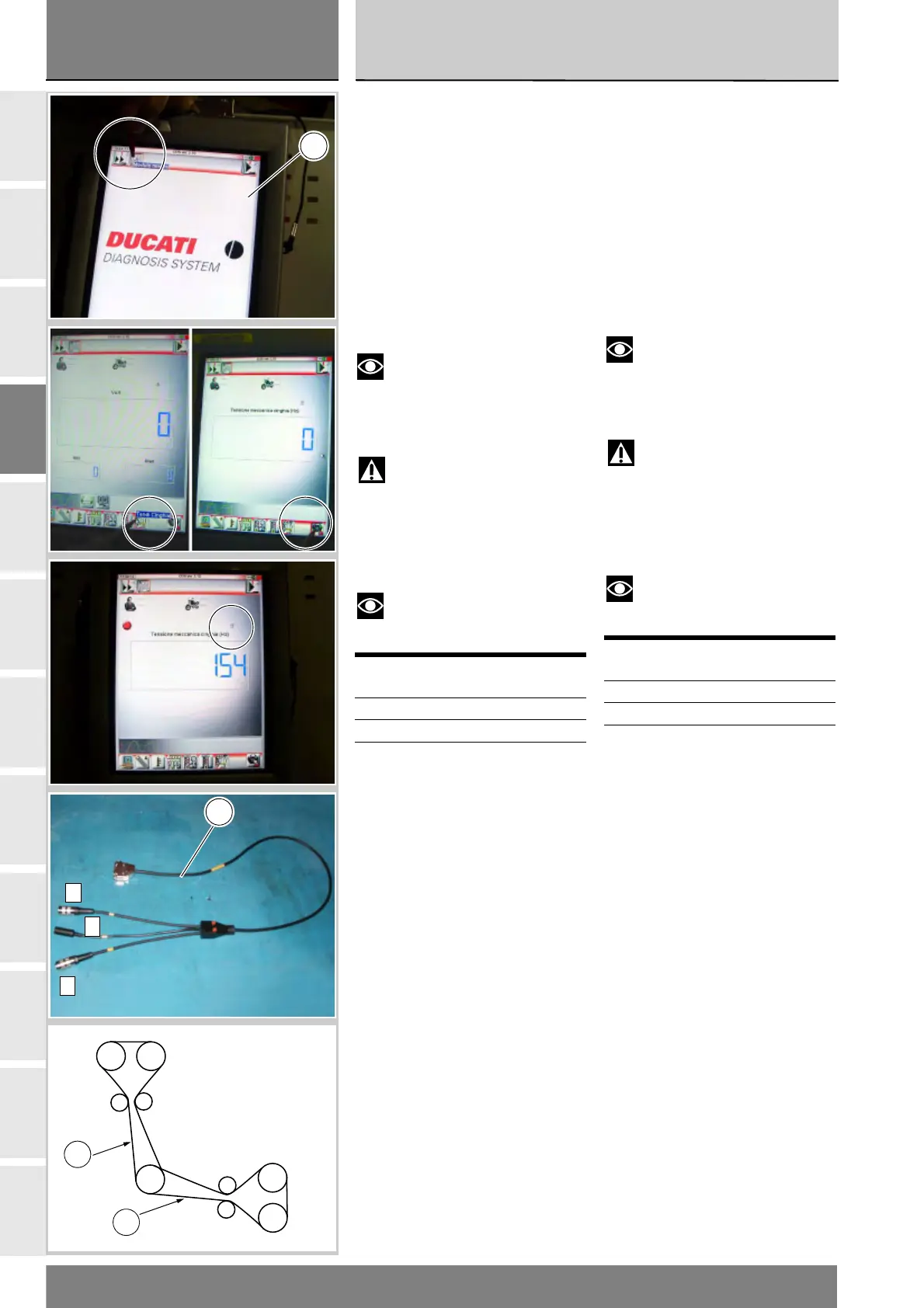
Sullo strumento DDS (1) selezionare
la funzione “Modulo misure”,
premendo sull'icona “Modulo
misure”; poi premere l'icona “Tendi
Cinghia” e di seguito l'icona di “Start”
per accedere alla schermata di
“Tensione meccanica cinghie”.
Nella schermata viene indicata con
una lettera maiuscola quale presa
utilizzare del cavo (Modulo Misure)
(3): A, B oppure C.
Sollecitare leggermente la cinghia
con un dito e leggere il valore della
frequenza (Hz) sul DDS.
Note
Non sollecitare la cinghia più
volte consecutivamente, poichè il
tempo minimo necessario al DDS per
effettuare la lettura è di 1 secondo.
Attenzione
Controllare i valori di
tensionamento sui bracci delle
cinghie (22) e (23) indicati in figura.
Per i valori di tensionamento
controllare la tabella sotto riportata.
Note
Per tensionare la cinghia ruotare
il rullo tenditore in senso antiorario.
Cinghia Tensione
(±5 Hz)
Orizzontale 110 Hz
Verticale 110 Hz
On the DDS tester(1), select the
“Measurement module” function by
pressing the corresponding icon; then
press the “Belt Tension” icon
followed by the “Start” icon to
access the “Mechanical belt tension”
screen.
The socket to which the cable (3) is to
be connected is indicated on the
screen with a capital letter: A, B or C.
Flick belt lightly with your finger and
read the frequency value (Hz) on the
DDS tester.
Notes
Do not flick the belt several
times repeatedly, as the minimum
time necessary for the DDS tester to
take a reading is 1 second.
Warning
Check the tension on the belt
sections(22) and (23) indicated in the
figure.
For correct tension values, refer to
the table below.
Notes
To tension the belt, turn
tensioner roller counterclockwise.
Belt Tension
(±5 Hz)
Horizontal 110 Hz
Vertical 110 Hz
1
A
B
C
3
Verticale
Vertical
Orizzontale
Horizontal
MobileFisso
Fixed
Fisso
Fixed
Mobile
Rinvio
Transm.
22
23











 To Next Page