Operation Manual – 802.1x-System Guard
H3C S3100 Series Ethernet Switches Chapter 1 802.1x Configuration
1-21
Caution:
z The Guest VLAN function is available only when the switch operates in the
port-based authentication mode.
z Only one Guest VLAN can be configured for each switch.
z The Guest VLAN function cannot be implemented if you configure the dot1x
dhcp-launch command on the switch to enable DHCP-triggered authentication.
This is because the switch does not send authentication packets unsolicitedly in that
case.
z This function is not supported on the S3100-C-EPON-EI Series Ethernet Switches.
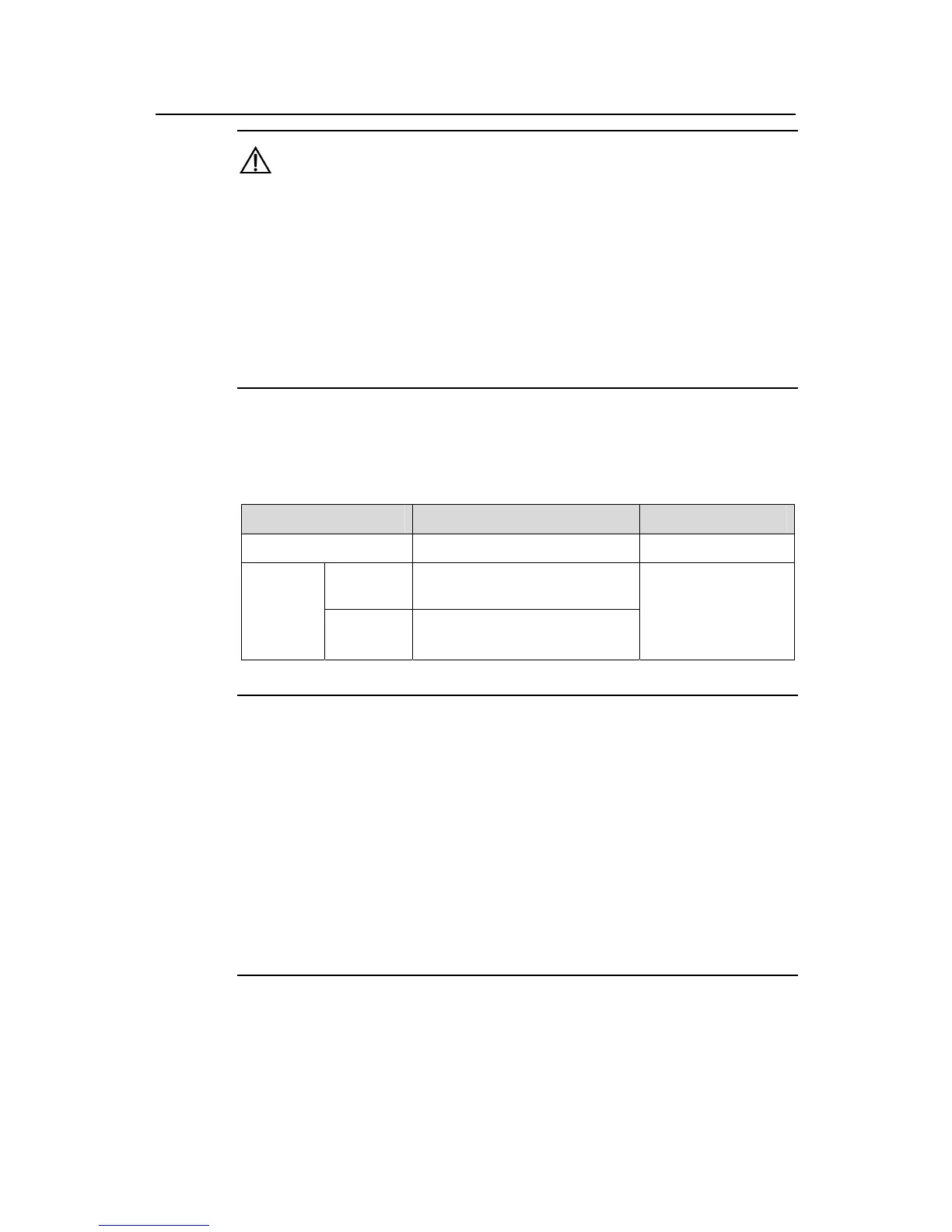
1.4.5 Configuring 802.1x Re-Authentication
Table 1-7 Enable 802.1x re-authentication
Operation Command Remarks
Enter system view
system-view
—
In system
view
dot1x re-authenticate
[ interface interface-list ]
Enable
802.1x
re-authent
ication on
port(s)
In port
view
dot1x re-authenticate
Required
By default, 802.1x
re-authentication is
disabled on a port.
Note:
z To enable 802.1x re-authentication on a port, you must first enable 802.1x globally
and on the port.
z When re-authenticating a user, a switch goes through the complete authentication
process. It transmits the username and password of the user to the server. The
server may authenticate the username and password, or, however, use
re-authentication for only accounting and user connection status checking and
therefore does not authenticate the username and password any more.
z An authentication server running CAMS authenticates the username and password
during re-authentication of a user in the EAP authentication mode but does not in
PAP or CHAP authentication mode.
1.4.6 Configuring the 802.1x Re-Authentication Timer
After 802.1x re-authentication is enabled on the switch, the switch determines the
re-authentication interval in one of the following two ways:



 To Next Page
 Loading...






