Operation Manual – ACL
H3C S3100 Series Ethernet Switches Chapter 1 ACL Configuration
1-13
II. Configuration procedure
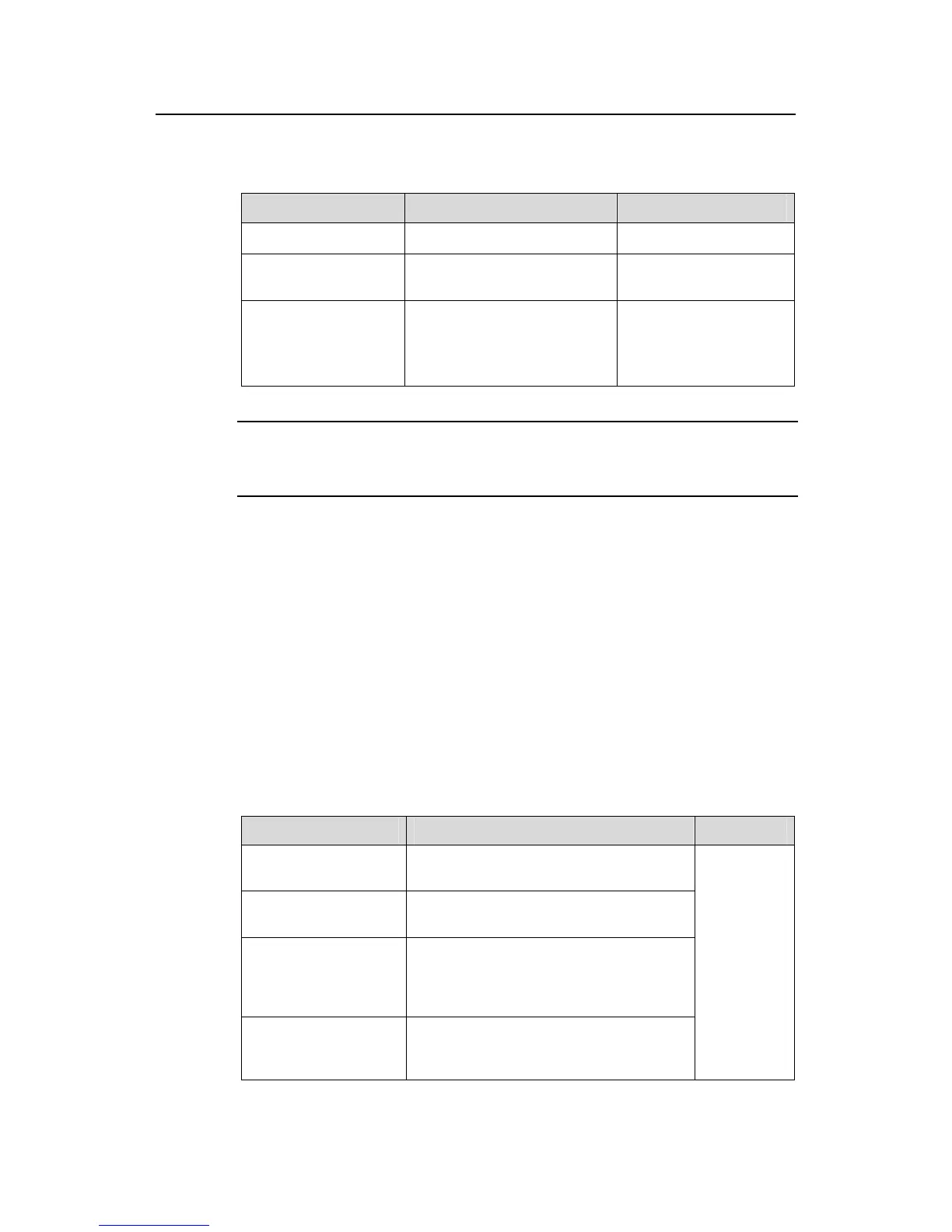
Table 1-8 Apply an ACL to a port
Operation Command Description
Enter system view
system-view
—
Enter Ethernet port
view
interface interface-type
interface-number
—
Apply an ACL to the
port
packet-filter inbound acl-rule
Required
For description on the
acl-rule argument, refer
to ACL Command.
Note:
You cannot assign an ACL to a member port of a port group.
III. Configuration example
# Apply ACL 2000 to Ethernet 1/0/1 to filter the inbound packets.
<Sysname> system-view
[Sysname] interface Ethernet 1/0/1
[Sysname-Ethernet1/0/1] packet-filter inbound ip-group 2000
1.4 Displaying ACL Configuration
After the above configuration, you can execute the display commands in any view to
view the ACL running information and verify the configuration.
Table 1-9 Display ACL configuration
Operation Command Description
Display a configured
ACL or all the ACLs
display acl { all | acl-number }
Display a time range or
all the time ranges
display time-range { all | time-name }
Display the information
about packet filtering
display packet-filter { global | interface
interface-type interface-number |
port-group [ group-id ] | unitid unit-id |
vlan [ vlan-id ] }
Display the information
about remaining ACL
resources
display acl remaining entry
In any view.



 To Next Page
 Loading...






