© 2018 MA Lighting Technology GmbH - Dachdeckerstr. 16 - 97297 Waldbüttelbrunn - Germany
Phone +49 5251 688865-27 - support@ma-dot2.com - www.malighting.com
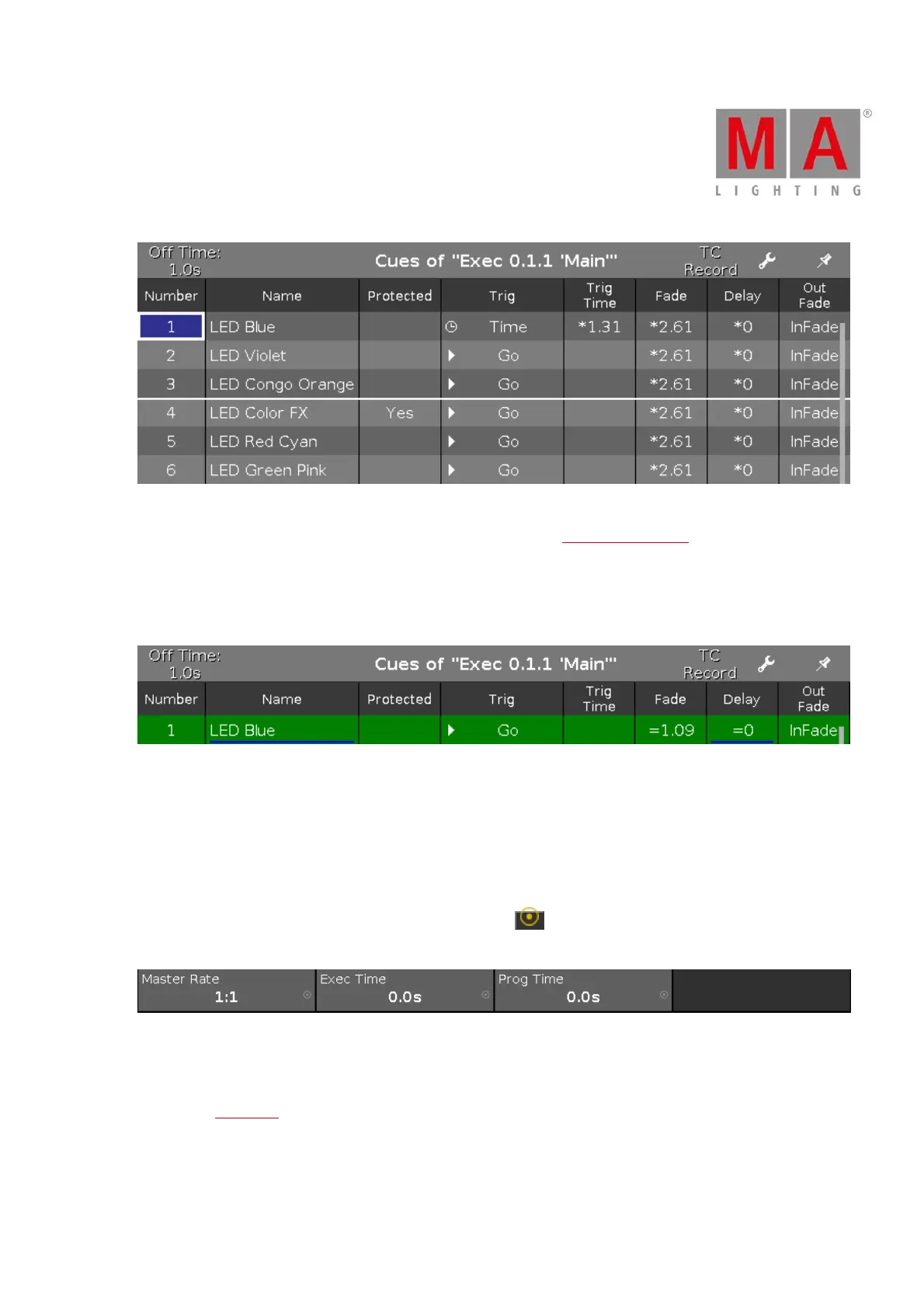
Figure 3: Main Cue List with Master Rate in Use
If an executor should not be controlled by the master rate fader, see Settings of Executor.
Exec Time (= Executor Time):
Overrides the cue fade and on/off times. Sets the cue delay to zero. The Trig Time and Trig Follow are excluded.
If the exec time is used, the fade and delay times are indicated by an equal sign =.
Figure 4: Main Cue List with used Exec Time
Prog Time (= Programmer Time):
Controls the fade time of the programmer.
Encoder Bar Functions
The default encoder speed is displayed without decimal places.
To change the encoder speed to slow, press the encoder key . The encoder speed is displayed with decimal
places.
Figure 5: Magic Speed View – Encoder Bar
Master Speeds 1-4:
To change the master speed, turn the encoder left or right.
To open the calculator, press the encoder.
Master Rate:
To change the master rate, turn the encoder left or right.



 To Next Page