© 2018 MA Lighting Technology GmbH - Dachdeckerstr. 16 - 97297 Waldbüttelbrunn - Germany
Phone +49 5251 688865-27 - support@ma-dot2.com - www.malighting.com
6.6. Calculator View
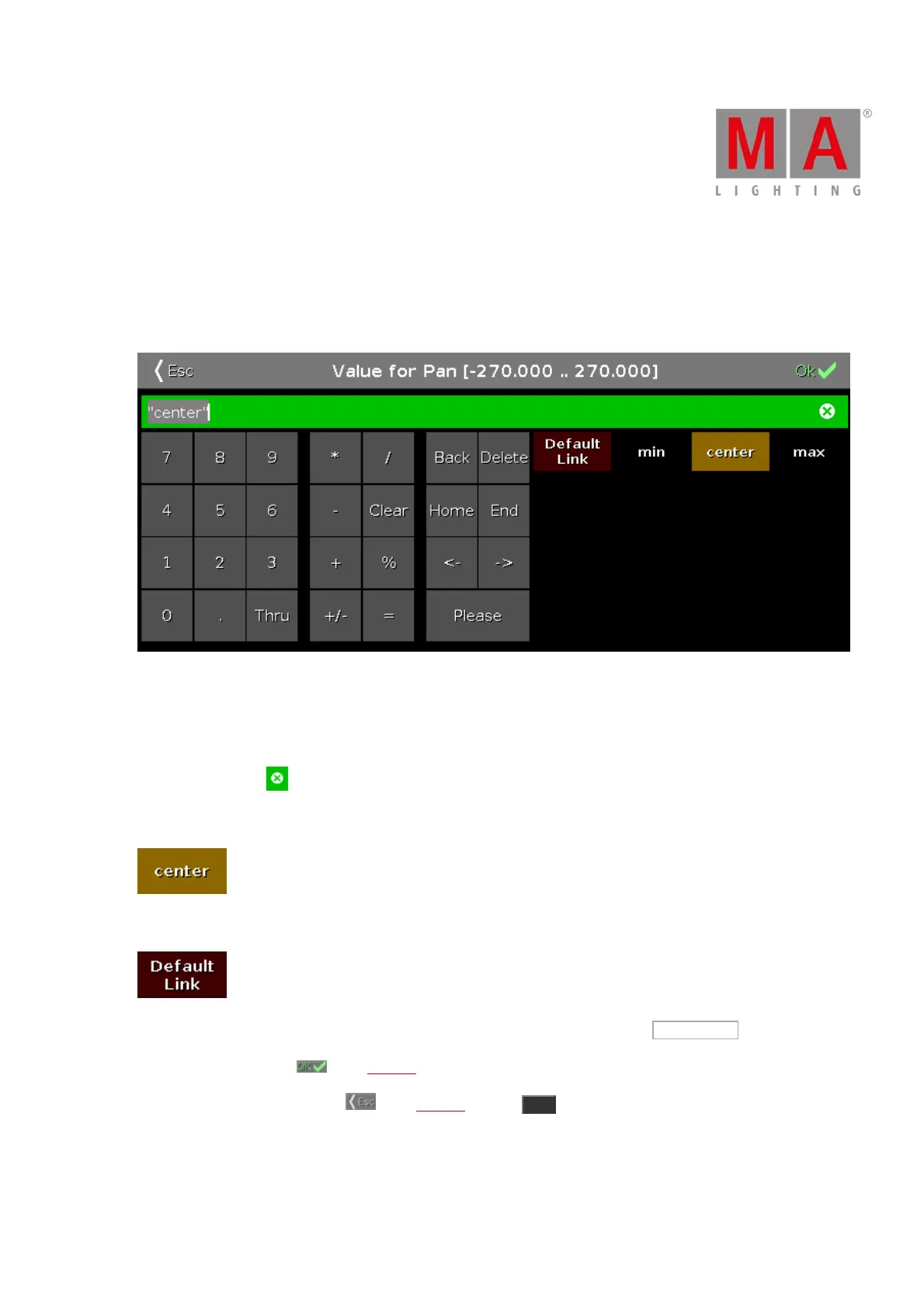
The Calculator View appears always if you enter or edit values of attributes.
The calculator is a dynamic view. The functions change regarding the value and the attribute.
Calculator view
The title bar displays the attribute, the unit and sometimes the range of the values.
Below the title bar is the green edit line.
To clear the line, tap on the right of the edit line.
The calculator view includes always a number pad at the left of the view.
Applied functions has a brown background.
To bring your attribute to link to the current default settings of the fixture type, tap Default Link .
To confirm the value, tap in the title bar. The calculator view will close.
To leave the Calculator View, tap in the title bar or press Esc on the console.
Default Calculator Buttons
The following buttons are in all calculator views available.



 To Next Page