© 2018 MA Lighting Technology GmbH - Dachdeckerstr. 16 - 97297 Waldbüttelbrunn - Germany
Phone +49 5251 688865-27 - support@ma-dot2.com - www.malighting.com
6.54. Remote Inputs Configuration Window
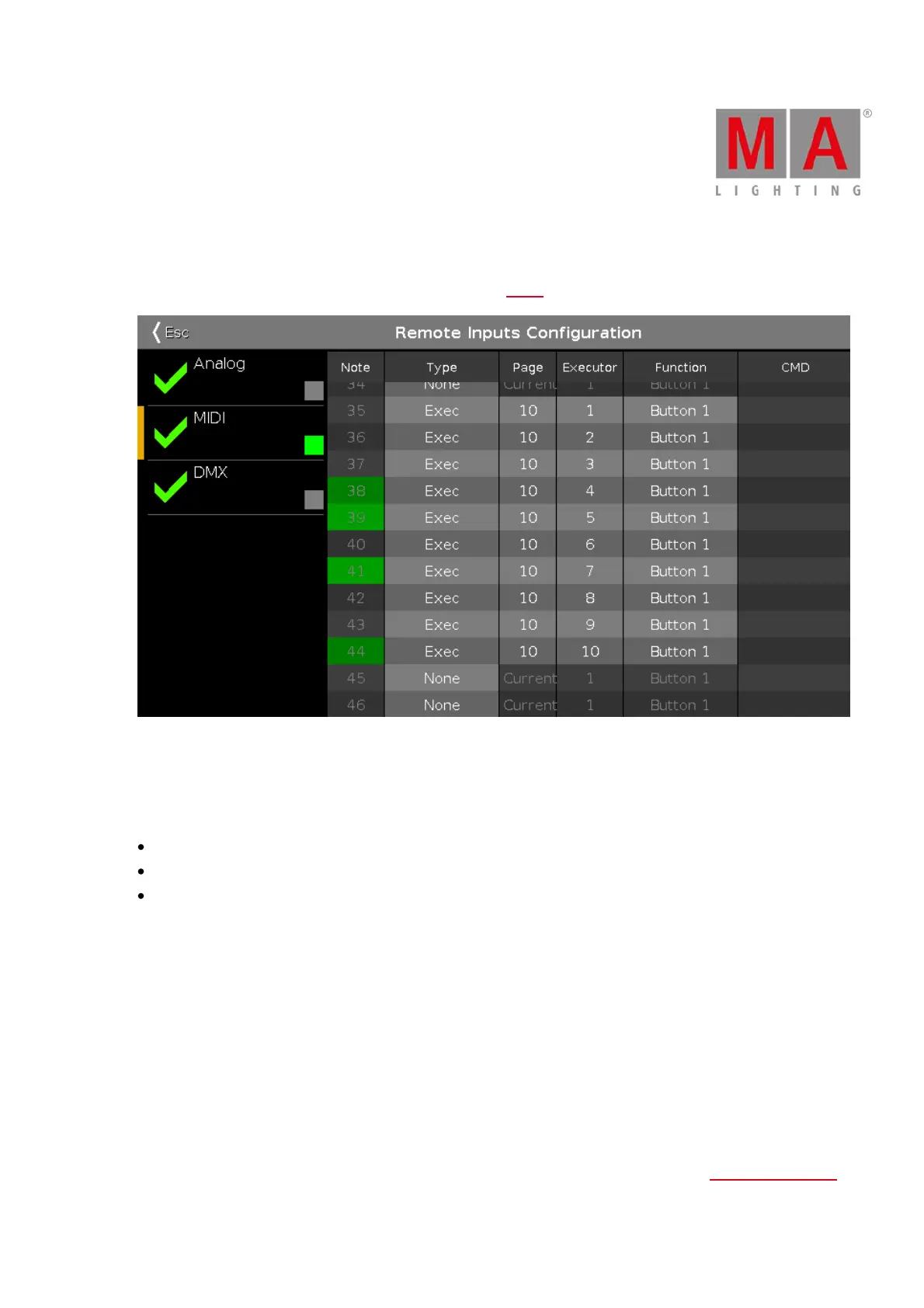
The Remote Inputs Configuration Window is located in the Setup, column Show, Remote Inputs.
Figure 1: Remote Input Configuration Window
In this window, you can set what the dot2 should do with the connected remote inputs.
On the left side of the screen are the three different remote inputs displayed:
Analog
MIDI
DMX
The green tick displays, that this type of remote control is enabled.
The red prohibition sign displays, that this type of remote control is disabled.
To enable or disable a type of remote control, press the Input Type encoder.
The selected remote input has an orange bar on the left side of the cell.
If an input activity is receiving, it is displayed by a green indicator.
For all remote control inputs are the following four columns available:
Type:
Displays the type of action what the console should do when the contact is activated.
To select the type, press and hold the cell or select the cell and press the scroll encoder. The Select Type Window



 To Next Page