© 2018 MA Lighting Technology GmbH - Dachdeckerstr. 16 - 97297 Waldbüttelbrunn - Germany
Phone +49 5251 688865-27 - support@ma-dot2.com - www.malighting.com
6.81. Tools Window
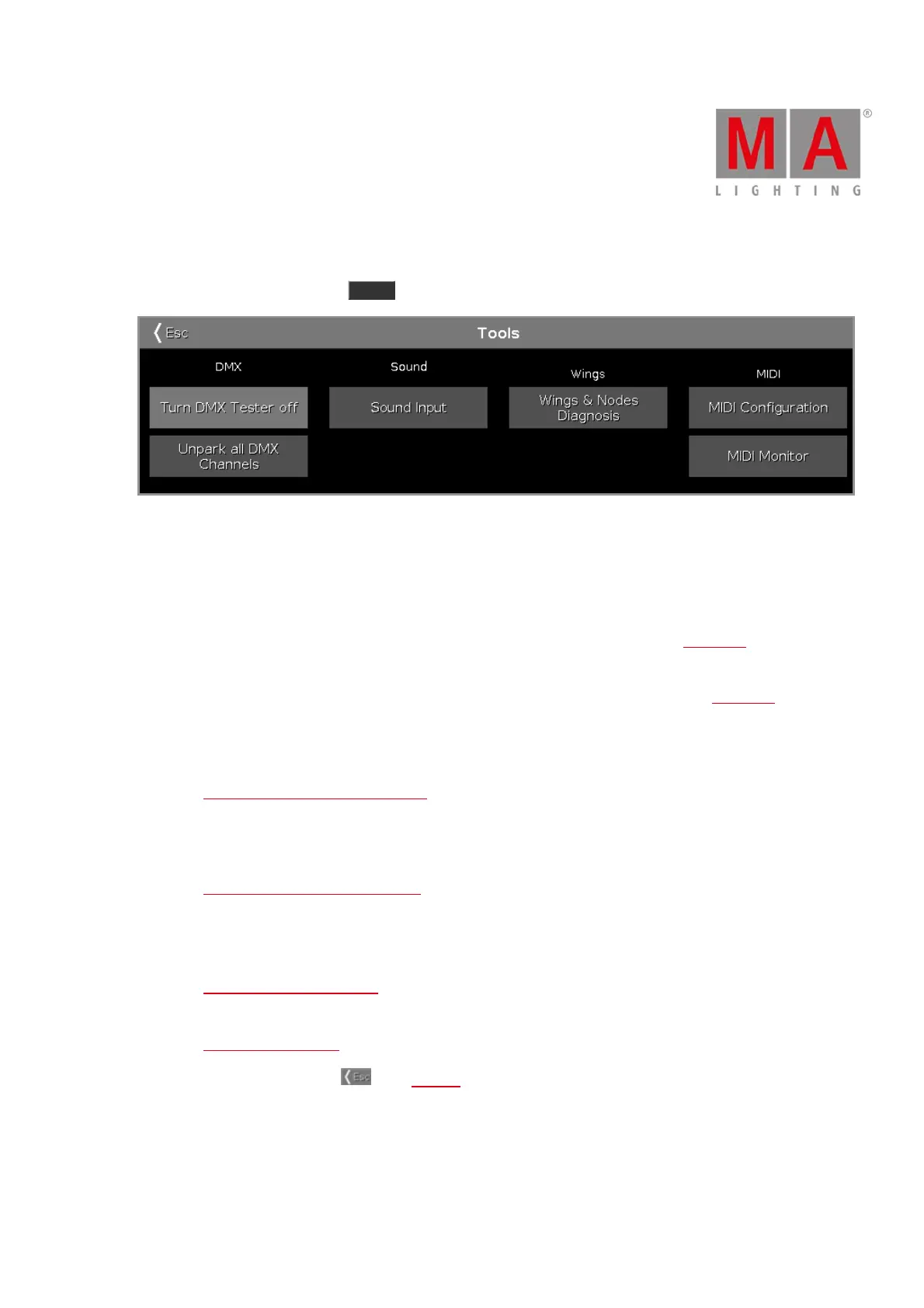
To open the Tools Window, press Tools on the console.
Figure 1: Tools Window
The Tools window has four categories.
DMX
Turn DMX Tester off:
Turns the DMX tester off. DMX tester values are displayed with a red background in the DMX view.
Unpark all DMX Channels:
Unparks all DMX channels. Parked DMX values are displayed with a blue background in the DMX view.
Sound
Sound Input:
Opens the Sound Input Configuration Window.
Wings
Wings & Nodes Diagnosis:
Opens the Wings & Nodes Diagnosis Window.
MIDI
MIDI Configuration (only dot2 onPC):
Opens the MIDI Configuration Window.
MIDI Monitor:
Opens the MIDI Monitor Window.
To leave the Tools Window. Tap in the title bar.



 To Next Page