© 2018 MA Lighting Technology GmbH - Dachdeckerstr. 16 - 97297 Waldbüttelbrunn - Germany
Phone +49 5251 688865-27 - support@ma-dot2.com - www.malighting.com
6.35. Import Fixture Type Window
The Import Fixture Type Window is located in the Setup, Patch and Fixture Schedule,
tap Add New Fixtures , tap Select other... OR
press and hold a cell of a fixture type in the patch and fixture schedule, tap Import
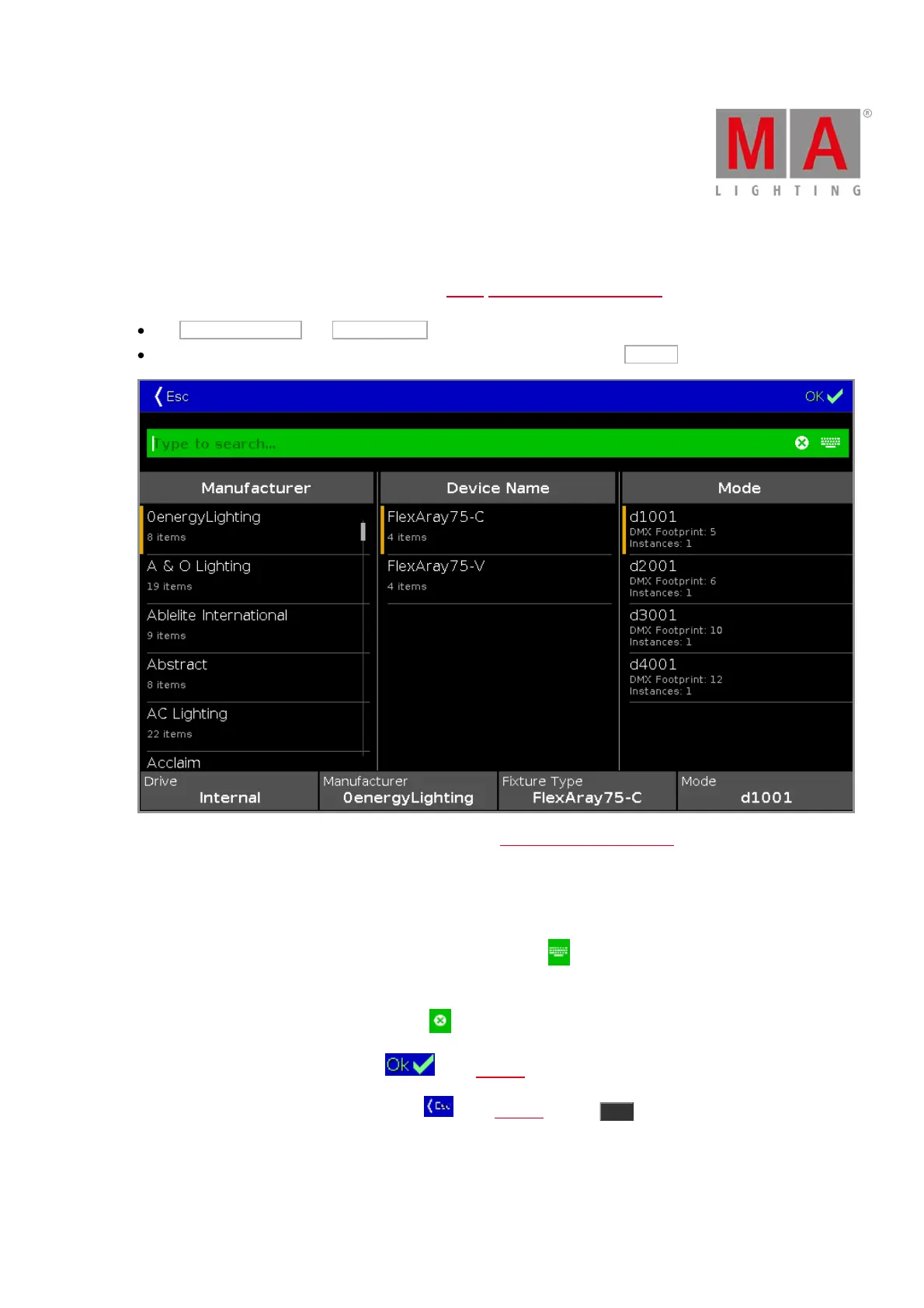
In this view, you select the fixture type and import it to the Patch and Fixture Schedule in the current show file.
This view has three fixture type columns and one in information area.
The orange bar at the left of the cells shows the current selection.
To search for a specific manufacturer, device name or mode: Tap at the right of the green edit line and type
in.
To delete the content of the green edit line, tap .
To confirm and apply the selection, tap in the title bar. The import fixture type window will close.
To leave the Import Fixture Type Window, tap in the title bar or press Esc on the console.
Column Manufacturer
This is the first column in this window.



 To Next Page