© 2018 MA Lighting Technology GmbH - Dachdeckerstr. 16 - 97297 Waldbüttelbrunn - Germany
Phone +49 5251 688865-27 - support@ma-dot2.com - www.malighting.com
6.51. Patch and Fixture Schedule Window
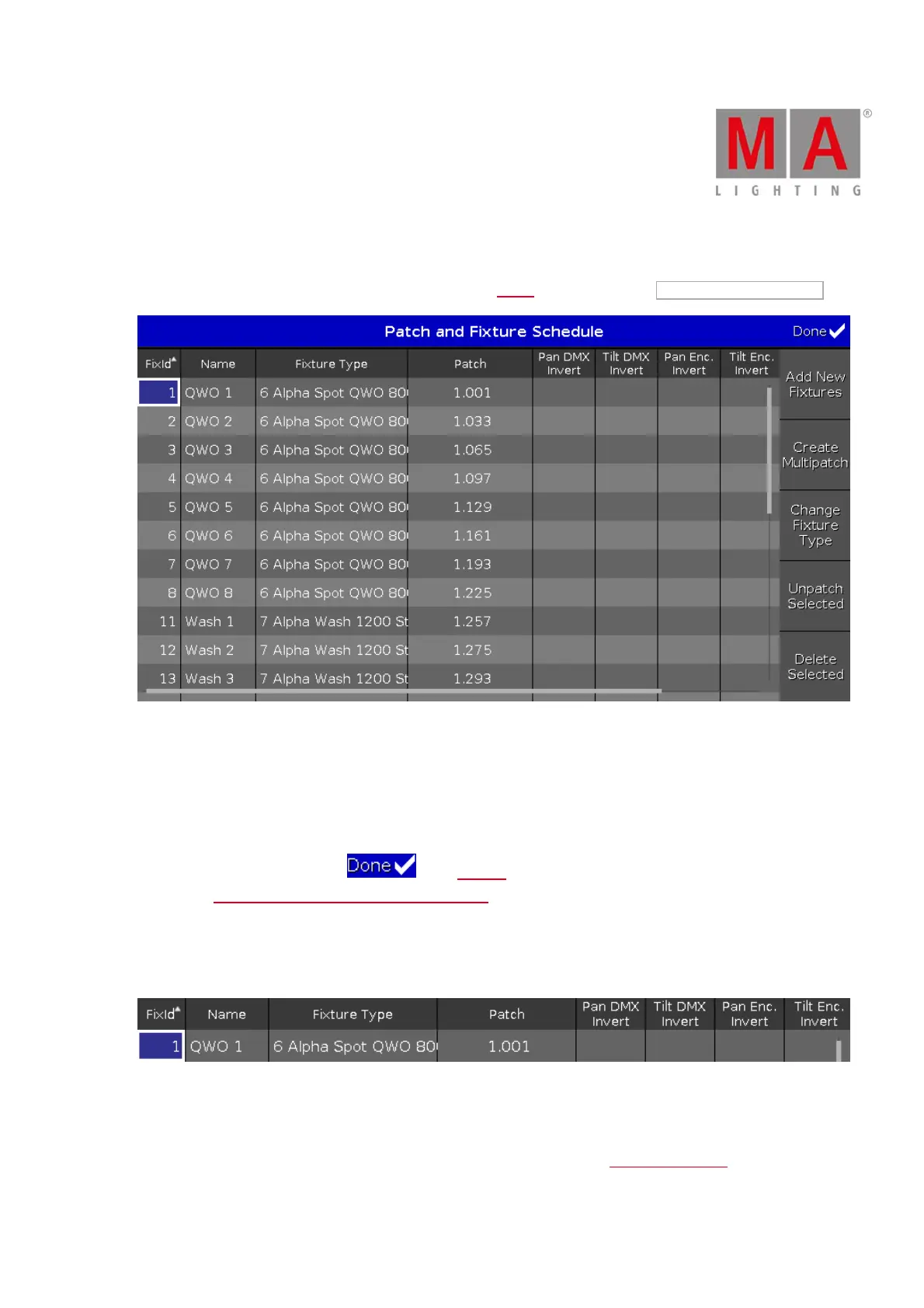
The Patch and Fixture Schedule Window is located in the Setup, column Show, tap Patch & Fixture Schedule .
Figure 1: Patch and Fixture Schedule
In this view, you have an overview about all imported fixtures in the show file.
You can also invert DMX values and encoders.
A selected fixtures has a blue background and a white frame around.
To confirm the settings tap Done in the title bar.
It opens the Leaving Patch & Fixture Schedule... Window.
Columns in the Schedule
The schedule has nine columns.
Figure 2: Patch and Fixture Schedule columns
FixId:
Displays the fixture Id. This column has a sort function.
To edit the fixture Id, press and hold the cell or press the scroll encoder. The Select Fixture ID(s) Window opens.



 To Next Page