© 2018 MA Lighting Technology GmbH - Dachdeckerstr. 16 - 97297 Waldbüttelbrunn - Germany
Phone +49 5251 688865-27 - support@ma-dot2.com - www.malighting.com
7.10. Clone Command
This page describes the syntax and how to use the Clone command.
To go to the Clone command press and hold the key and Copy on the console.
Clone is in the command line now.
Description
With the Clone command, you copy all values from a fixture to another fixture throughout the entire show file.
This includes cues, presets, and groups. The clone command works like a batch processing for the At command
along with Update command.
Syntax
Clone fixture 1 at fixture 2.
Clone Fixture 1 At 2
Example 1
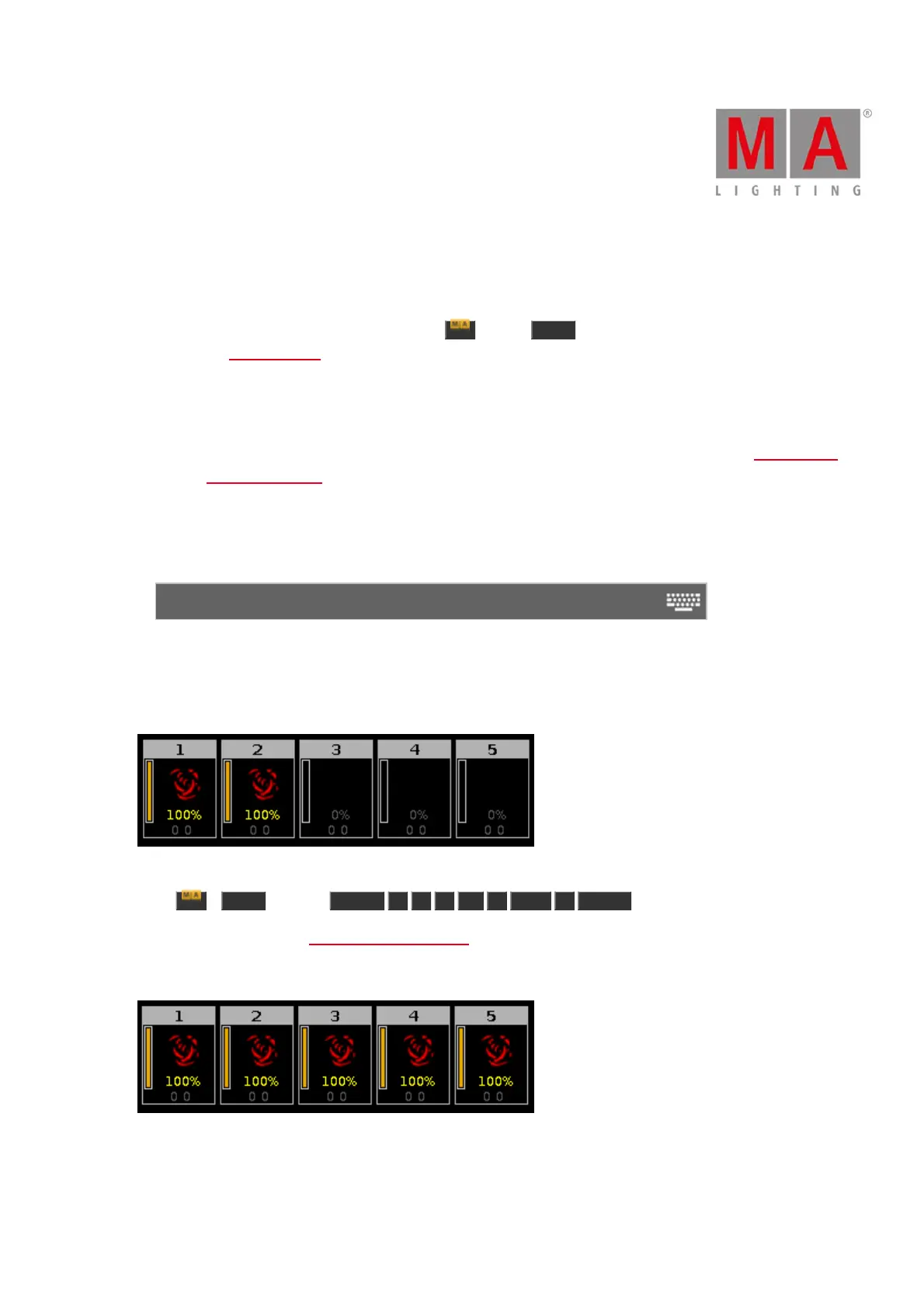
Let´s assume, you did programming for 2 fixtures (ID 1 and 2) and then you realize you will add three more
fixtures at this spot doing the same as the other one.
Figure 1: Fixture 1 and 2 are programmed ready
Press + Copy (= Clone) Fixture 1 + 2 At 3 Thru 5 Please .
The console will ask you to choose the clone method.
Fixtures 1 and 2 are cloned at fixture 3 thru 5. All fixtures doing exactly the same.
Figure 2: Fixture 1 and 2 are cloned at fixture 3 thru 5



 To Next Page