© 2018 MA Lighting Technology GmbH - Dachdeckerstr. 16 - 97297 Waldbüttelbrunn - Germany
Phone +49 5251 688865-27 - support@ma-dot2.com - www.malighting.com
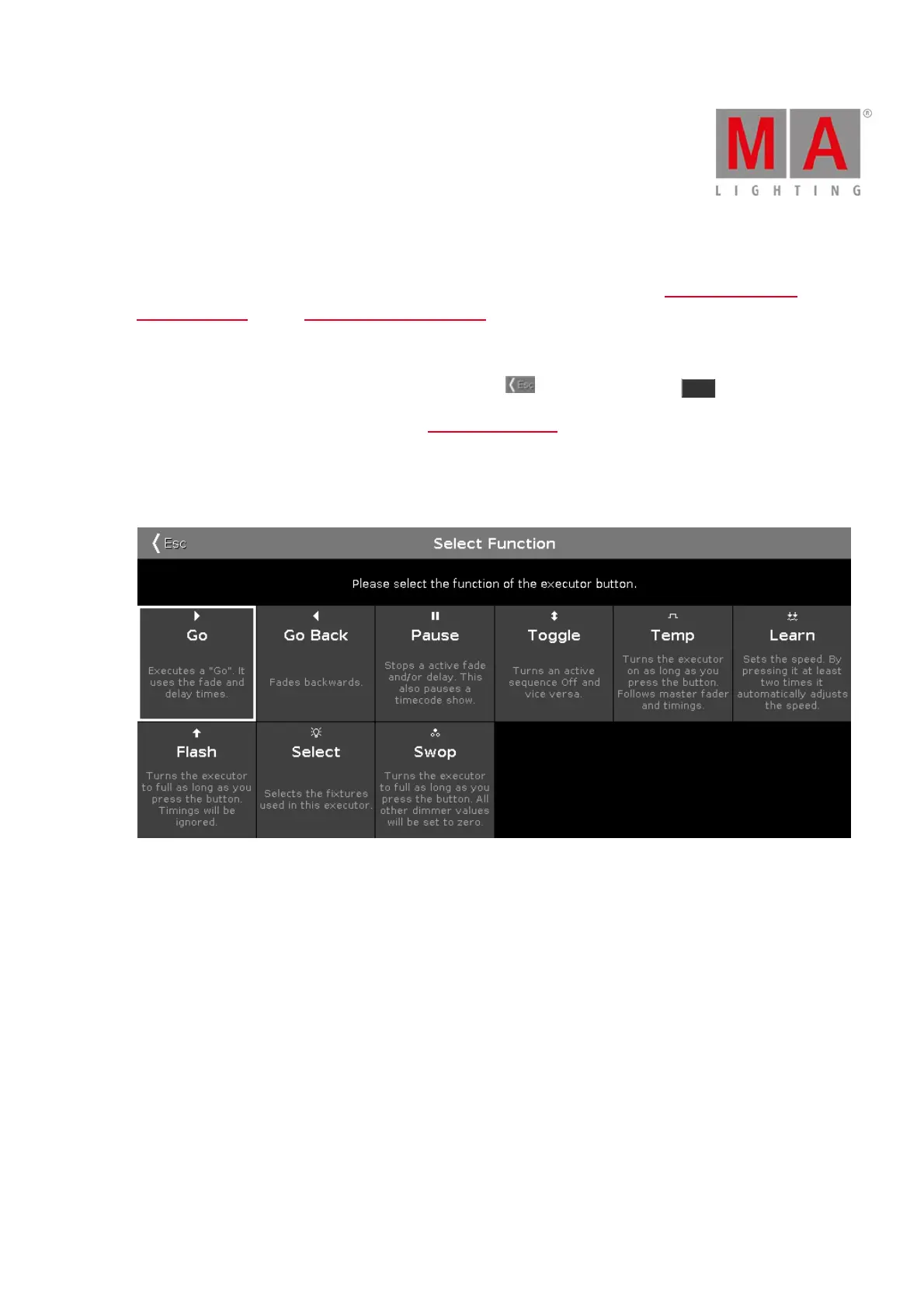
6.61. Select Function of Executor Window
To get to the Select Function of Executor Window, press an assigned executor in the Change Functions of
Executor Window or in the Settings of Executor Window.
Select the function of the corresponding executor in this view.
To leave the Select Functions of Executor Window, tap Esc in the title bar or press Esc on the console.
For more information about executors refer to What are executors?
Normal Executor Button
If the selected executor is a normal executor with a cue list, there are nine different functions.
Figure 1: Select Function of Executor – Normal Executor
Go: Calls the next cue.
GoBack: Calls the previous cue.
Pause: Stops an x-fade between cues.
Toggle: Turns the executor on or off.
Temp: Turns the executor on as long as the executor button is pressed. It also follows master fader and timings.
Learn: Learns a tact (BPM).
Flash: Turns the executor to full as long as you press the button. Timings will be ignored.
Select: Selects all fixtures used on this executor.



 To Next Page