© 2018 MA Lighting Technology GmbH - Dachdeckerstr. 16 - 97297 Waldbüttelbrunn - Germany
Phone +49 5251 688865-27 - support@ma-dot2.com - www.malighting.com
6.41. MIDI Configuration
Important:
The MIDI Configuration window is only available with a dot2 onPC. On a dot2 console is this
configuration not necessary.
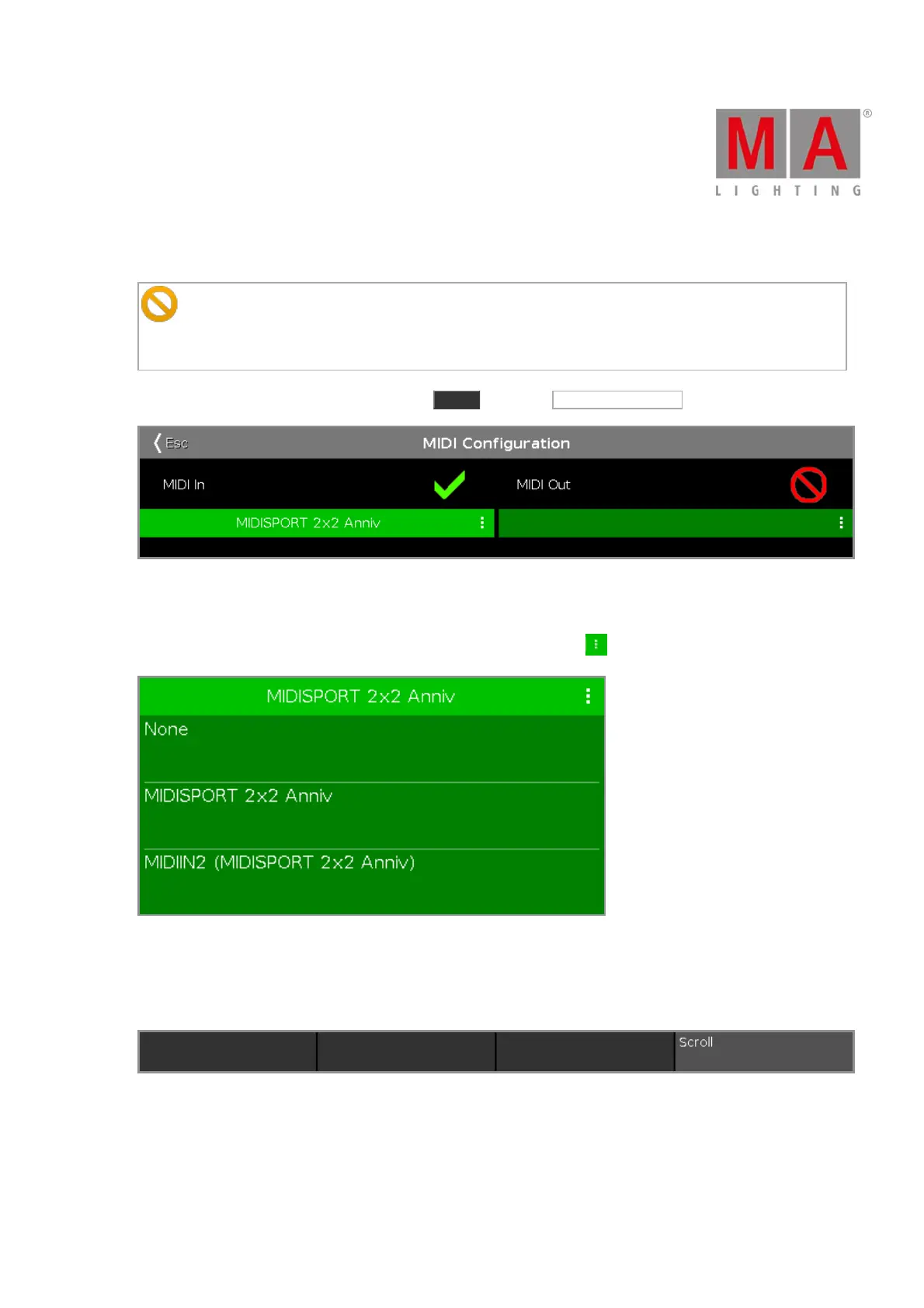
To go to the MIDI Configuration window, press Tools and tap at MIDI Configuration .
Figure 1: MIDI Configuration Window
In the MIDI Configuration window you select the MIDI In and MIDI Out source.
To open the drop-down with the available sources, tap at the three dots .
Figure 2: MIDI In drop-down
If a valid is source is selected, the red prohibition sign changes into a green tick mark.
Encoder Bar Functions
Figure 3: Encoder Bar - MIDI Configuration Window
Scroll:
To scroll in the selected drop-down up or down, turn the encoder left or right.



 To Next Page