© 2018 MA Lighting Technology GmbH - Dachdeckerstr. 16 - 97297 Waldbüttelbrunn - Germany
Phone +49 5251 688865-27 - support@ma-dot2.com - www.malighting.com
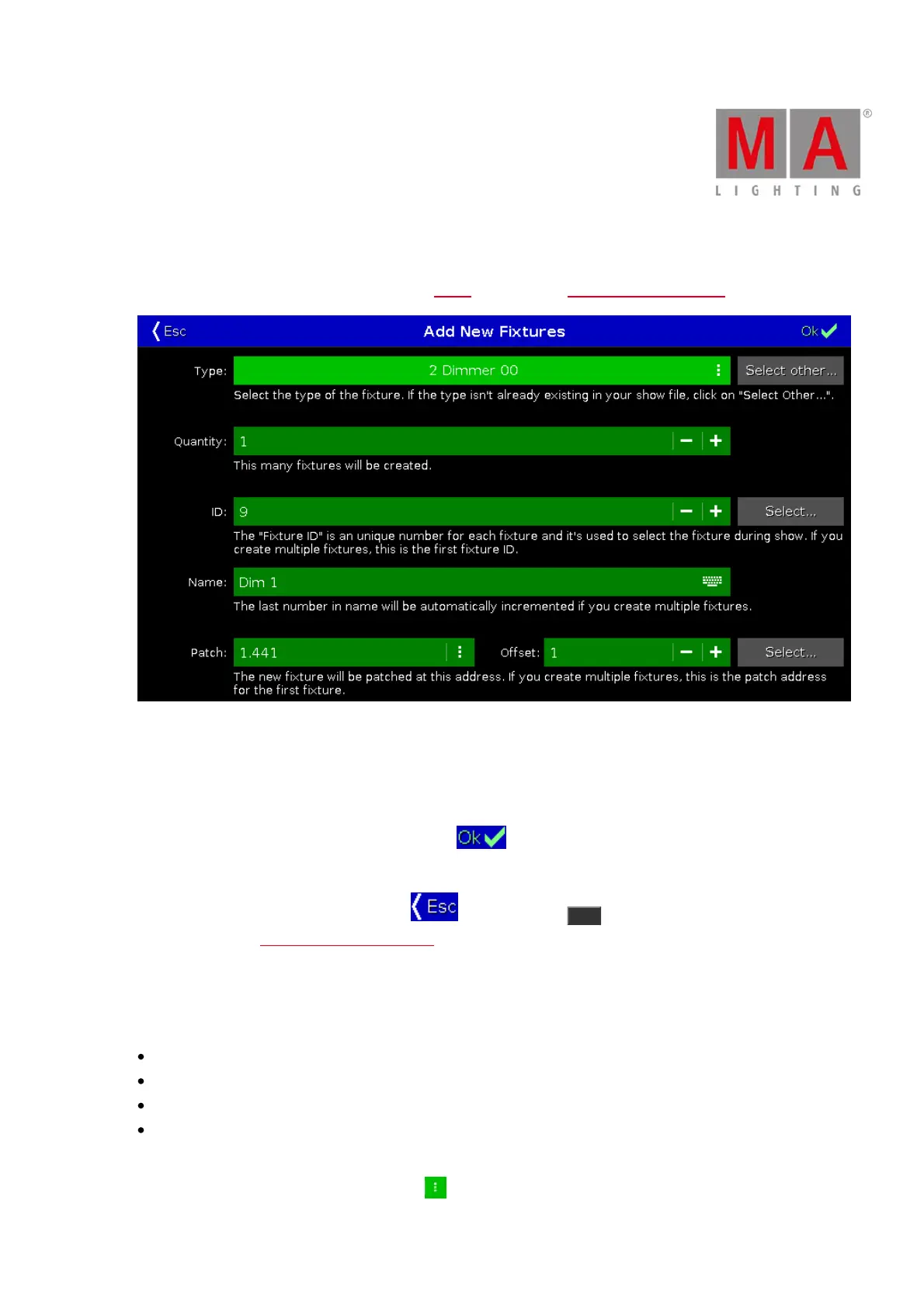
6.3. Add New Fixtures Window
The Add New Fixtures Window is located in the Setup, column Show, Patch & Fixture Schedule, Add New Fixtures.
Figure 1: Add New Fixtures Window
In this view, you select your fixture type, the quantity, the fixture ID, the fixture name, the patch address, and the
offset.
There are six edit lines.
To confirm your settings and add new fixtures, tap in the title bar.
You are back in the Patch and Fixture Schedule.
To leave the Add New Fixtures Window, tap in the title bar or Esc on the console.
You are back in the Patch and Fixture Schedule.
Type
The type edit line contains a drop down list with four standard fixture types
2 Dimmer 00
3 LED - RGB 8 bit
4 LED - RGBA 8 bit
5 LED - RGBW 8 bit
and those which are already in the current show file exist.
To open the drop down list, tap the three dots in the edit line.



 To Next Page