© 2018 MA Lighting Technology GmbH - Dachdeckerstr. 16 - 97297 Waldbüttelbrunn - Germany
Phone +49 5251 688865-27 - support@ma-dot2.com - www.malighting.com
6.68. Select View for External Screen Window
To open the Select View for External Screen Window
On the console: Press Setup and then in the column Console, Select Views for External Screen .
On the external screen: Click or tap More... in the View Bar.
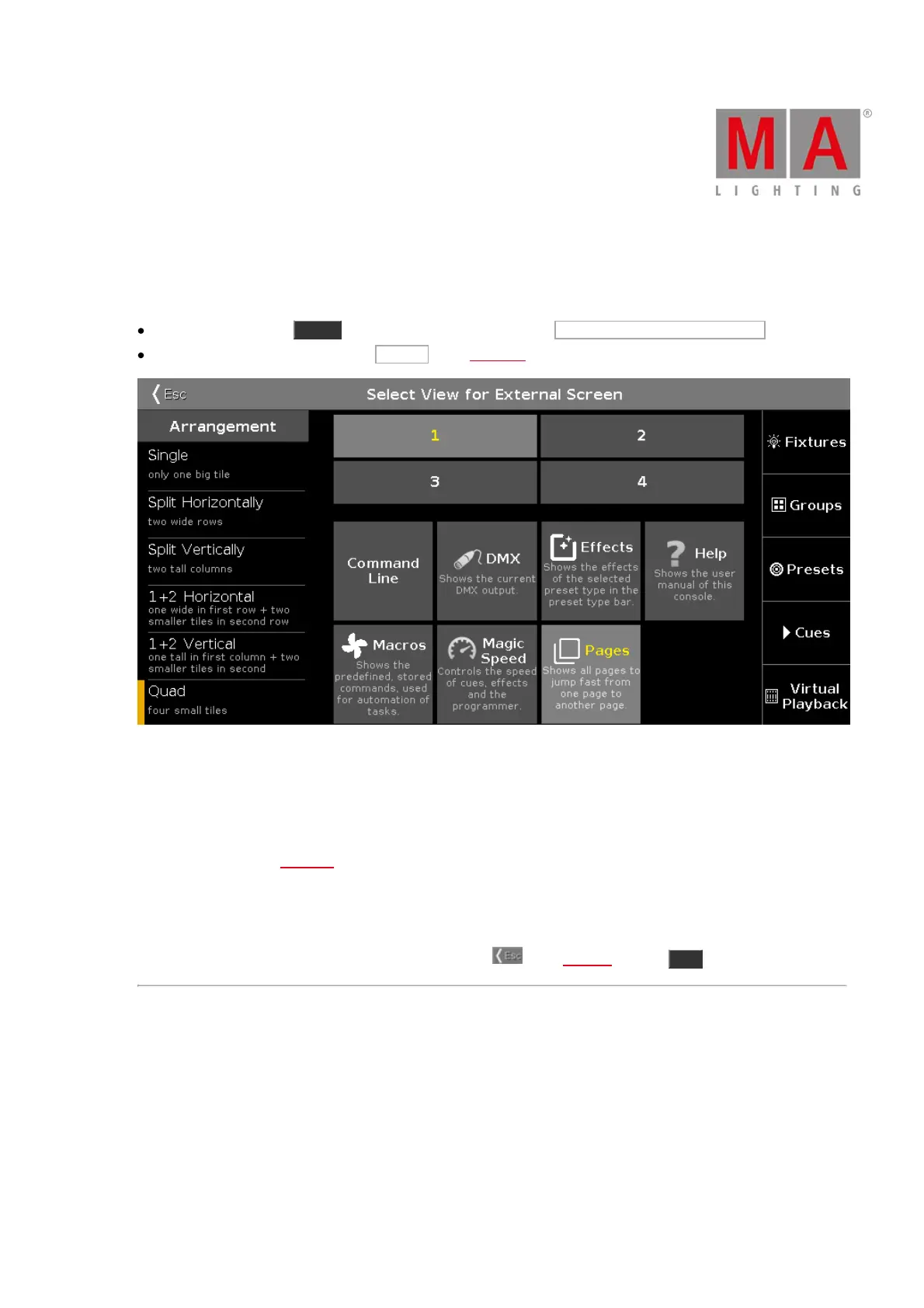
Figure 1: Select View for External Screen Window
In this window, you arrange the views on the external screen.
The window is fragmented in the arrangement column on the left side, and the preview view of the selected
arrangement.
On the right side is the view bar displayed.
To select the view for the respective screen area: Select the screen area and then select the view, e.g. Fixtures.
A selected tile or view has yellow lettering.
To leave the Select View for External Screen Window, tap in the title bar or press Esc on the console.
Arrangement Column
The Arrangement column is located on the left side of this window.



 To Next Page