Humphrey Field Analyzer II-
i
series User Manual 2660021145640 A
Installing & Licensing HFA II-i Software
J-9
5 Select SAVE to record all of your settings to the hard drive and to return to the Install Software
screen. If you entered the correct license information, a message will be displayed telling you
the software installation was successful. Select OK to continue. If you get an invalid value
message, verify that you have entered the correct values for your license information and try
again.
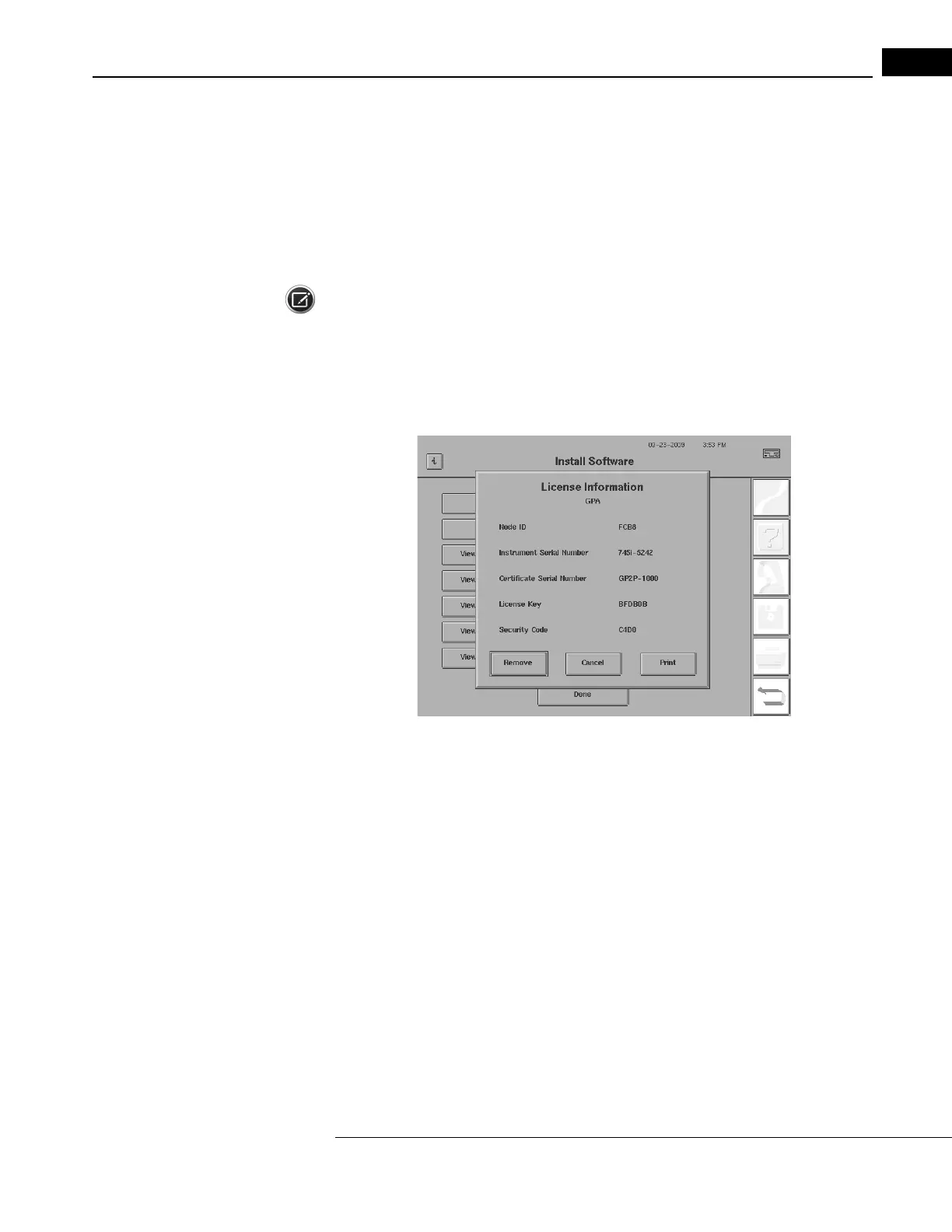
6 To view or remove the software license information, select the VIEW / REMOVE button next to
the software you want.
Note: HFA-NET Pro is viewed/removed with the VIEW / REMOVE button next to HFA-NET. XML Data
Expo
rt is specialized software reserved for research purposes.
A License Registration screen (Figure J.11) is displayed with the license information. Select
REMOVE if you wish to remove the license. Select PRINT
if you wish to print out the license
information. Select CANCEL to return to the Install Software screen.
Figure J.11 License Registration Screen After Selecting the View / Remove Button
7 Select DONE on the Install Software screen to complete the licensing process, or select the
INSTALL button next to INSTALL SOFTWARE WITH CERTIFICATE again for another software that
you wish to license, such as SITA-SWAP.
8 After selecting DONE, a message will be displayed saying “Please cycle power to restart.” Turn
off your HFA II-
i
and wait approximately 10 seconds before turning it on again.
This completes the Licensing process.



 To Next Page
 Loading...







