EasyManua.ls Logo

Datalogic Magellan 1500i - User Manual

Datalogic Magellan 1500i
346 pages
Print Icon
To Next Page IconTo Next Page
Loading...
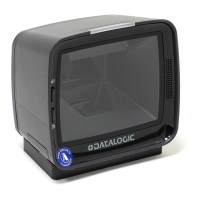
MAGELLAN 1500i
PRODUCT REFERENCE GUIDE
Omni-Directional Imaging Scanner

Table of Contents

Other manuals for Datalogic Magellan 1500i

Questions and Answers

  • J
    John RobinsonJul 25, 2025
    What to do if Datalogic Barcode Reader reads poorly?
    • A
      Amy CurtisJul 25, 2025
      If your Datalogic Barcode Reader isn't reading barcodes well, ensure the barcodes are high quality and free from wrinkles, smudges or tears. Try scanning known-good labels of a supported symbology to test the scanner's functionality. Also, make sure the scanner window is clean.
  • V
    Virginia TurnerJul 30, 2025
    Why Datalogic Barcode Reader has no communication with the host?
    • J
      James RothJul 31, 2025
      If your Datalogic Barcode Reader isn't communicating with the host, verify that the interface cable is securely connected to both the host and the scanner. Check the proper interface type, cable, and connection port(s) for the scanner by consulting your technical support personnel or your host system manual.
  • L
    longdavidAug 5, 2025
    What to do if Datalogic Barcode Reader has no communication with host?
    • E
      Edward DiazAug 5, 2025
      If your Datalogic Barcode Reader isn't communicating with the host, first ensure the interface cable is securely connected to both the host and the scanner. To confirm the correct interface type, cable, and connection ports for your scanner, consult your technical support personnel or refer to your host system manual.
  • A
    Alexandria NguyenAug 10, 2025
    How to fix Datalogic Barcode Reader that does not power on?
    • T
      Terri MyersAug 10, 2025
      If your Datalogic Barcode Reader does not power on, try exchanging the power supply with a known good one to retest its operation. Alternatively, if you're using an RS-232 cable on a scanner configured for USB, it won't power up because it awaits enumeration from the host. As a workaround, hold the scanner button while applying power, and release it when the green light appears. The scanner will power up with limited scanning, allowing you to scan programming labels to reconfigure the scanner to the desired interface.
  • N
    natasha25Aug 14, 2025
    What to do if Datalogic Barcode Reader won't read barcodes?
    • A
      Abigail SmithAug 14, 2025
      If your Datalogic Barcode Reader struggles to read barcodes, ensure the barcodes are of sufficient quality. Wrinkled, smudged, or torn labels can prevent the scanner from reading. Try scanning known-good labels of an active symbology to check the scanner's operation. Also, make sure the scanner window is clean.
  • S
    Stephanie PatelAug 19, 2025
    How to fix Datalogic Barcode Reader when it does not power on?
    • D
      Daniel FreemanAug 20, 2025
      If your Datalogic Barcode Reader doesn't power on, try exchanging the power supply with a known good one to retest its operation. Alternatively, if using an RS-232 cable on a scanner configured for USB, hold the scanner button down while applying power, and release it when the green light appears. This provides limited scanning functionality, allowing you to scan programming labels to reconfigure the scanner to the desired interface.

Summary

CONFIGURATION | GENERAL SCANNER FEATURES

CONFIGURATION | INTERFACE RELATED FEATURES

INTERFACE SELECTION

Specifies the current scanner interface type and how to select it.

1 D SYMBOLOGY PROGRAMMING

1 D SYMBOLOGIES

Contains configuration information for various 1D barcode types the scanner supports.

APPENDIX A. PRODUCT SPECIFICATIONS

DECODING CAPABILITY

Lists the types of barcode symbologies (1D, 2D, Stacked, Postal, Digital Watermarks) the scanner can decode.

READING PERFORMANCE

Specifies parameters like aiming, image capture resolution, read height, and angle.

SAFETY & REGULATORY

Lists agency approvals, environmental compliance, and safety standards.

APPENDIX D. FACTORY DEFAULT SETTINGS

Factory Default Settings

Lists common factory default settings for various scanner features across different interfaces.

APPENDIX F. HOST COMMANDS

ACCEPTING RS-232 AND USB COM COMMANDS

Lists commands the scanner responds to for RS-232 and USB COM interfaces, including ASCII and HEX values.

Datalogic Magellan 1500i Specifications

General IconGeneral
TypeFixed bar code reader
Sensor typeLED
Scanner type2D
Yaw reading angle-75 - 75 °
Scanner resolution0.13 mm
Tilt reading angle0 - 360 °
Pitch reading angle-65 - 65 °
Light levels (direct sunlight)0 - 86.1 lx
Linear (1D) barcodes supported-
Optical sensor resolution (W x H)1280 x 800 pixels
2D (matrix & stacked) barcodes supportedAztec Code, Data Matrix, MaxiCode, QR Code
Input voltage5 V
Power consumption500 mA
Power source typeUSB
BuzzerYes
CertificationEN62471, IEC62471
Product colorBlack
Housing materialPlastic
Image formats supportedBMP, JPEG
International Protection (IP) codeIP52
Storage temperature (T-T)-40 - 70 °C
Operating temperature (T-T)0 - 40 °C
Operating relative humidity (H-H)5 - 95 %
USB version2.0
Connectivity technologyWired
Sustainability certificatesRoHS
Harmonized System (HS) code84716070
Weight and Dimensions IconWeight and Dimensions
Depth75 mm
Width60 mm
Height150 mm
Weight240 g

Related product manuals