Chapter 3 ’Web User Graphical Interface’ — Operating Instructions (Tutorial)
Electra VS
-
Version 05.10 139
User Manual - Rev. A
Adapting a Sample Workflow (Steps)
To adapt a sample workflow, proceed as follows:
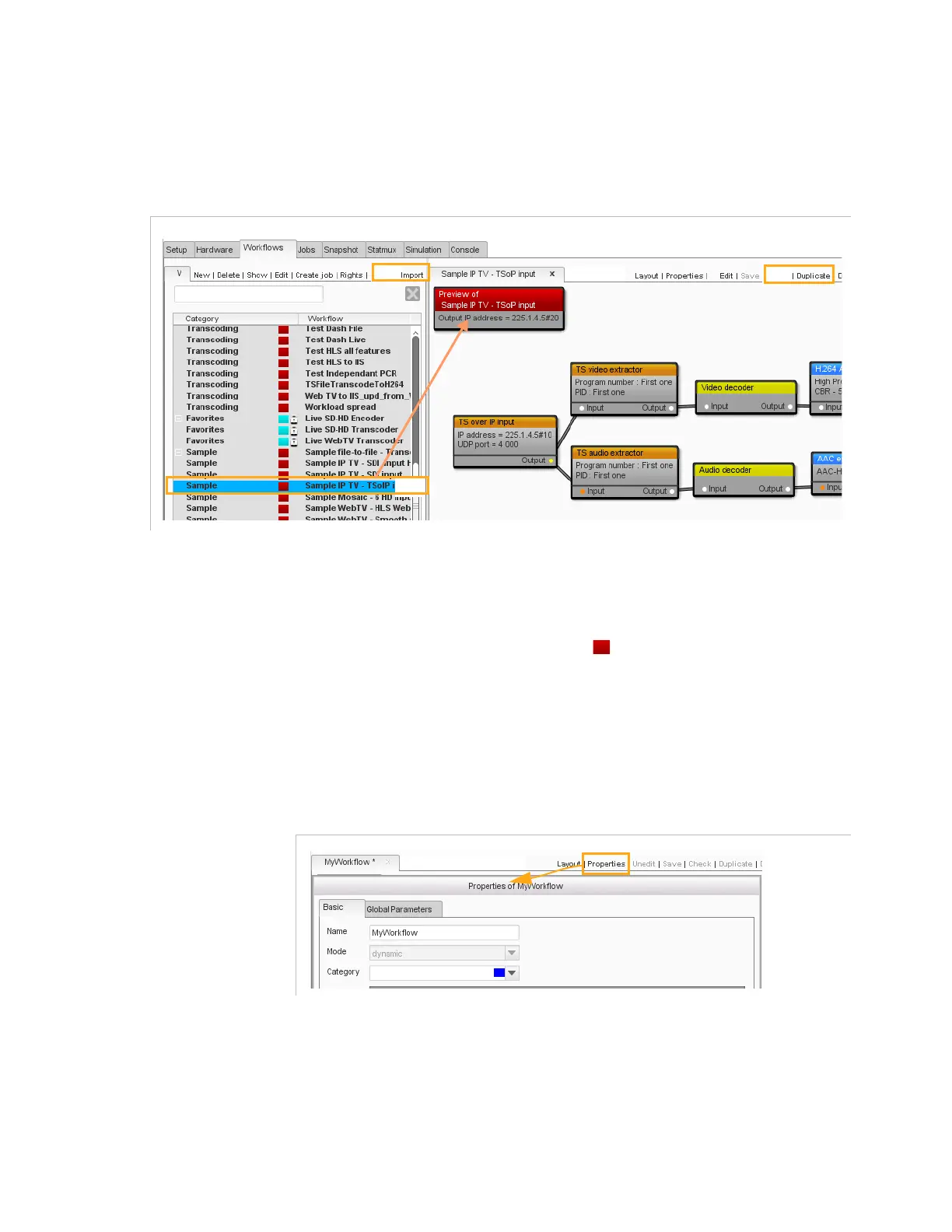
Figure 3-82. Duplicate button
1.
In the
Workflows
tab, import the sample workflows from the
DVD-ROM (mark 1 in the figure above).
2.
Identify the sample workflow in which you are interested (e.g. ‘Sample
IPTV transcoding’) in the workflows library (you can find sample
workflows under the red category (
)).
Double-click it to display it in
the right area (mark 2).
3.
Click
Duplicate
so as to keep the original sample workflow and to
work on a copy (mark 3).
4.
Click
Properties
and enter an explicit name for your workflow.
Figure 3-83. Properties button



 To Next Page