Chapter 3 ’Web User Graphical Interface’ — GUI Description
Electra VS
-
Version 05.10 211
User Manual - Rev. A
Statmux Tab
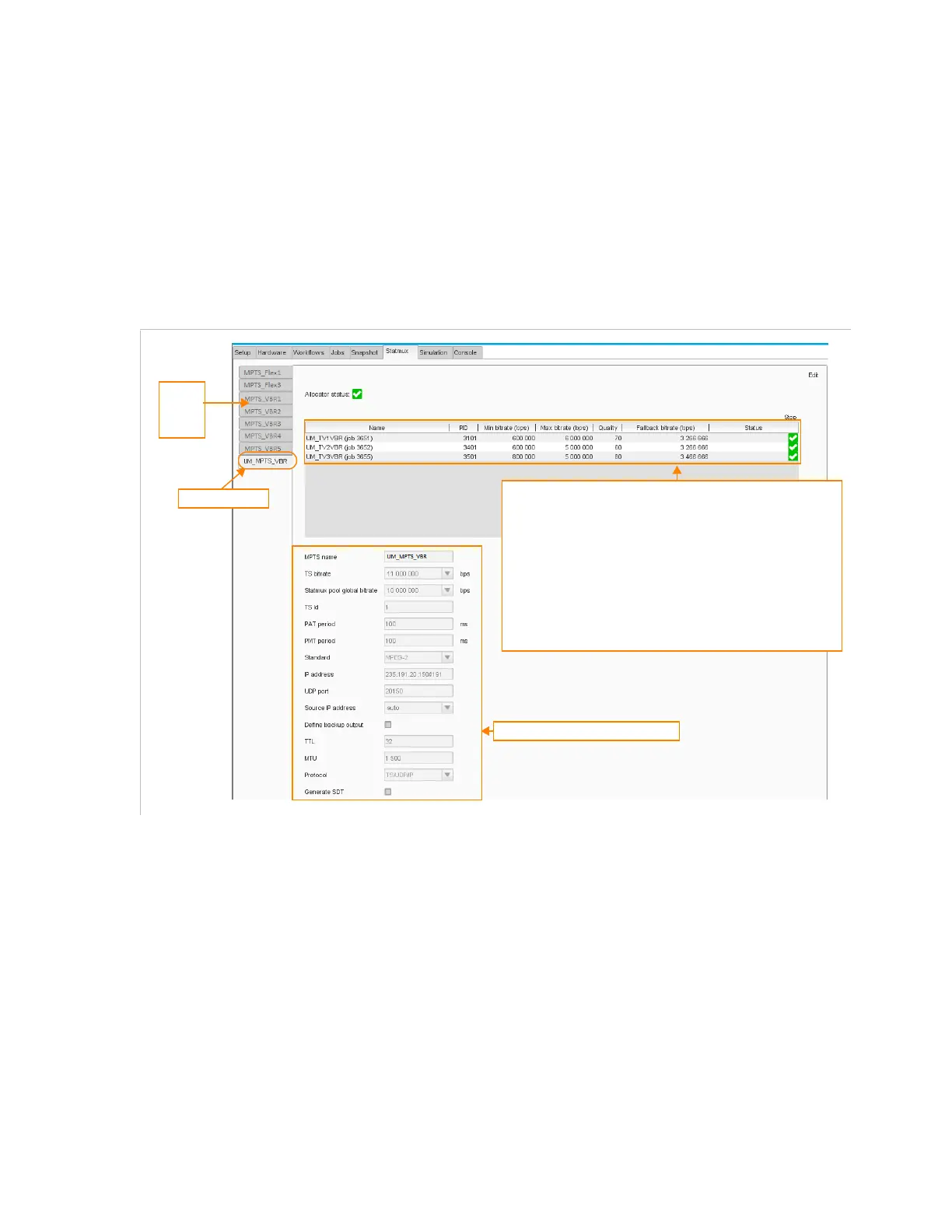
The Statmux view combines a monitoring view and a configuration view.
It displays the list of MPTS with statistical multiplexing and for each of
them, the list of video components included in the statistical
encoding.
It lets you edit and checks the statistical multiplexing job parameters.
Figure 3-174. Statmux tab - Consult mode
List of
MPTS
with
statmux
Stamux parameters for each VBR program in the selected MPTS:
• Name of the job included in the statistical multiplexing
• PID of the video component
• Minimum bitrate of the video component, in bits per second
• Maximum bitrate of the video component, in bits per second
• Quality of the video component, in percentage (set 90 for the
maximum quality)
• Fallback bitrate, in bits per second: this is the bitrate used if the
communication is lost between the allocator and the encoder.
This is not configurable, the value is automatically computed by
the equipment.
• State of the job
• Status of the job
Selected MPTS
Parameters of the selected MPTS



 To Next Page