Chapter 7 ’Tools’ — HP Monitoring Tools (6RU and 10RU Devices)
Electra VS
-
Version 05.10 477
User Manual - Rev. A
5.
Set the
Network Mode
to
static
and press
OK
.
6.
Select
Accept
and press
OK
.
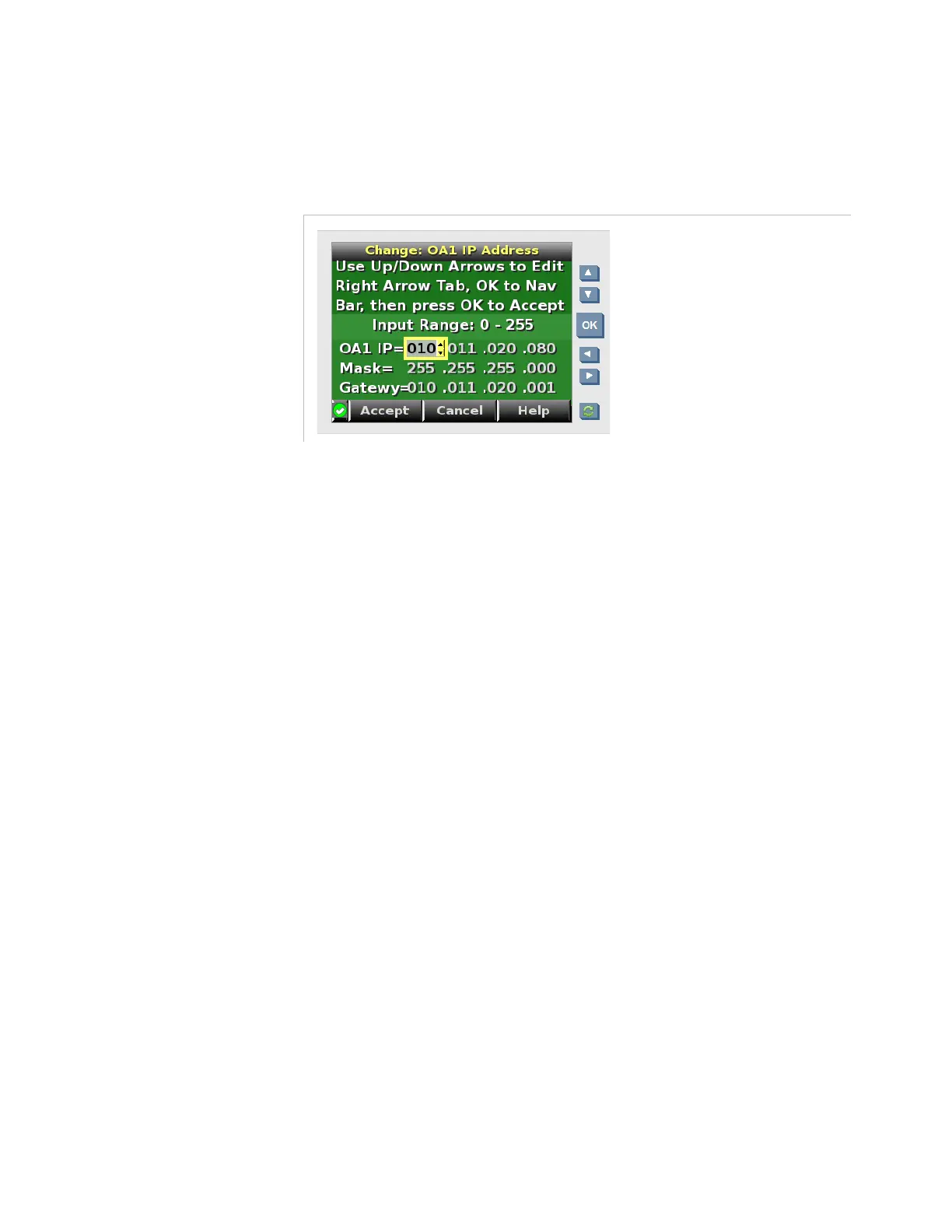
Figure 7-13. Electra VS front panel screen – Onboard Administrator IP address setting
7.
Use the arrows to enter the IP address in the
OA1 IP
field.
8.
Select
Accept
and press
OK
.
Once the IP address is set, you can access the equipment remotely.
1.
From a remote computer, type the IP address in the address bar.
2.
Enter the user name and password indicated on the asset tag.
You are now connected to the HP configuration interface.
Performing the IP Configuration from the HP
Interface
Once you are connected to the HP configuration interface, you can
perform a variety of settings, and particularly the settings of the
interconnect bays. What we call
interconnect bays
are the HP VC Flex-10
Enet Modules.
Accessing the Interconnect Bays’ Management Console
Before configuring the interconnect bays, make sure you write down the
user name and password of each module. They are indicated on the label
on the rear panel of the blade center.
To connect to the interconnect bay:
1.
From the tree menu on the left, select
Enclosure Information
,
Interconnect Bays
and select a bay.



 To Next Page