Chapter 3 ’Web User Graphical Interface’ — Operating Instructions (Tutorial)
Electra VS
-
Version 05.10 89
User Manual - Rev. A
This is the default factory account. With administrator rights, you can
change the password at your convenience.
Using the GUI
General Organization
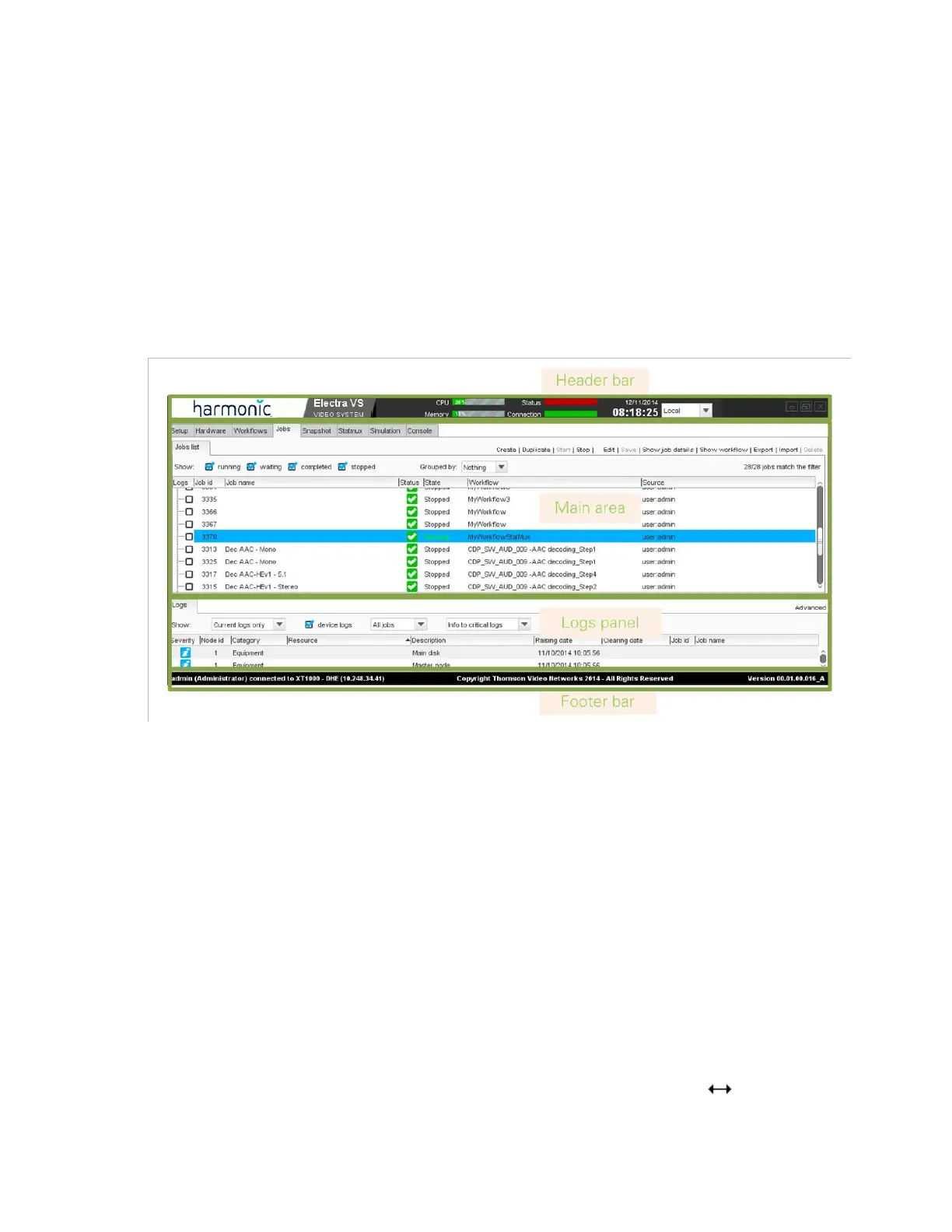
The graphical user interface is divided into four main areas, shown in the
figure below.
Figure 3-9. Graphical user interface overview
The GUI contains the following areas:
An header bar that provides information on the equipment status, the
date and time, etc.
A Main area from where you can perform configuration and
monitoring. This area contains several tabs. Click them to navigate in
the GUI.
A Logs panel that shows the logs raised on the equipment.
A Footer bar that provides the name of the connected user, the Electra
VS name and IP address and the Electra VS software release.
Customizing the Display
Resizing the Columns
In arrays, columns can be resized. Move the mouse cursor between two
header columns. The mouse cursor should change to . Click and drag
the column to the desired size, and then release the mouse button.



 To Next Page