Chapter 3 ’Web User Graphical Interface’ — GUI Description
200 Electra VS
-
Version 05.10
User Manual - Rev. A
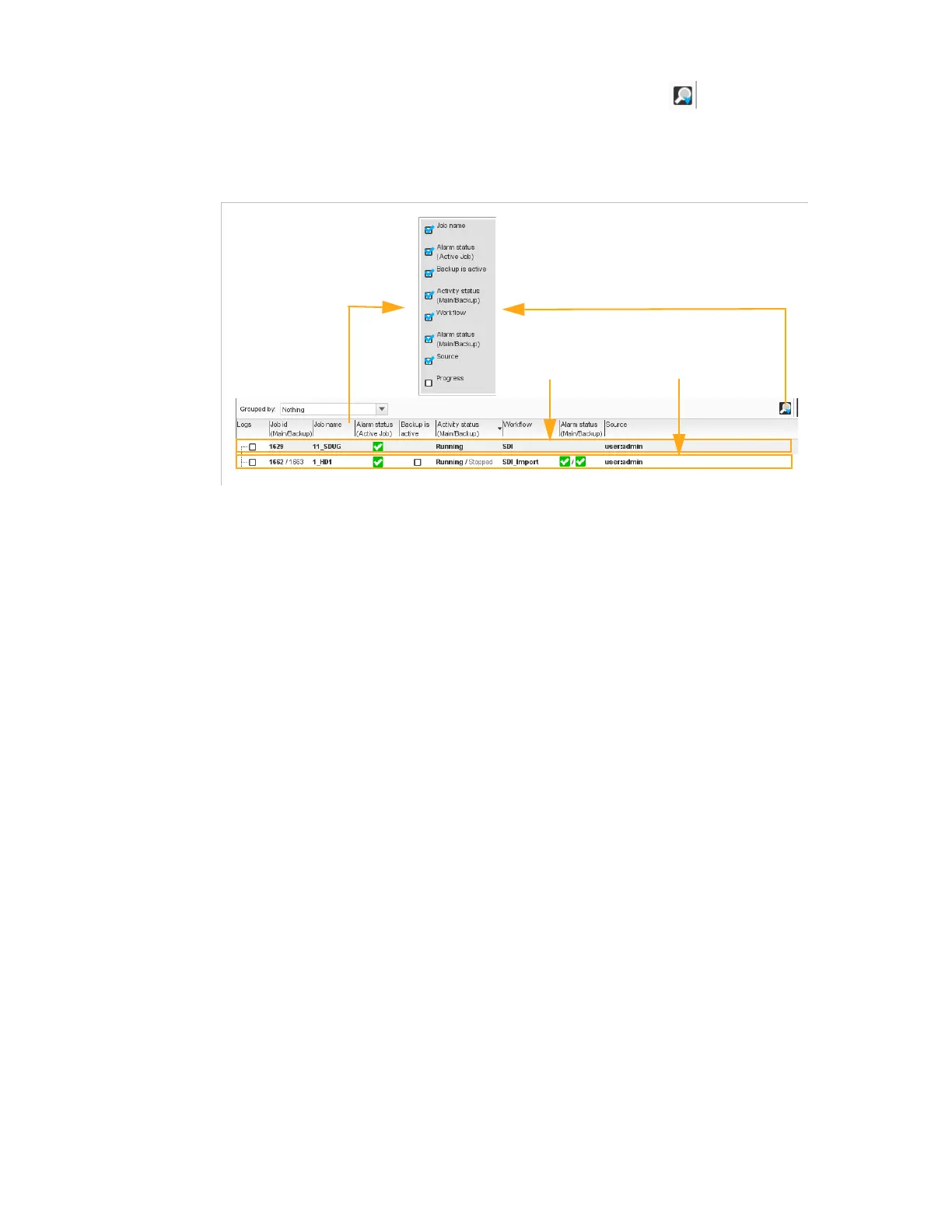
By right-clicking on the titles of column or by click on , it is possible
to select the columns that will be displayed or hidden.
Figure 3-160. Jobs list array
For each job, the following information can be provided:
Logs:
if checked the logs of the job will be displayed in the Logs tab.
Refer to section
’Logs Tab’
on page 208.
Job id (Main/Backup)
: identifier of the main and backup jobs.
These identifiers are automatically created. Active jod are in bold.
Job name
: at your convenience. You can modify it in the job
parameters.
Alarm status (Active Job)
: alarm status of the active job. List of
possible status and their meaning is provided in
Table 3-1 ’Status
pictograms’
on page 90.
Backup is active
: if checked indicates that the backup job is active.
This column allows to see at first glance all the redundant job with
backup active.
Activity status (Main/Backup)
: state of the main and backup jobs.
See section
’State’
below.
Workflow
: workflow on which the job is based.
Alarm status (Main/Backup)
: alarm status of the main and backup
jobs. List of possible status and their meaning is provided in
Table 3-1
’Status pictograms’
on page 90.
Source
: user who created the job.
Progress
: for offline jobs only, indicates the progress percentage of
the job.
No redundant job
Redundant job
Right-click to select the
information displayed



 To Next Page