Chapter 3 ’Web User Graphical Interface’ — Workflow Library
Electra VS
-
Version 05.10 279
User Manual - Rev. A
IP address
: IP address of the receiver equipment.
If you use a xMixer, the first two digits are the equipment id and the
last digit the audio channel.
Mixer Latency
: set the latency introduced by the external
equipment in the received audio.
Example
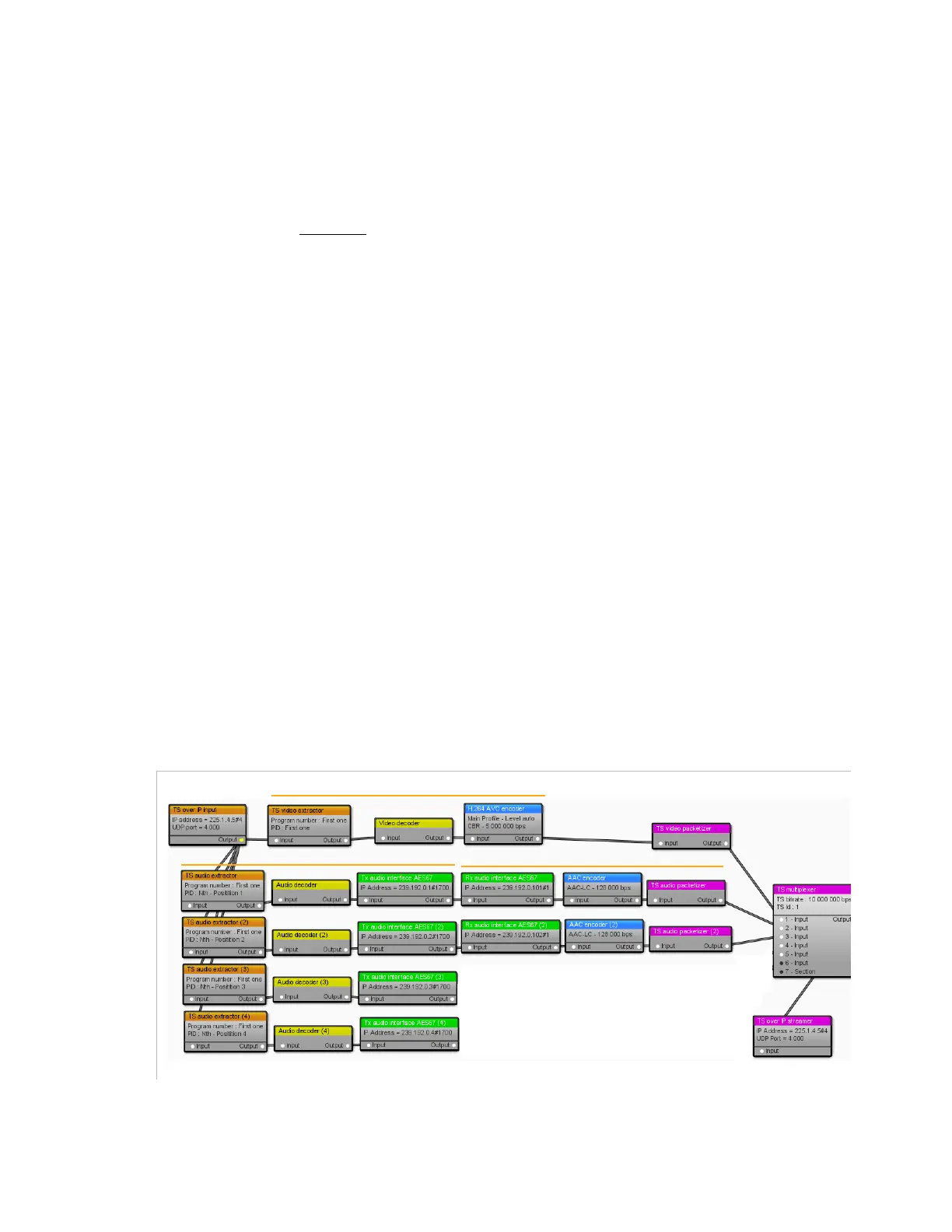
For the generation of a live multi-lingual commentary events, the
following workflow shall be created:
1.
Electra VS receives a TSoIP stream containing the event video and
ambient noise audio(s).
2.
The video is transcoded and integrated in the output SPTS.
3.
The audios are extracted and transmitted to an external equipment
using AES67 protocol.
In the external equipment, the event ambient noise will be mixed with
comments in different languages (4 in this example).
In each
Tx audio interface AES67
box, the
additional delay
parameter can be set so that the ambient audio is synchronized with
the comment.
4.
The mixed commentary and ambient noise stereo audios are received
from the mixer (one per comment language). In each
Rx audio
interface AES67
box, the
mixer latency
parameter shall be
configured to take in account the delay introduced by the mixing
operation.
5.
The audios are multiplexed with the source video.
Figure 3-249. Workflox using two Rx and Txaudio interface AES67 example
Video transcoding
Mixed audios reception and encoding
Ambient audio decoding & transmission



 To Next Page