© 2018 MA Lighting Technology GmbH - Dachdeckerstr. 16 - 97297 Waldbüttelbrunn - Germany
Phone +49 5251 688865-27 - support@ma-dot2.com - www.malighting.com
Symbol View
You get to the fixture symbol view with a tap on the symbol view icon in the title bar of the fixture view.
This is a graphical layout of the patched fixtures. The symbol view displays always the playback output.
The fixtures are grouped in fixture types.
There are different symbols in the symbol view, depending on the fixture type.
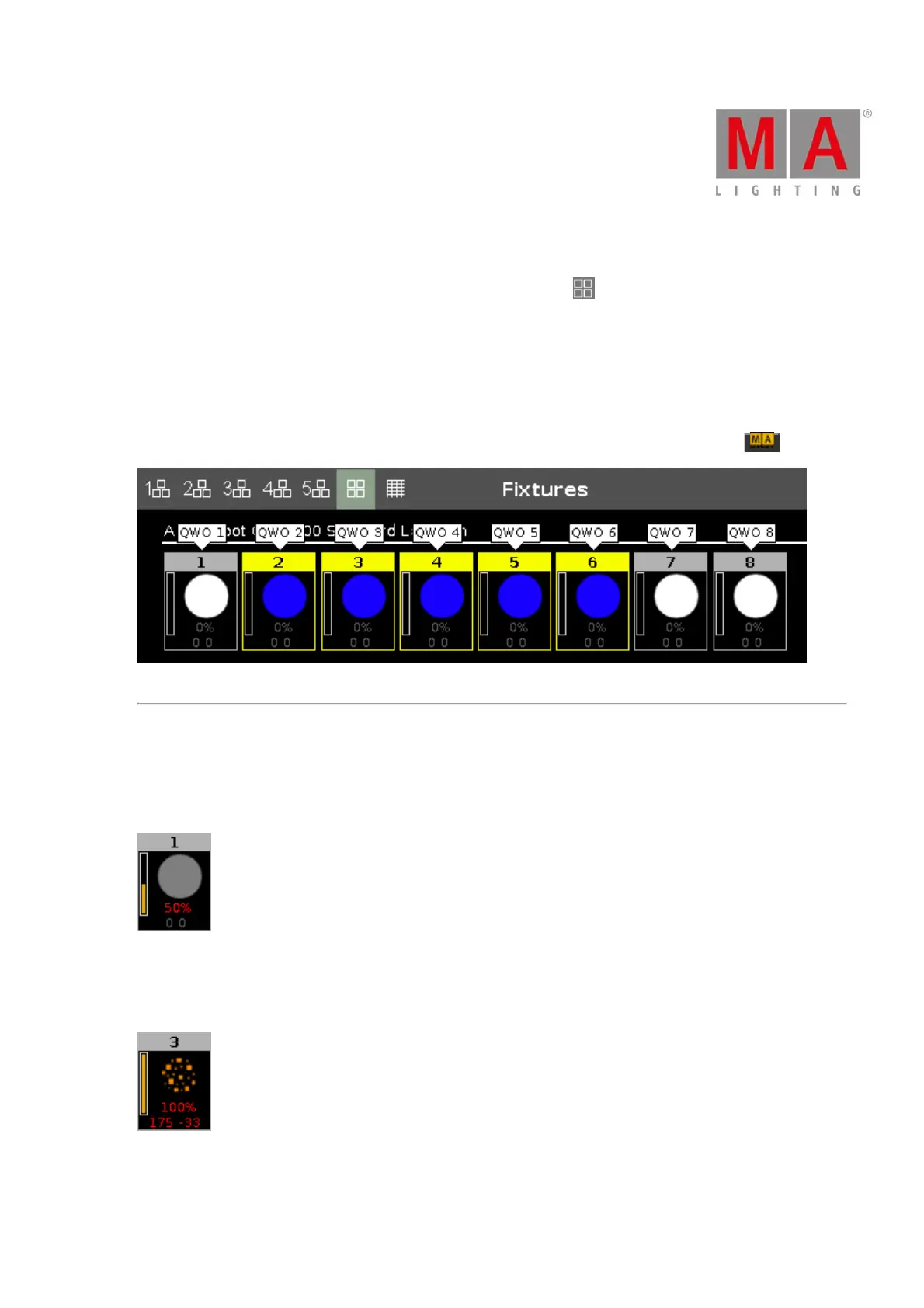
To see the fixture names and to see the colors and gobos if the dimmer is closed, press and hold .
Figure 2: Fixtures symbol view with pressed MA key
Fixture Symbols
All fixture symbols have in the upper area the fixture ID and the orange dimmer bar below.
The dimmer bar is a graphical view of the dimmer value.
Figure 3: Example fixture ID 1
Displays additional to the dimmer bar the dimmer value of 50 % in red (= programmer values), and 0 0 for the
position of pan and tilt values.
Figure 4: Example fixture ID 3



 To Next Page