© 2018 MA Lighting Technology GmbH - Dachdeckerstr. 16 - 97297 Waldbüttelbrunn - Germany
Phone +49 5251 688865-27 - support@ma-dot2.com - www.malighting.com
Displays additional to the dimmer bar the dimmer values of 100 % in red (= programmer values), and 175 -33 for
the position of pan and tilt values, and the gobo wheel.
Figure 5: Example fixture ID 21
Displays the current color and the dimmer values. For more information, see value colors.
Sheet View
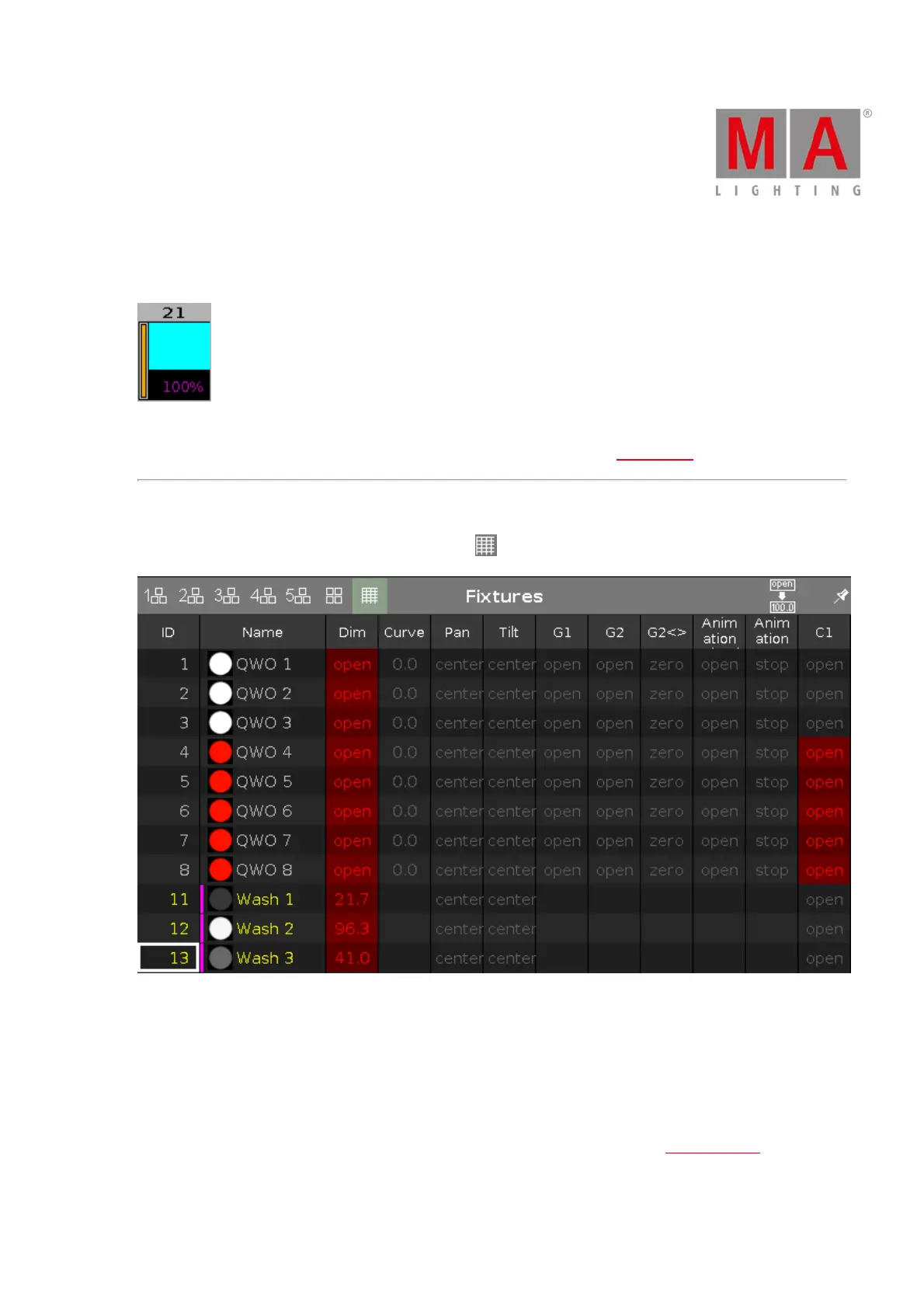
To go to the fixture sheet view tap the sheet view icon in the title bar.
Figure 6: Fixture sheet view
In the fixture sheet view are all patched fixtures, and their values and attributes, in a numeric order of the fixture
ID.
In the first column is the fixture ID displayed. In the second column is the fixture name displayed. Those two
columns are fixed.
After the fixture name column are the attributes displayed, in the same order like the preset type bar.
If you use a preset, the name of the preset is displayed instead of the value.



 To Next Page