© 2018 MA Lighting Technology GmbH - Dachdeckerstr. 16 - 97297 Waldbüttelbrunn - Germany
Phone +49 5251 688865-27 - support@ma-dot2.com - www.malighting.com
Session required:
To use Art-Net or sACN (=streaming ACN), it is necessary to be in a session. To create a session, tap
Sessions in the Setup. The network setup opens.
If you are not in a session, Art-Net or sACN is not active.
Network protocols and dot2 onPC:
When using Art-Net or sACN with a dot2 onPC, the first universe is free. If you would like to output more
than one universe, you have to add a Node4 with a maximum of 1024 DMX channels.
Windows® 8 or Windows® 8.1:
To use Art-Net on Windows® 8 or Windows® 8.1, it is necessary to start the application as
administrator. If you don´t start the application as administrator, Art-Net is not active.
Important:
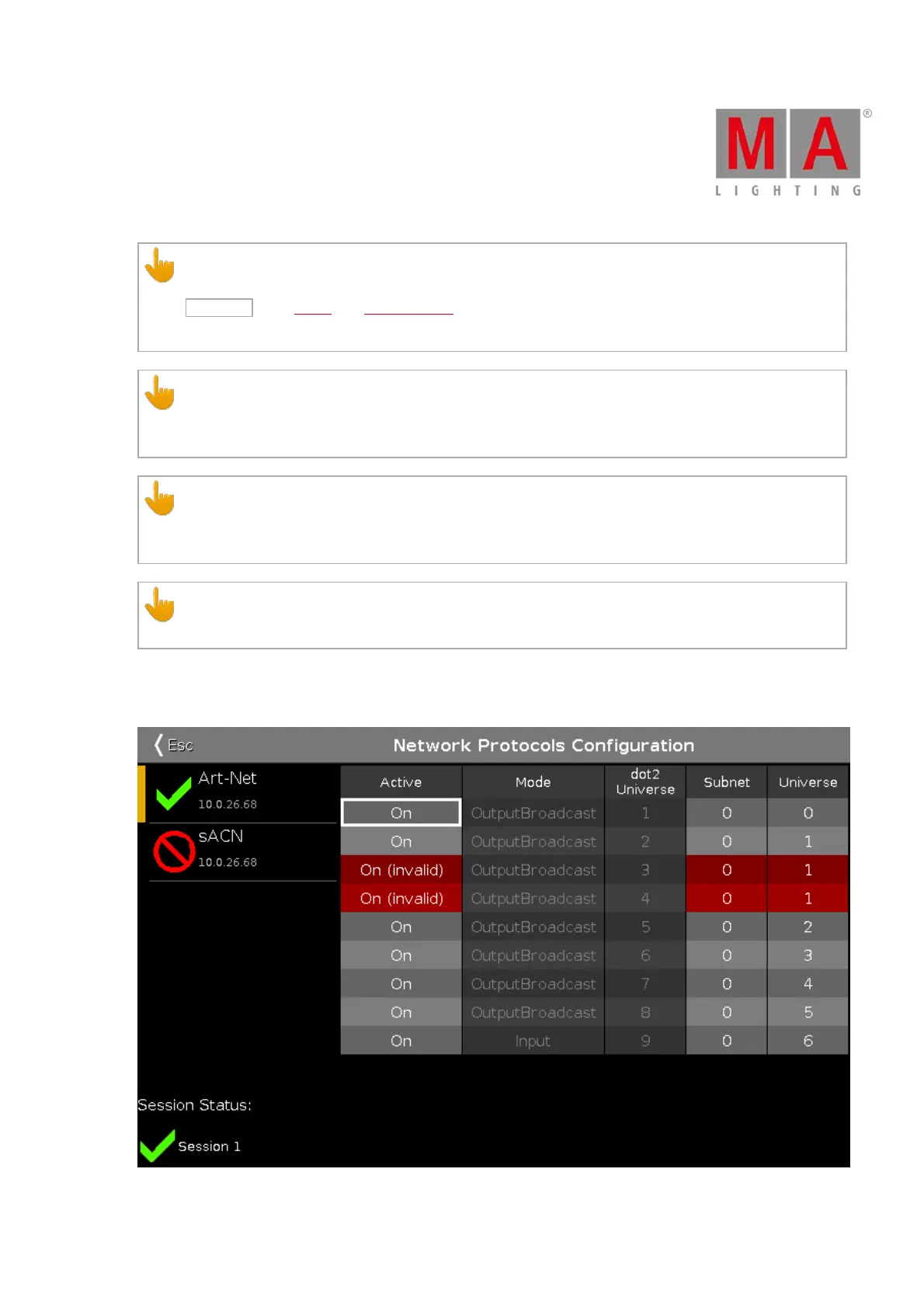
Art-Net and sACN addresses must not be assigned to multiple universes.
If an Art-Net or an sACN address is assigned to multiple universes, the values will be marked in red, meaning that
they are invalid.
Figure 5: Invalid Values in Network Protocols Configuration



 To Next Page