HIGH DATA RATE RECEIVER
HDR-4G+ USER’S MANUAL
Ref. DTU 100782
Is.Rev 3.5
Date: June 1, 2021
© Safran Data Systems – IMP000074 e14r1
This document is the property of Safran Data Systems.
It cannot be duplicated or distributed without expressed written consent.
The following commands are supported:
Stop the active menu: the CORTEX application software is not stopped but all IP connections
(to the monitoring port, telemetry port, ranging ports, etc…), except the connections to the RAC
port, are automatically closed. The connection status on the top level window of the GUI
indicates DISCONNECTED.
Start a new menu: select and start a new menu.
Check the active menu: indicates the active menu.
Load the menu table: on reception of this command, the CORTEX returns the list of available
menus.
MCS Graphical User Interface 4.2.4.2
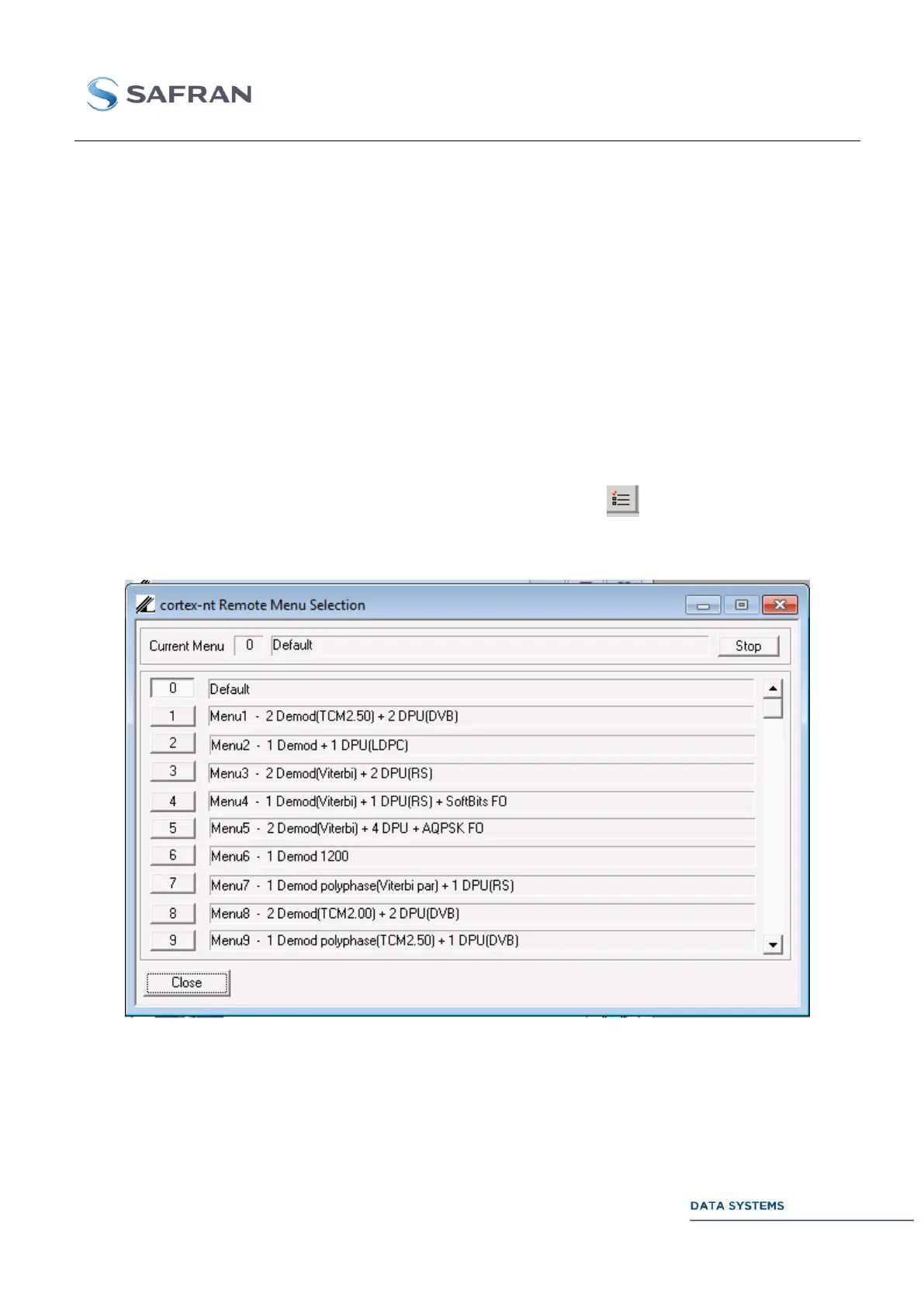
From the IN-SNEC MCS, the operator can access the RAC server by clicking successively, in the
upper toolbar, on Window Menu_Selection, or by clicking on the icon.
Next picture shows the operational scenarios offered by the start-up menu. Use the Stop active menu
and Start new menu pushbuttons to re-configure the CORTEX.
Figure 78: MCS Menu Management Window



 To Next Page