HIGH DATA RATE RECEIVER
HDR-4G+ USER’S MANUAL
Ref. DTU 100782
Is.Rev 3.5
Date: June 1, 2021
© Safran Data Systems – IMP000074 e14r1
This document is the property of Safran Data Systems.
It cannot be duplicated or distributed without expressed written consent.
Data Processing Unit Windows 4.5.5
“CADU” Window 4.5.5.1
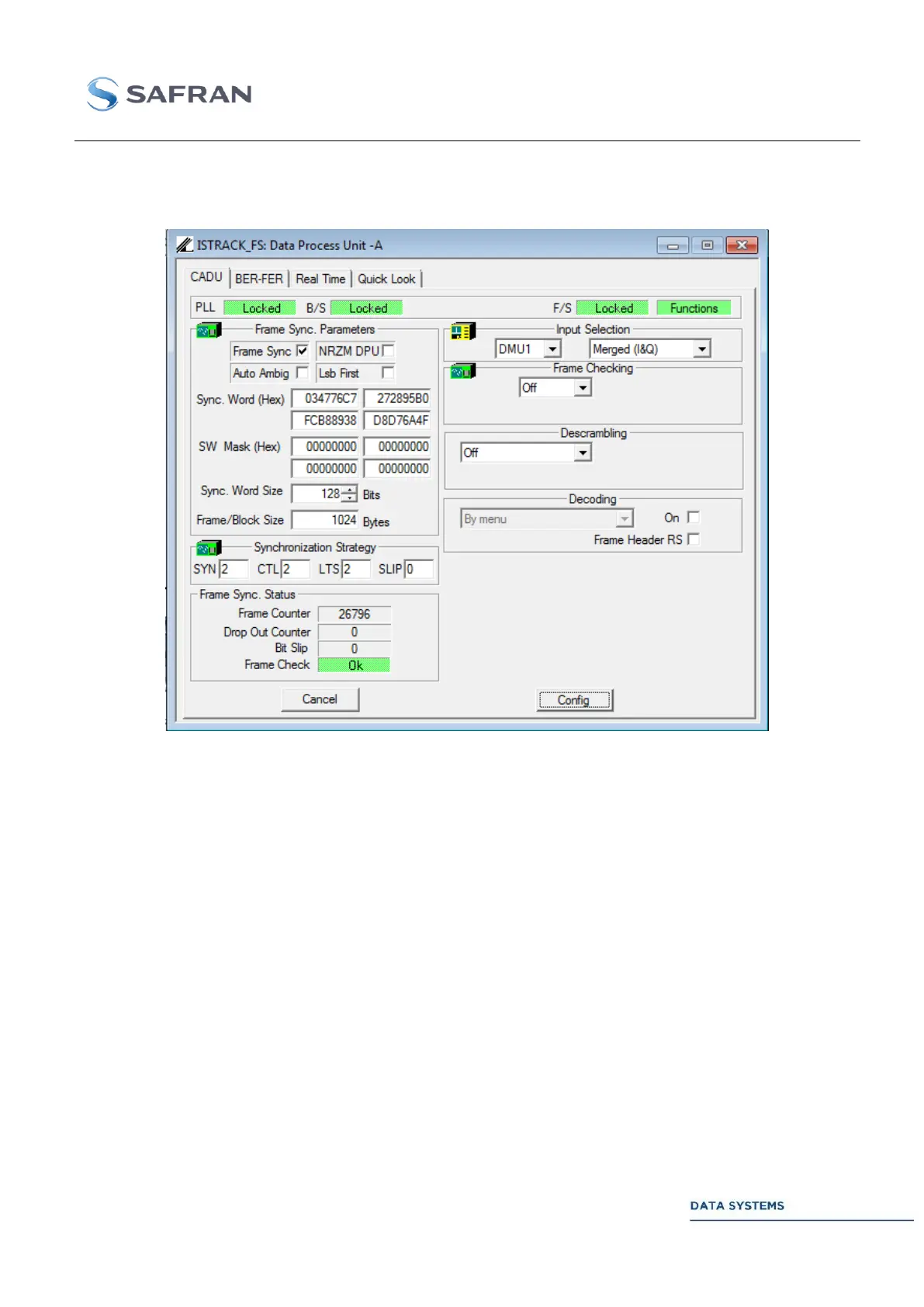
Figure 132: DPU: CADU Window
Position the mouse cursor on Function to see which DPU-related licenses are available.
Depending on the available option (DVB Transport Layer, CCSDS Reed Solomon, or LDPC decoding),
the right low part of the window lets appear the status of the corresponding function: RS DVB Status,
Reed Solomon Status or LDPC Status.
Control 4.5.5.1.1
Parameters in this window are described in DPU.
Click on the check box to enable or disable the frame synchronizer:
Frame synchronizer ON. Minor frames reconstruction
according to the programmed strategy.
Frame synchronizer OFF. Transmission of raw data frames to
the Telemetry Clients.



 To Next Page