HIGH DATA RATE RECEIVER
HDR-4G+ USER’S MANUAL
Ref. DTU 100782
Is.Rev 3.5
Date: June 1, 2021
© Safran Data Systems – IMP000074 e14r1
This document is the property of Safran Data Systems.
It cannot be duplicated or distributed without expressed written consent.
“Quick Look” Window 4.5.5.5
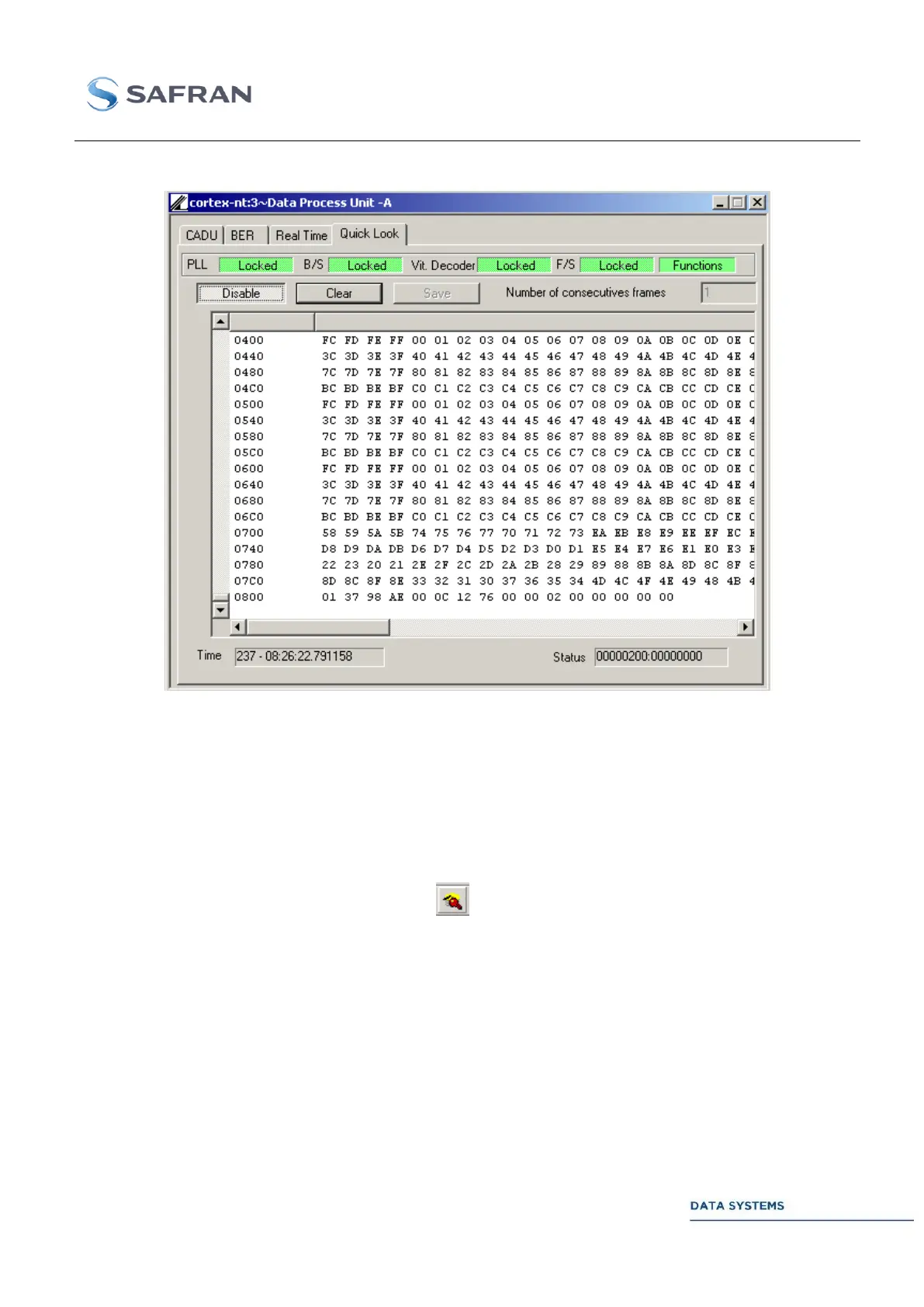
Figure 136: Data Processing Unit: Quick Look Window
Control 4.5.5.5.1
Parameters in this window are described in DPU.
Enable (the MCS opens a connection to the telemetry port) or Disable the Quick
Look display.
Important: the Quick Look can only be enabled if the Acquisition mode is
selected (click on icon ). Switching back to the Configuration mode is
impossible as long as the Quick Look is enabled.
Clear the Quick Look window
Save the data displayed on the Quick Look to a text file on the disk (click on
SAVE only after the Quick Look has been disabled).
NUMBER OF
CONSECUTIVE
FRAMES
Frame display rate. Enter any value from 1 to 10:
1: display one frame every second
2: display two consecutive frames every two seconds
etc…



 To Next Page