HIGH DATA RATE RECEIVER
HDR-4G+ USER’S MANUAL
Ref. DTU 100782
Is.Rev 3.5
Date: June 1, 2021
© Safran Data Systems – IMP000074 e14r1
This document is the property of Safran Data Systems.
It cannot be duplicated or distributed without expressed written consent.
32APSK Modulation:
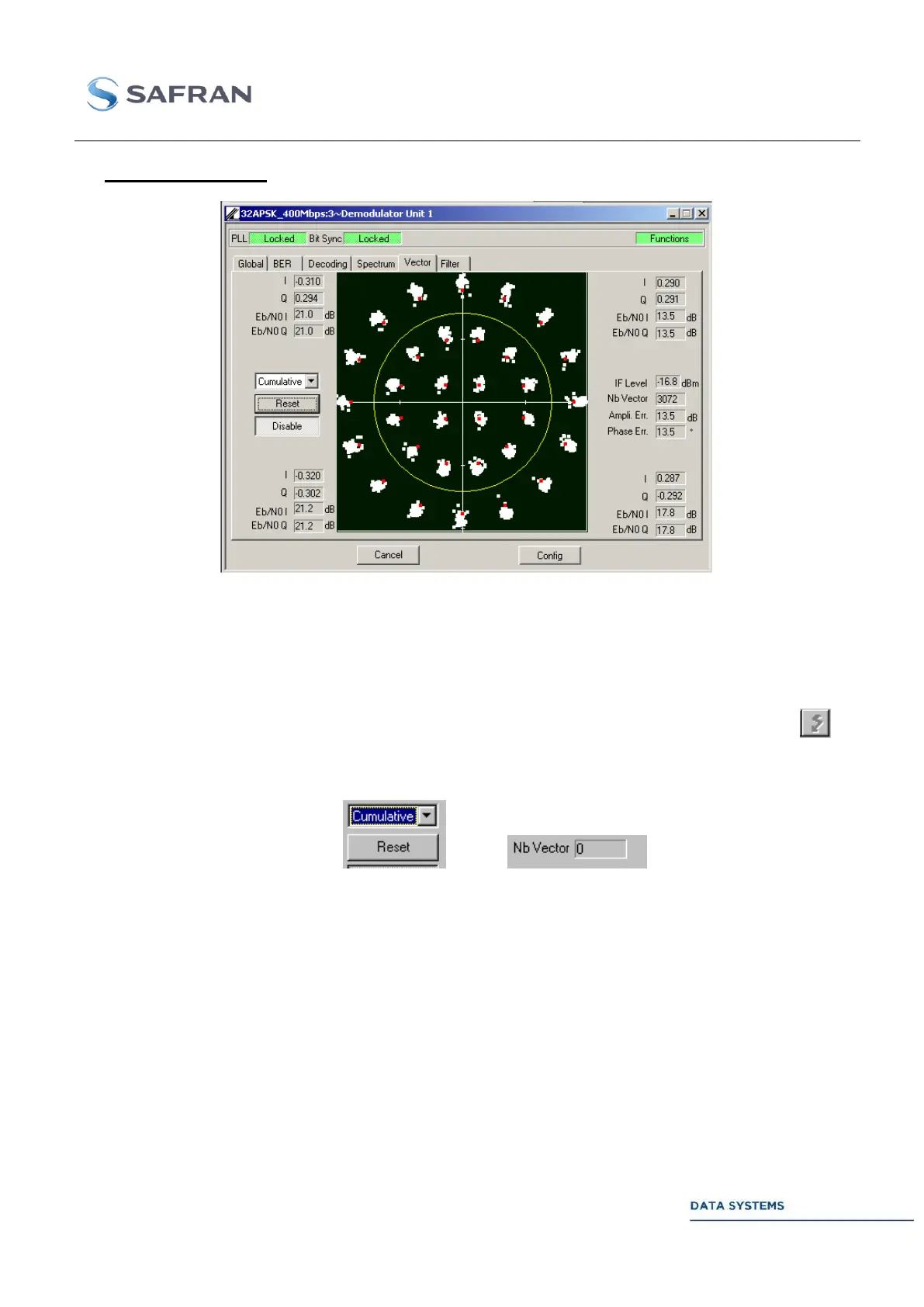
Figure 129: Demodulator: 32APSK Vector Window
Starting the Vector Analyzer:
In the Demodulator Global window (see section 4.5.4.1.1.1 ), set parameter Mode to
Demod.
In the Demodulator Vector window, click on Enable. A TCP-IP connection is opened to
the Vector port (VEC). To close the connection, click on Disable or click on icon or
exit the Vector window.
Vector display:
Vectors are transmitted to the local MCS in bursts (TCP-IP packets) of 256 vectors.
In Single mode, the display is refreshed burst by burst, with all vectors displayed.
In Cumulative mode, the display is refreshed every 20 bursts only.
In Average S mode, the MCS displays the average vector value for the received burst of
vectors in each I/Q quadrant.
In Average C mode, the MCS displays the average vector value for the 20 last bursts of
vectors in each I/Q quadrant.
Click on the Reset button to reset the display.



 To Next Page