3-62
Digital Electronic Control
Digital Electronic Control
Digital Electronic Control system
reset
A Digital Electronic Control system reset is re-
quired after the replacement of the Digital
Electronic Control ECM or the engine ECM.
1. Connect the YDIS to display “Boat Sys-
tem” menu. To connect and operate the
YDIS, see the YDIS (Ver. 2.49 or later) in-
struction manual.
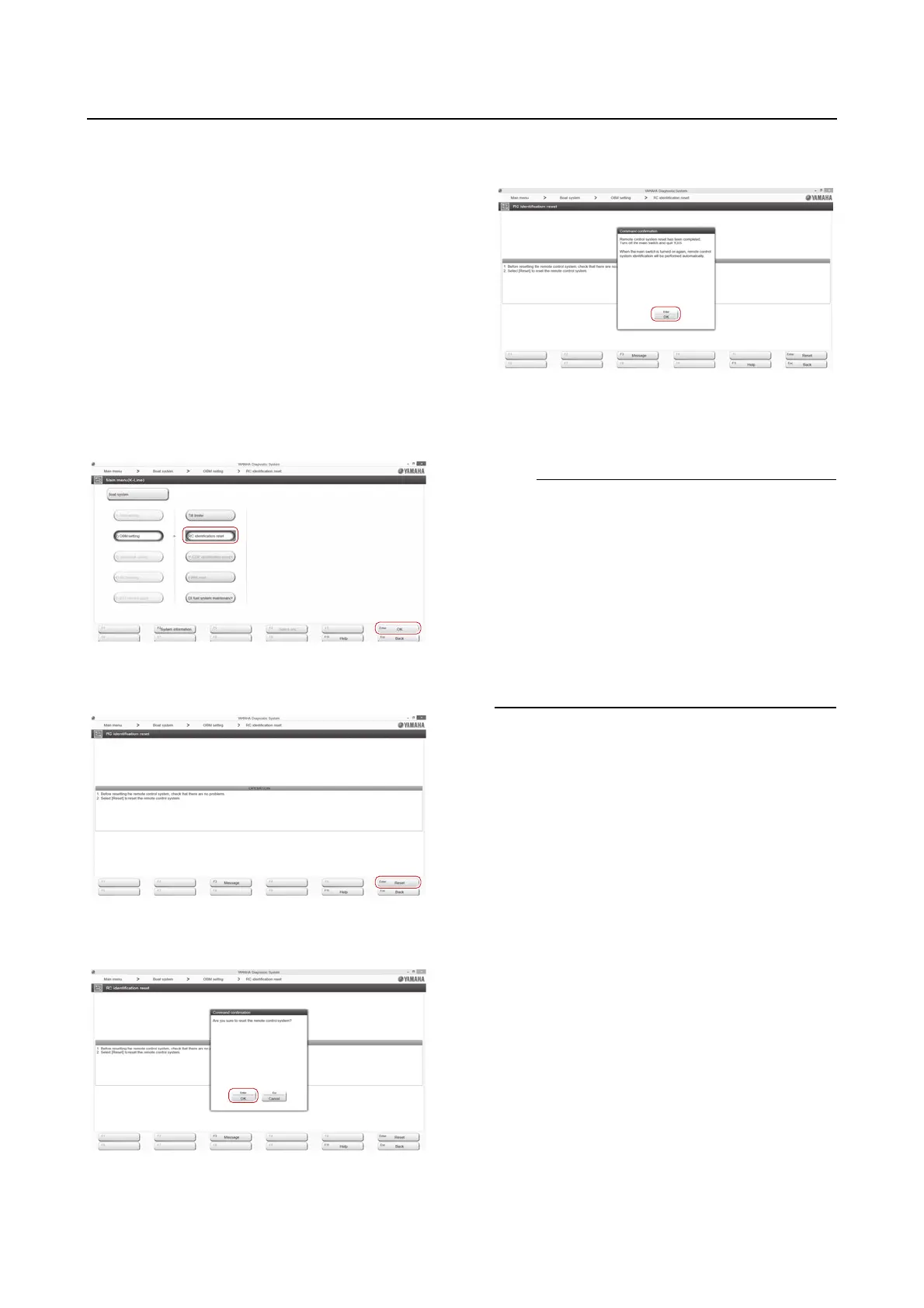
2. Click the “R/C identification reset” button
or “OK” button, or select “R/C identifica-
tion reset” using the arrow keys, and then
press the Enter key on the keyboard.
3. Click the “Reset” button or press the Enter
key on the keyboard.
4. Click the “OK” button or press the Enter
key on the keyboard.
5. Click the “OK” button or press the Enter
key on the keyboard.
6. Turn the main switch or power switch to
OFF, and then remove the extension wire
harness of the Digital Electronic Control.
The outboard motor will automatically identify
the newly connected Digital Electronic Control
under any of the following conditions:
• When the extension wire harness is con-
nected and the engine start switch is turned
to ON again.
• When the engine start switch is turned to
OFF, and then turned to ON again after wait-
ing for about 10 seconds until the power to
the engine ECM is shut off.










 To Next Page