CL5 display calibration
3-71
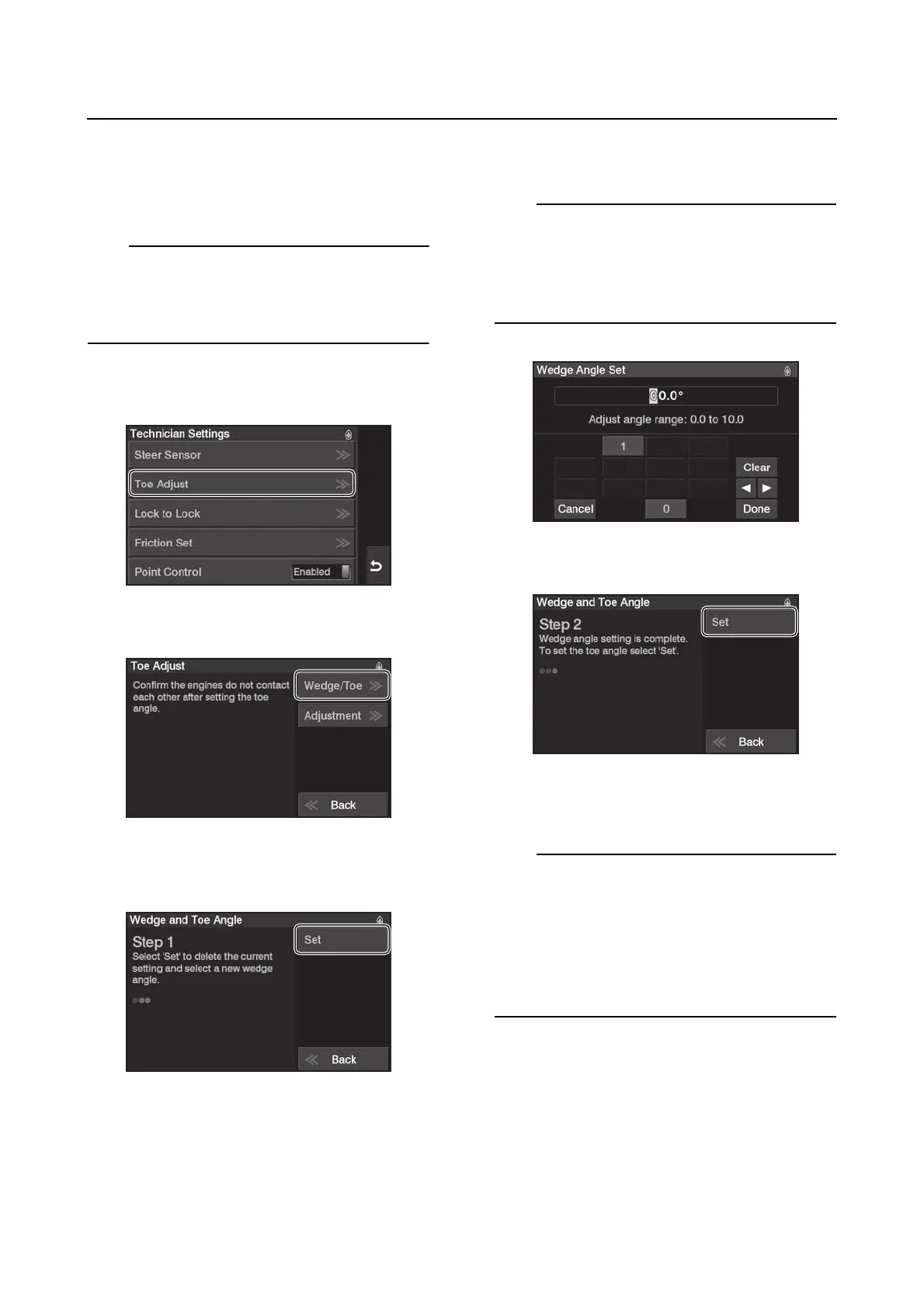
Wedge/Toe settings
Do this setting for “Wedge/Toe” only if the ad-
justment width of the toe angle is insufficient
due to the shape of the transom.
Single engine application: No setting
Twin engine application: Wedge and Toe
Triple/quad/quint engine application: Toe Ad-
just only
1. From the “Technician Settings” menu, se-
lect “Toe Adjust”.
2. Tap “Wedge/Toe”.
3. Select “Set” to delete the current setting
and select a new wedge angle.
4. Adjust the wedge angle. Tap “Done” to
confirm.
The Helm Master EX control system comes
with the toe set at 00.0°. The adjustment range
is:
• 0.0° to +10.0° in 0.1° increments.
• Plus (+) degrees equals toe-out.
5. Select “Set” to adjust the toe angle.
6. Adjust the toe angle. Tap “Done” to con-
firm.
The Helm Master EX control system comes
with the toe set at 0.0°. The adjustment range
is:
• –2.0° to +2.0° in 0.2° increments (up to 0.2
in).
• Minus (–) degrees equals toe-in.
• Plus (+) degrees equals toe-out.





 To Next Page