Chapter 3 ’Web User Graphical Interface’ — Operating Instructions (Tutorial)
Electra VS
-
Version 05.10 119
User Manual - Rev. A
-
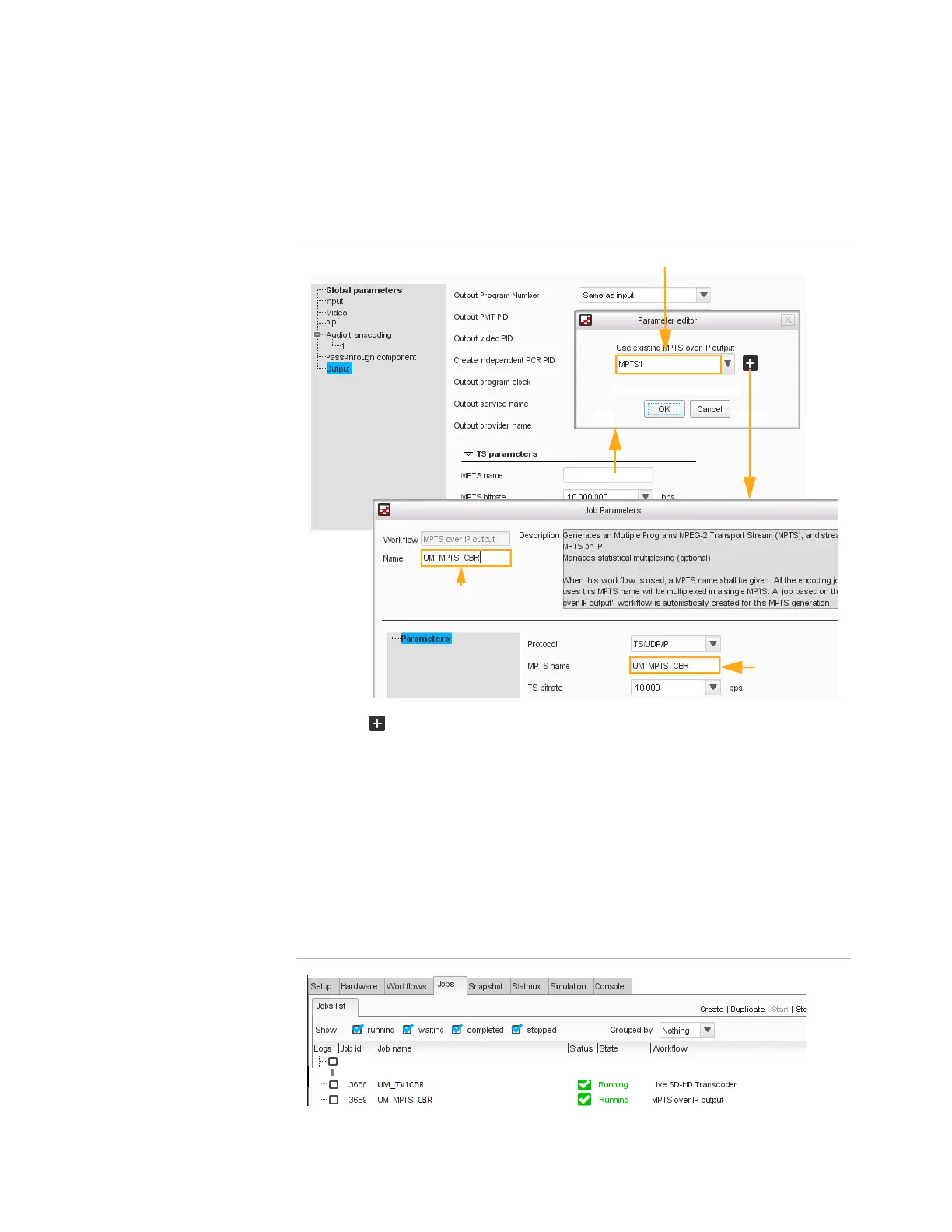
Click
MPTS name
field in the
Output
section. A dialog
box is opened allowing you to choose an existing MPTS
over IP output or to create a new MPTS over IP output (e.g.
UM_MPTS_CBR)
.
Figure 3-55. UM_TV1CBR and UM_MPTS_CBR jobs parameter
2.
Click to create a new MPTS and configure it with
UM_MPTS_CBR
as name.
3.
Click
Create and start
at the bottom of the dialog box to launch the
multiplexing job
UM_MPTS_CBR
.
The first program
UM_TV1CBR
as well as the MPTS multiplexing
UM_MPTS_CBR
are processed in separate jobs. They are visible in the
jobs list in the
Jobs
tab.
Figure 3-56. The first program job and the multiplexing job
Existing MPTS
Creating
a new MPTS
MPTS selection
MPTS job name
MPTS name
UM_TV1CBR job
UM_MPTS_CBR job



 To Next Page