Chapter 3 ’Web User Graphical Interface’ — GUI Description
Electra VS
-
Version 05.10 205
User Manual - Rev. A
The contents of input for the selected job is showed in a tree (available
for jobs that include a TS file input or a TS over IP input only).
Job Nodes
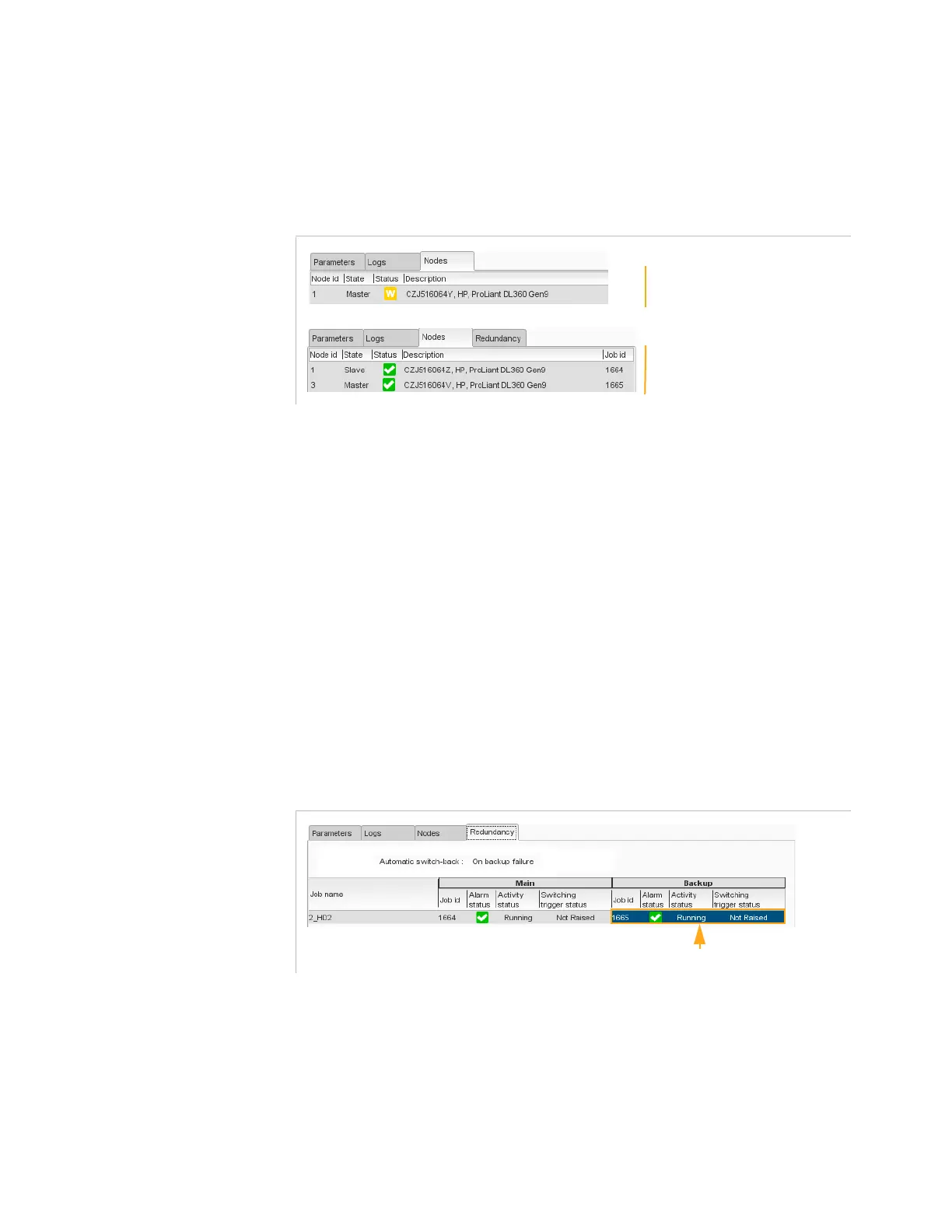
Figure 3-168. Job Nodes view
This panel indicates the node(s) where the job is running.
The following information is provided for the selected job:
Node id
: nodes used by the main and backup jobs if the job is
redundant
State
: state of the node(s)
Status
: status of the node(s). See
Table 3-1 ’Status pictograms’
on
page 90
Description
: node(s) description
Job id
: Identifiers of main and backup nodes if the job is redundant
Job Redundancy
This view is displayed if the selected job is a redundant job.
Figure 3-169. Job Redundancy view
This panel indicates the status of the selected redundant job.
The following information is provided:
Automatic switch-back
: Status of the SDI redundancy mode. SDI
redundancy mode must be set in the Hardware/SDI panel. Refer to
section
’SDI Redundancy Mode’
on page 189.
Job name
: name of the job
No redundant SDI job
Redundant SDI job
Active job is highlighted



 To Next Page