Chapter 3 ’Web User Graphical Interface’ — Workflow Library
238 Electra VS
-
Version 05.10
User Manual - Rev. A
4.
Click the button located in the top-right corner to build the link.
5.
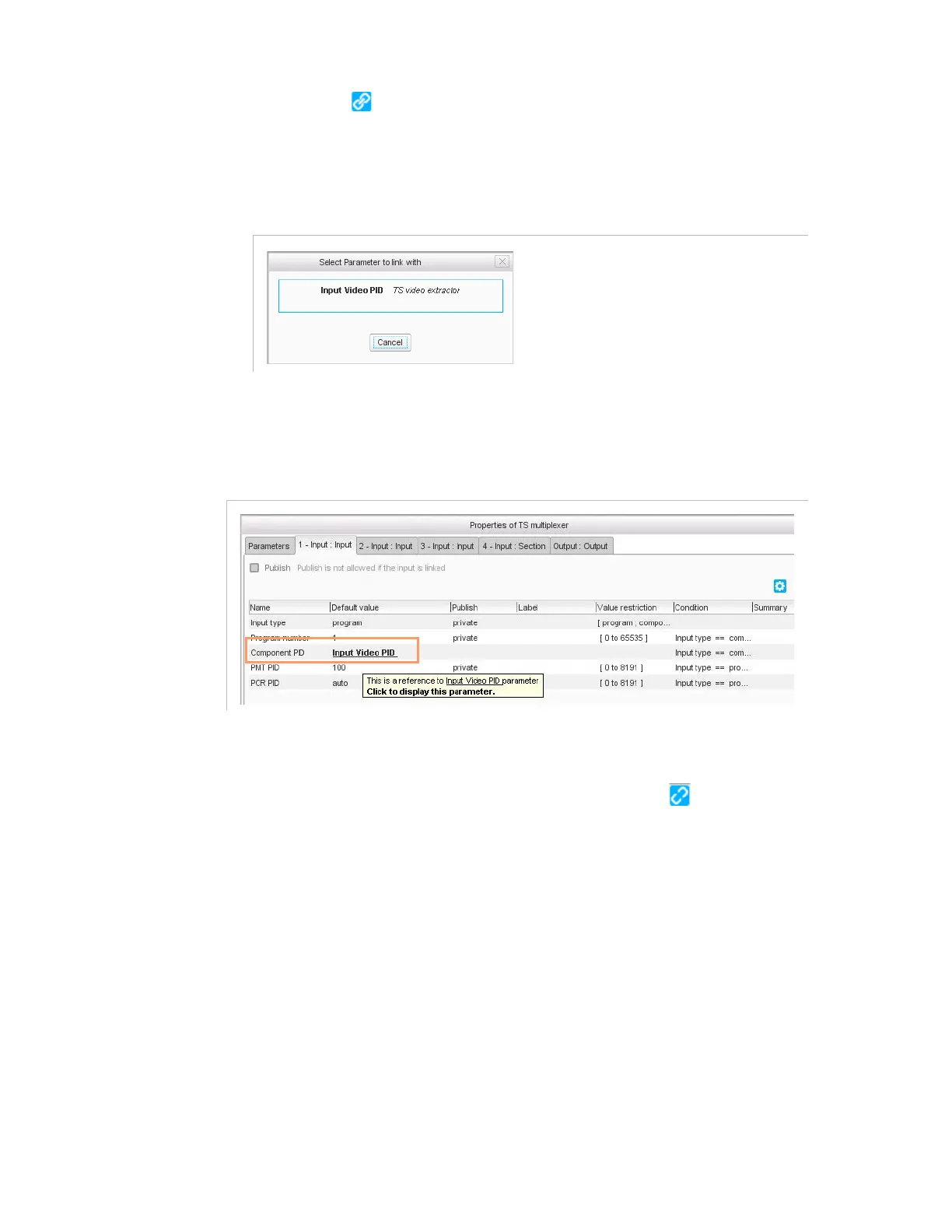
Select the parameter that should be used as reference (the parameter
to link with).
Figure 3-213. Selecting the parameter to link with
In the
TS multiplexer
processing component, you can see that there is
now a link to the reference.
Figure 3-214. Link established between two parameters
You can click the link to open the processing component in which the
parameter is specified.
To remove the link, select the parameter and click the button again.
In case you try to remove the processing component toward which a link
is made, a message is displayed to warn you. Click
Cancel
to cancel the
removal, or
OK
to proceed, knowing that the links will be broken.
Example 2
: We want to use the same PMT PID for the output program:
you set a label to the input PMT PID parameter in the
TS video
extractor
processing component, and link the output PMT PID
parameter in the
TS multiplexer
processing component to this
parameter.



 To Next Page