A
B
C
D
E
F
G
H
L
M
N
P
section
P 8
106 1098/1098S - M.Y. 2007 - edition 00
Electric system
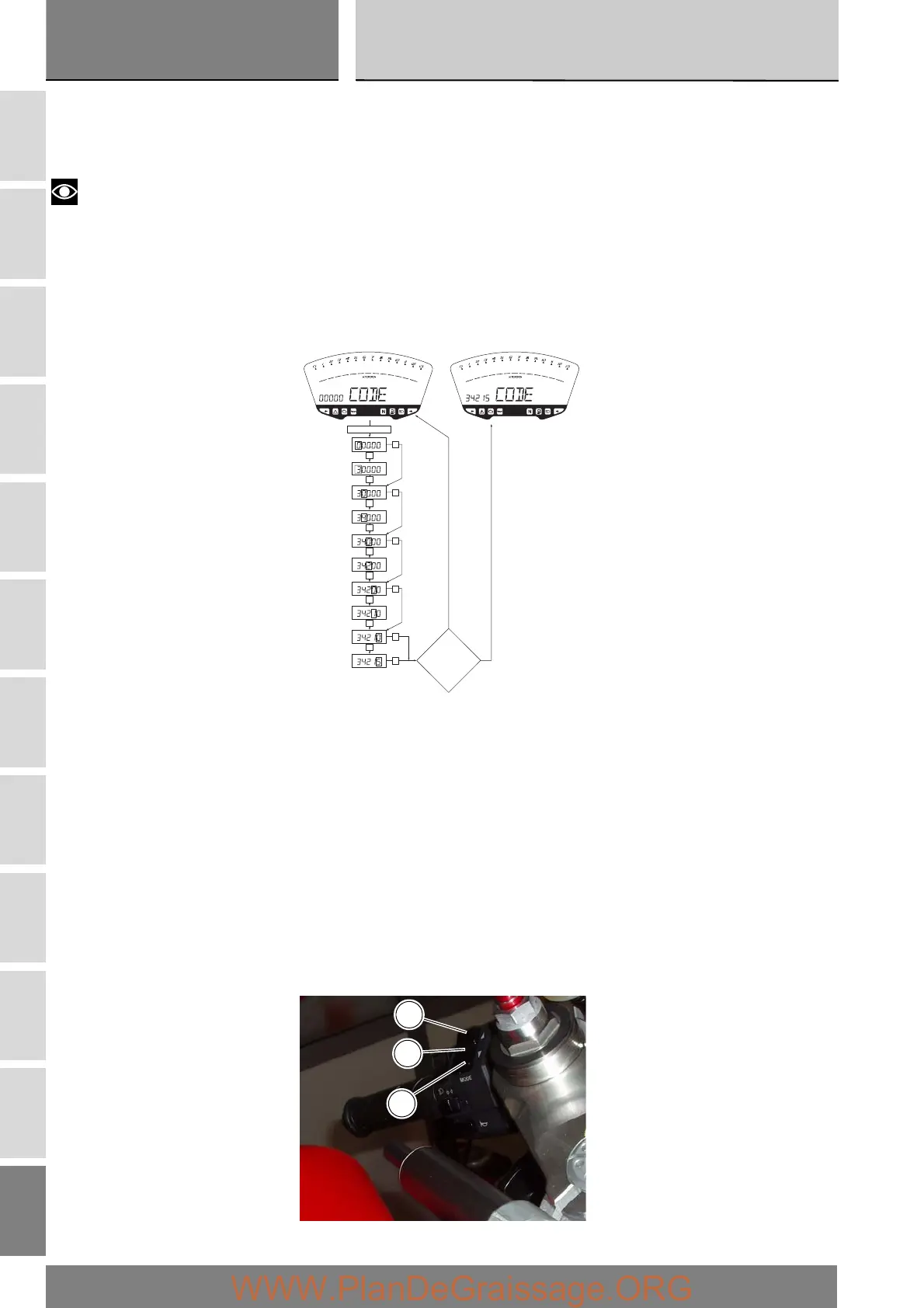
Immobilizer override procedure
Should the immobilizer become locked, you can perform the “Immobilizer Override” procedure from the instrument panel by
entering the respective function as follows:
Select the “CODE” page from the menu.
Notes
This menu should be active only if there is at least one immobilizer error.
With this page selected, the initial code is always displayed as “00000”. If you hold the button (1) in position B “▼” for 3 seconds,
you will access the procedure for entering the electronic code marked on the Code Card.
Entering the code:
on entering this function, the first digit on the left starts flashing.
Button (1):
each time you press the button in position B “▼”, the number increases cyclically in steps of one digit every second;
If you press the button in position A “▲”, you can set the second digit, which will start flashing. Each time you press the button
in position B “▼”, the number increases cyclically in steps of one digit every second.
if you press the button in position A “▲”, you can set the third digit, which will start flashing. Each time you press the button in
position B “▼”, the number increases cyclically in steps of one digit every second.
If you press the button inposition A “▲”, you can set the fourth digit, which will start flashing. Each time you press the button in
position B “▼”, the number increases cyclically in steps of one digit every second.
if you press the button in position A “▲”, you can set the fifth digit, which will start flashing. Each time you press the button in
position B “▼”, the number increases cyclically in steps of one digit every second.
press the button in position A “▲” to confirm the code.
B= ON 3 sec.
B
B
B
lamp.
A
A
A
A
A
Insert CODE
OK?
A
sell.
A
A
lamp.
sell.
lamp.
A
sell.
B
lamp.
A
sell.
B
lamp.
sell.
NO
YES
1
B
A











 To Next Page