Chapter 3 ’Web User Graphical Interface’ — Workflow Library
Electra VS
-
Version 05.10 283
User Manual - Rev. A
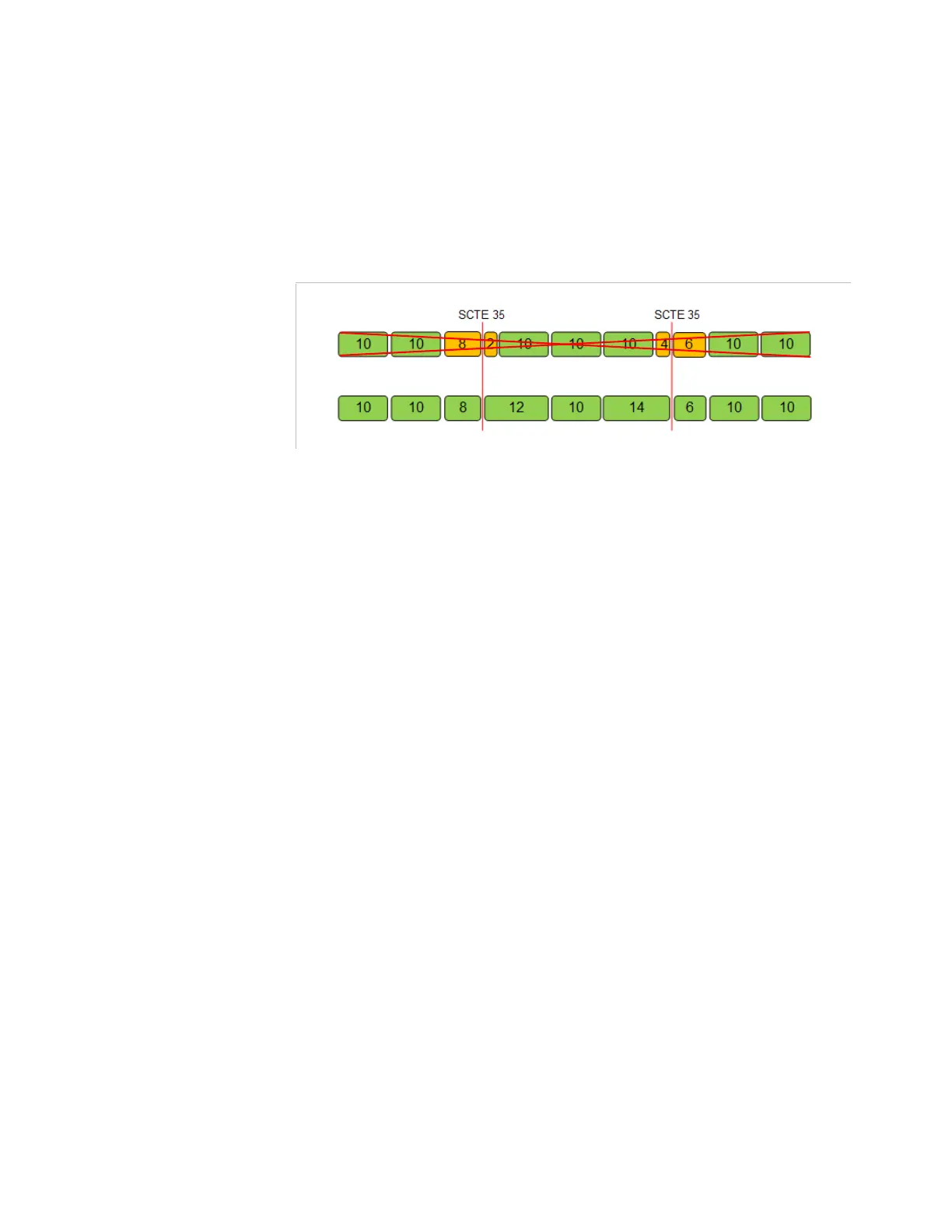
SCTE 35 conditioning
: if true, the chunker will insert
chunk/segment start for the timestamps corresponding to the splice in
or out points defined in the incoming SCTE 35 sections (splice_insert).
To improve stream stability the segment duration is adapted to avoid
short segments. It may vary between ½ and 1½ time the configured
duration. Refer to figure below.
Figure 3-254. SCTE 35 conditioning, segment duration adaptability
The following AST and AET parameters only impact MPEG-DASH
outputs.
Both parameters are only indicative. the segments continue to be
generated at the Electra VS Dash output whatever are their values. The
dates can be in the past or in the future but AET must be after AST.
Availability start time (acquisition date)
: the Availability Start
Time (AST) is the time instant in UTC time at which an event becomes
available at the MPEG-DASH output. Set it to
auto
if you want to use
the acquisition time of the stream after the startup of the job. Set it to
Custom
if you want to declare an
Availability start time
and fill it
with a custom time.
Availability start time offset
: set it to
Auto (internal latency)
to let
Electra VS add automatically the internal latency to the MPD AST. Set
it to
Additional (internal latency + extra latency)
to let Electra VS add
automatically the internal latency and a configured extra latency to
the MPD AST. Set it to
Custom
if you want to configure the latency
added to the acquisition time and fill the
Custom offset
field.
Availability end time (acquisition date)
: the Availability End
Time (AET) is the time instant in UTC time at which an event ceases to
be available. It is translated in the MPD as a
MediaPresentationDuration parameter indicating the duration of the
event (AST - AET). Set it to
Custom
if you want to declare an
Availability end time
and fill it with a custom time. The date can be
in the past or in the future but it must be after the availability Start
time.
Check
Generate ATS Source Description
if you want to generate an
ATS Source description following the Adaptive Transport Stream
Specification (see
OC-SP-ATS-I01-140214
standard) for a TS output.
Generating an ATS Description file make sense only if there is in the
workflow a WebTv output in TS format. If checked you must also set:
Stream with short segments
Stream without short segment



 To Next Page