204
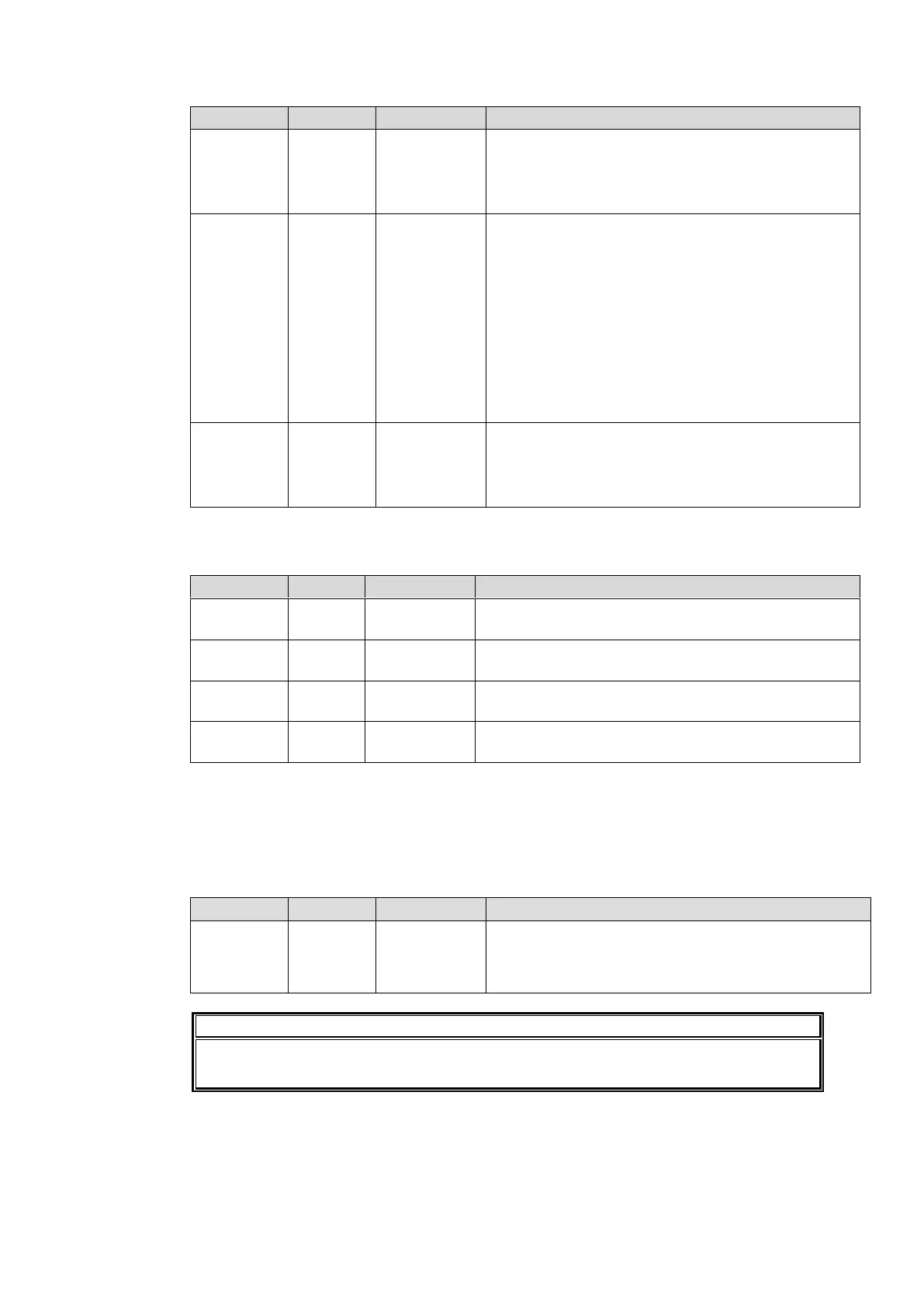
FS1, FS2 Ancillary Setting
Selects ancillary data processing mode for the
FS1/FS2 output signal. H ANC and V ANC menu
settings will become available when H/V ANC is
selected. Set to Detail to enable ANC Data Embed
settings in 9-4-3 “ANC Settings”.
Embeds audio signals into horizontal ancillary data
of FS1/FS2 output videos.
Overwrite: Removes the embedded audio from the
input SDI video, then embeds the processed audio
data in the video signal. Whether to embed is
determined by the FS1/FS2 Audio Group setting.
The input SDI data will be embedded in the video
signal after audio signals are embedded.
In Data: Passes the input SDI horizontal ancillary
data without processing. (Processed audio data
cannot be embedded.)
Blank : Deletes all horizontal ancillary data, and
embeds the processed audio data.
Embeds audio signals into vertical ancillary data of
FS1/FS2 output videos.
Pass: Embeds the vertical ancillary data without
processing.
Blank: Deletes all vertical ancillary data.
* H ANC and V ANC settings are effective if input and output formats are the same. If such
formats are different, both H ANC and V ANC will be set to BLANK.
FS1, FS2 Audio Group
Disable: Does not insert GROUP 1-embedded audio.
Enable: Inserts GROUP 1-embedded audio.
Disable: Does not insert GROUP 2-embedded audio.
Enable: Inserts GROUP 2-embedded audio.
Disable: Does not insert GROUP 3-embedded audio.
Enable: Inserts GROUP 3-embedded audio.
Disable: Does not insert GROUP 4-embedded audio.
Enable: Inserts GROUP 4-embedded audio.
*1 Operative if H ANC under FS1/FS2 Ancillary Setting is set to Overwrite or Blank.
*2 GROUP4 embedded audio cannot be inserted into SD-SDI output signals regardless of the
GROUP4 setting.
*3 The setting is ineffective if the input and output formats are the same, and H ANC is set to In
Data under Converter1 Ancillary Setting.
FS1, FS2 SD Line Mask
Pass: Outputs the line to a composite, Y/C or SD-SDI
output signal without processing.
Blank: Masks the selected composite, Y/C or SD-SDI
output signal line.
Line settings specified under ANC Settings (sec. 9-4-3) take a priority over FS1, FS2
Line Mask line settings and will take effect.



 To Next Page