229
9-8. Network Settings
If the user name and password are not set in the USER SETTING page (see section 9-8-5), the
Logout is not shown.
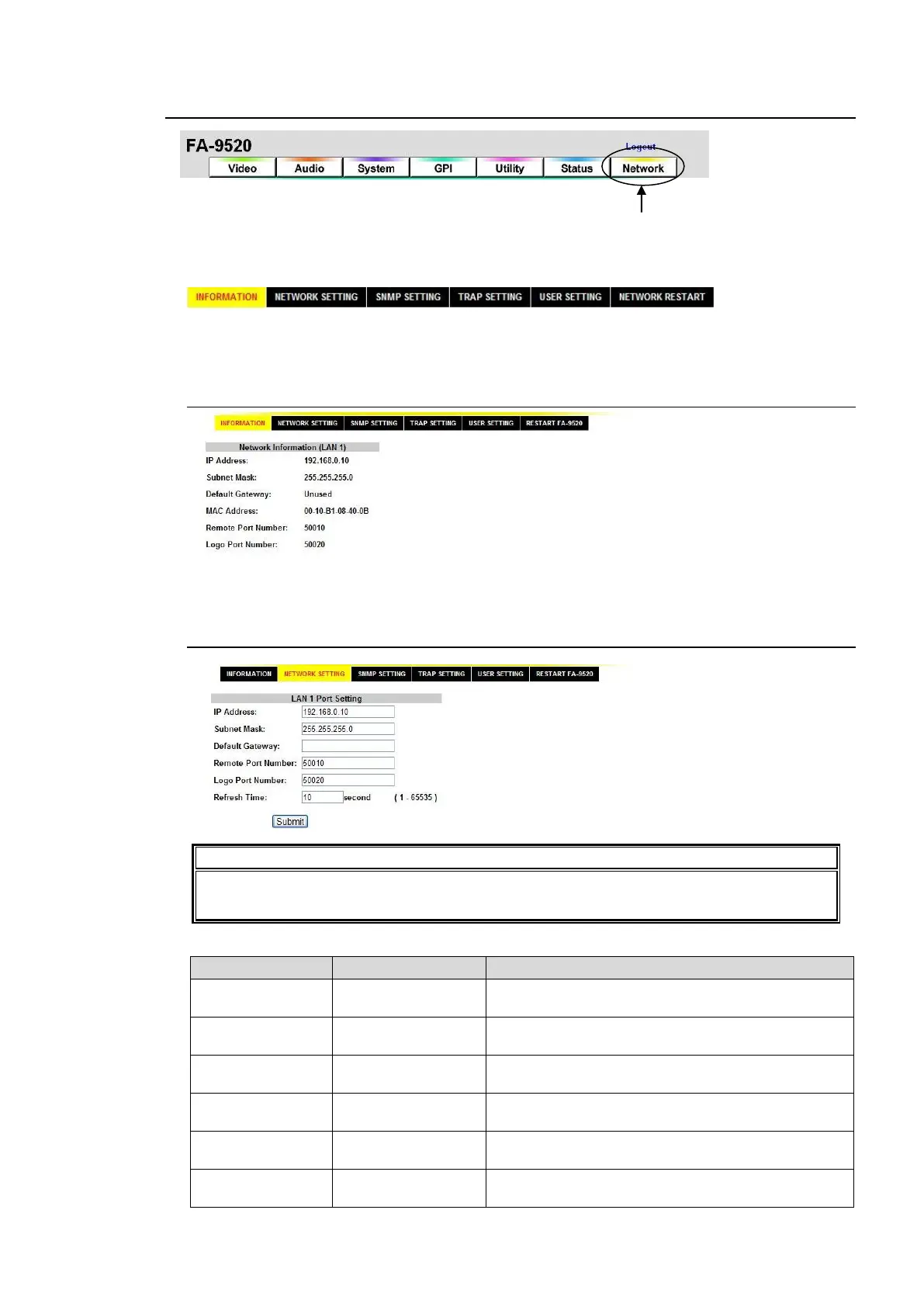
Click the Network tab at the top of the page. The Network page will be displayed.
In at the top left, click
NETWORK SETTING to go to the NETWORK SETTING screen. In the same way, click SNMP
SETTING, TRAP SETTING, USER SETTING, or NETWORK RESTART to go to the respective
page.
9-8-1. Network Information
Displays the network settings of the LAN1 port on the rear panel.
9-8-2. NETWORK SETTING
The web page may not be properly displayed if your PC does not have sufficient capacity
(CPU, memory, etc.). In such case, set Refresh Time to a value larger than 30.
The LAN1 port network settings screen will be displayed.
Allows you to set the LAN1 port IP address. A
period “.” is used to separate each octet.
Allows you to set the LAN1 port subnet mask. A
period “.” is used to separate each octet.
Allows you to set the gateway. A period “.” is used to
separate each octet.
Allows you to set the TCP port number for the
FA-95RU / FA-10DCCRU connection.
*1
Allows you to set the TCP port number for the
FA-95LG GUI connection.
*2
Allows you to set the time (seconds) for refreshing
the web screen.



 To Next Page