200
9-4. SYSTEM Settings
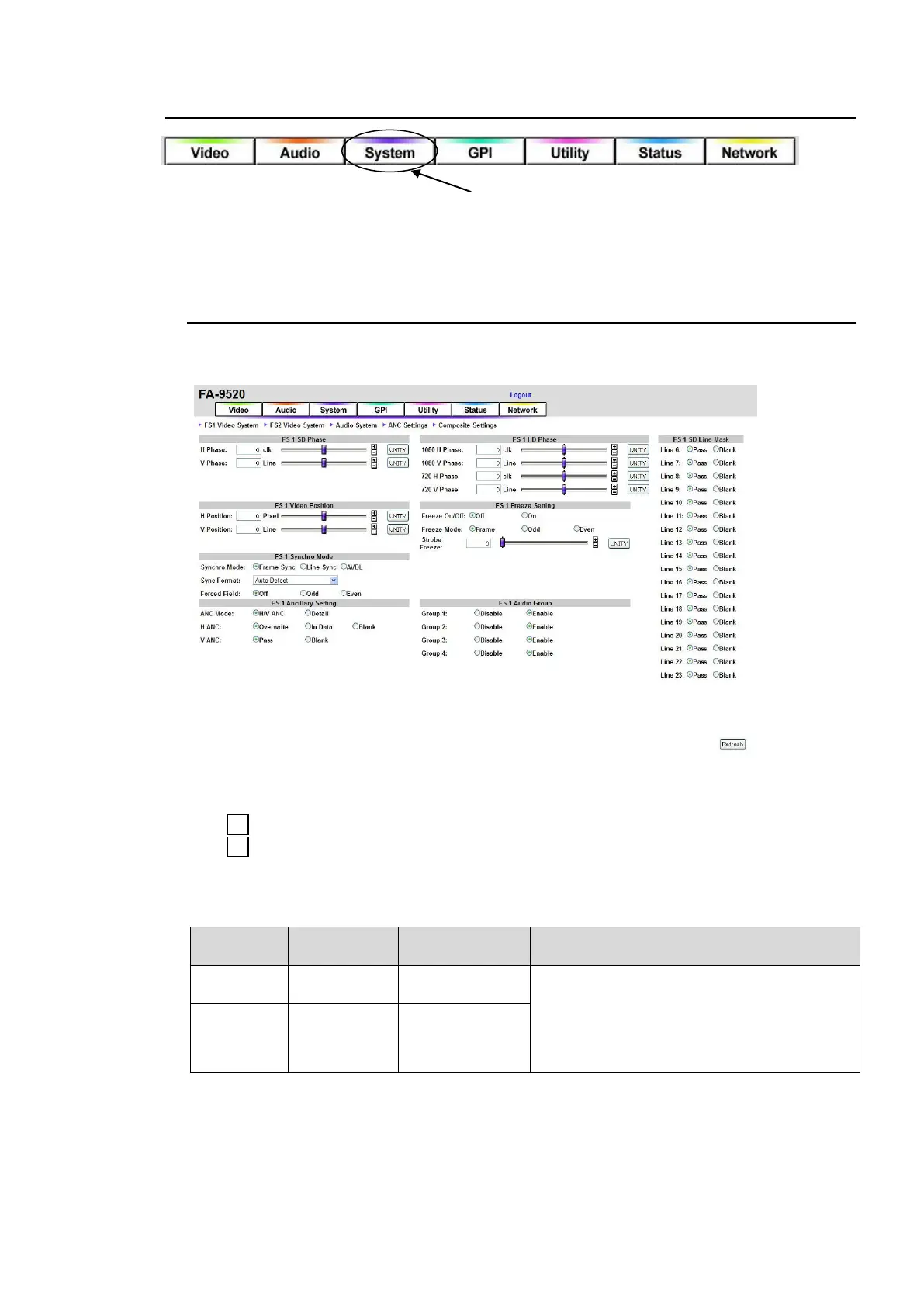
Click the System tab at the top of the page. The System setting window will be displayed.
The system setting window consists of Video System and Audio System pages.
Those pages are accessed by clicking ►FS1 Video System ►FS2 Video System ►Audio
System at the top of the page.
9-4-1. FS1/FS2 Video System
Click ►FS1 Video System or ►FS2 Video System at the top of the Video System page to
access the corresponding FS Video System page.
Click Refresh to update the settings.
Click Unity to reset to the default settings.
Click to increase the value by the smallest steps.
Click to decrease the value by the smallest steps.
If the user name and password are not set in the USER SETTING page (see section 9-8-5),
the Logout is not shown.
FS1, FS2 SD Phase
*1
Adjusts the horizontal and vertical phases of
the system referring to genlock signal. This
setting is applied to SD output signals.
0 Line
*2
(Frame, Input)
1 Line
*2
(Line, AVDL)
-313 - 313 Lines
(1 Lines)
*1 These settings cannot be made if there is no reference signal input.
*2 The default value varies depending on the Synchro Mode setting as shown in the below table. The set
value will be reset to its relevant default value whenever the Synchro Mode setting is changed.



 To Next Page