Chapter 5 Parameters Definition
106
F2 – Wait Timeouts
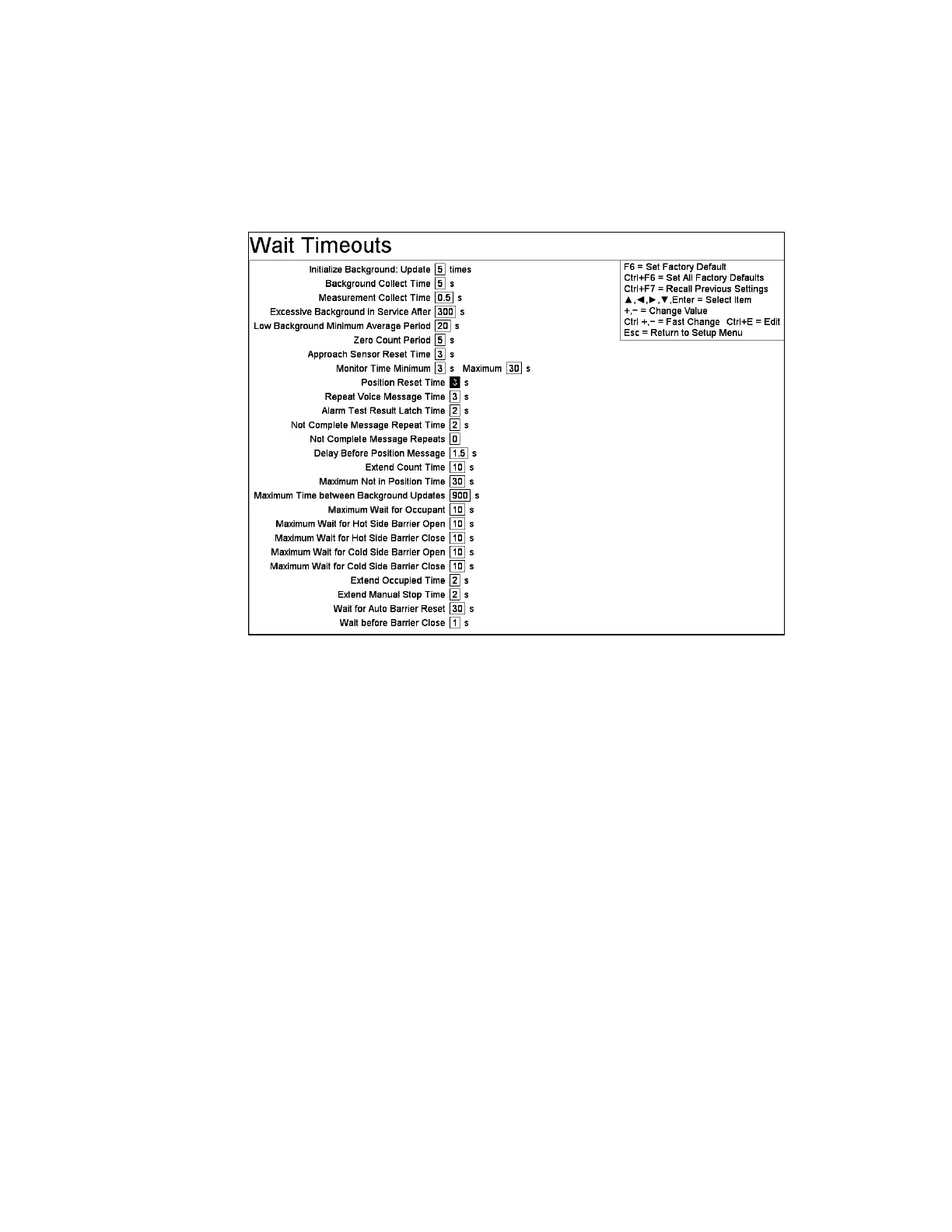
The Wait Timeouts screen (Figure 52) controls various timing loops used during
monitoring sequences. Note that, for settings that change by 0.125 s instead of 1 s,
Ctrl + will increment by 8 instead of 10 and Ctrl - will decrement by 8 instead of 10.
Figure 52 The Wait Timeouts Screen
Line Items
Initialize Background Update x times: where x is the number of Background
Update cycles performed during an initialize background sequence (which occurs
when program starts, and when it returns to service). The default is 5.
Background Collect Time: This sets the background counting period. This should
be in the order of 3 to 10 seconds, although it can be set larger. Values larger than 10
seconds result in fewer resets to the average background rate. However, smaller
values allow for a faster response to real changes in background levels, particularly
decreasing changes. The default is 5 seconds. In equations, this is T
b
. Changing this
time resets the background averages.
Note: If Initialize Background Update x, times multiplied by the Background
Collect Time is greater than (F3 - Setup, F3 - Detection Zones, F1 - Zone
Configuration) Background Average Period then the monitor will not be able
to leave the Initialize background screen.
Measurement Collect Time: Range is 0.125 s to 99 s. Default is 0.125s for GEM-5
in walkthrough mode, otherwise its 0.5 s. This determines how often the
measurement running total is updated. This running total is used to determine



 To Next Page