Chapter 5 Parameters Definition
186
F3 – Go Back Instructions
This exists in the event that the reason for “Go Back” mode can be shown. The
reasons are “Position Timeout’, “Background Change”, “Manual Stop”, or
“Dosimeter Reader Fault”. An Out of Service Fault can also cause an aborted
measurement.
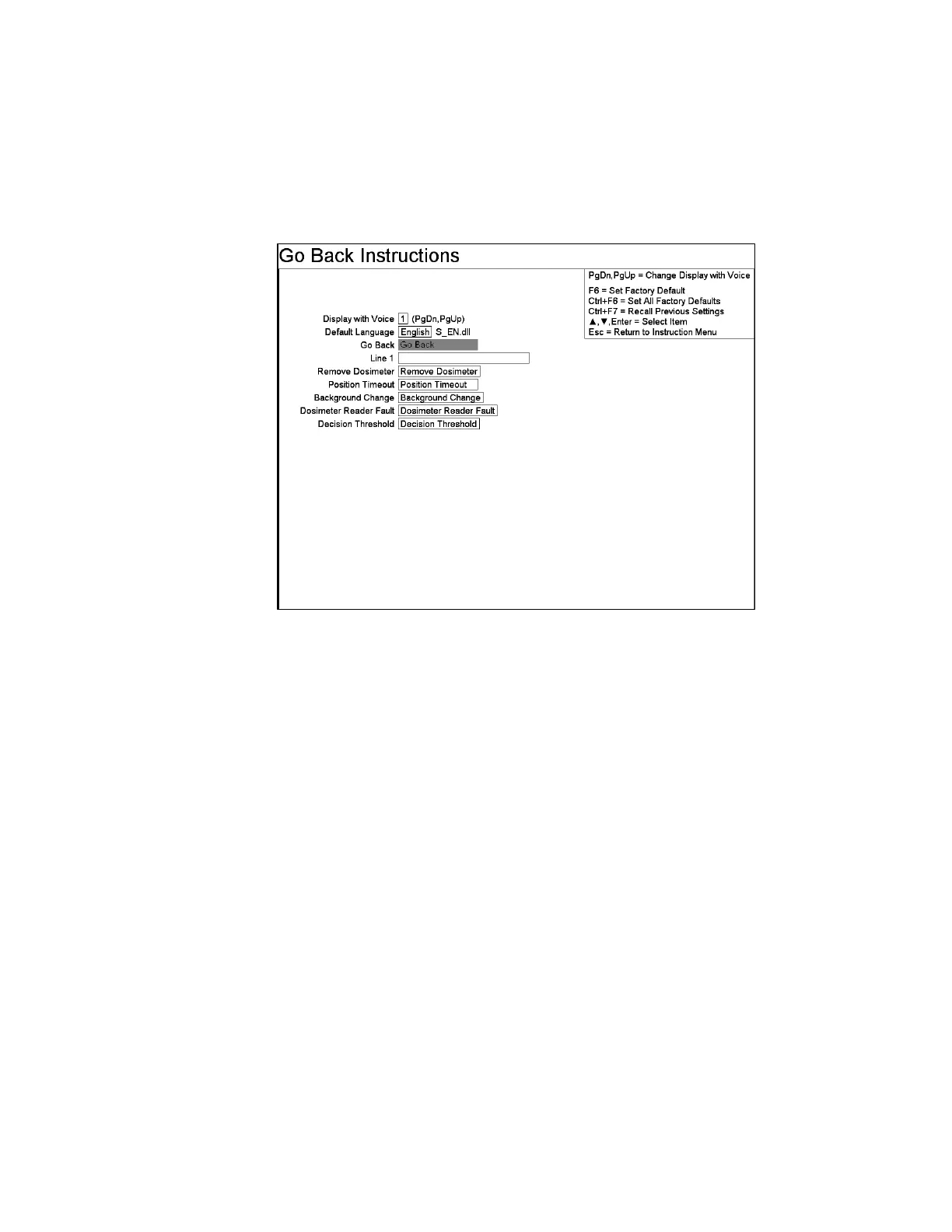
Figure 82 The Go Back Instructions Screen
Line Items
The Line 1 setting is shown under the text used for Go Back.
The Remove Dosimeter setting is shown when Dosimeter is inserted while the Go
Back screen and the Ctrl+F10 Factory Setup, F7 – Dosimeter Reader Configuration
– Dosimeter Reader Enabled is set to “Yes” (on page 40).
The Position Timeout setting is shown when the Go Back reason is “Position
Timeout”.
The Background Change setting is shown when the Go Back reason is “Background
Change”.
The Dosimeter Reader Fault setting is shown when the Go Back reason is
“Dosimeter Fault” and the Ctrl+F10 Factory Setup, F7 – Dosimeter Reader
Configuration – Dosimeter Reader Enabled is set to “Yes” (on page 40).
The Decision Threshold setting is setting is shown when the Go Back reason is
“Decision Threshold” and the Ctrl+F10 Factory Setup, F10 – Methodology
Configuration – Methodology is set to “Bayesian” (on page 46).



 To Next Page