Model Selection and Configuration
Gem-5 User’s Manual 47
K Interpretation: [One-Tailed] “(-∞ ∫ K)” (default)or [Two-Tailed] “(-K ∫ K)”. If set
to [One-Tailed] the K factor used goes from -∞ to x , and if set to [Two-Tailed], the
K factor used goes from -x to x. A comparison of 1-Tailed and 2-Tailed Values for
Same Confidence Level are also discussed in section Confidence Levels on page 270.
Note: Previous versions always used [Two Tailed] (−K ∫ K).
This is used on the F3 - Setup, F3 - Detection Zones, F1 - Zone Configuration
screen for interpretation to right of Bkg False Alarm (K Alpha), Extend
Confidence (K Beta 1), Alarm Confidence (K Beta 2), and Bkg Reset Level
(K Delta) settings.
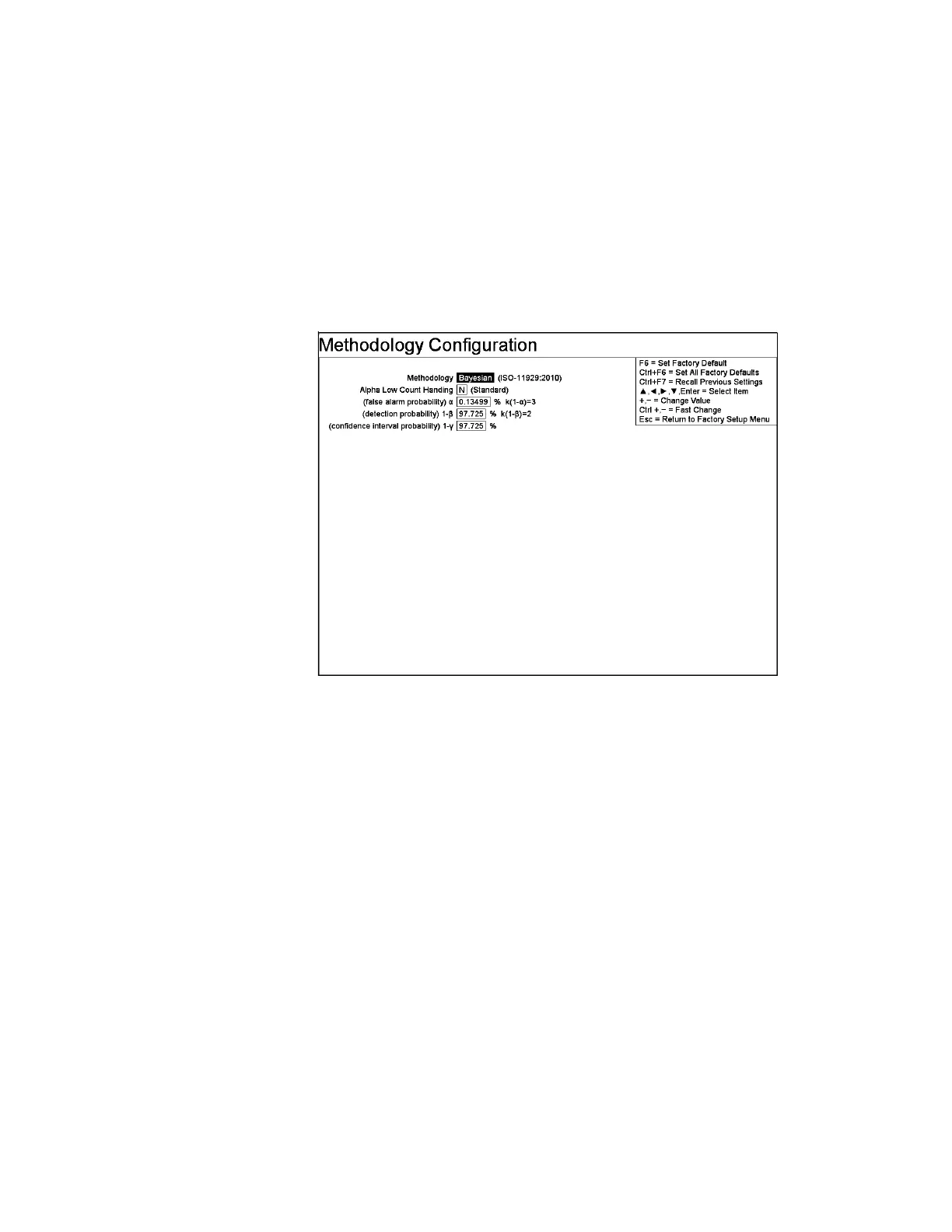
Figure 21 Bayesian Methodology Configuration Screen
Line Items
Methodology: “Traditional” (default) or “Bayesian”. Refer to Supplementary
Bayesian Methodology User's Manual for more information.
Alpha Low Count Handing: Choices are “N” (Standard) and “N+1” (Improved).
Default is [N] (Standard).
(false alarm probability) α: Range is [0] to [100] %. Default is [0.13499] %
(equivalent to Traditional K Alpha default of [3.0]).
(detection probability) 1-β : Range is [0] to [100] %. Default is [97.725] %
(equivalent to Traditional K Beta default of [2.0]).
(confidence interval probability) 1-γ: Range is [0] to [100] %. Default is
[97.725]%.
Note that this affects Confidence Interval Upper Limit (Ān(ul)) used for the
Clean/Contaminated decision.



 To Next Page