Internal Component Replacement (Inside Front Enclosure)
10-38 Service Manual
To replace the speaker:
1. Follow the procedure Separating the Front and Rear Enclosures on page 9-2.
2. Disconnect the two speaker wires from the speaker.
3. Remove the four screws securing the speaker to the enclosure, and remove the
speaker.
4. Position the new speaker on the four mounting bosses, with the connector termi-
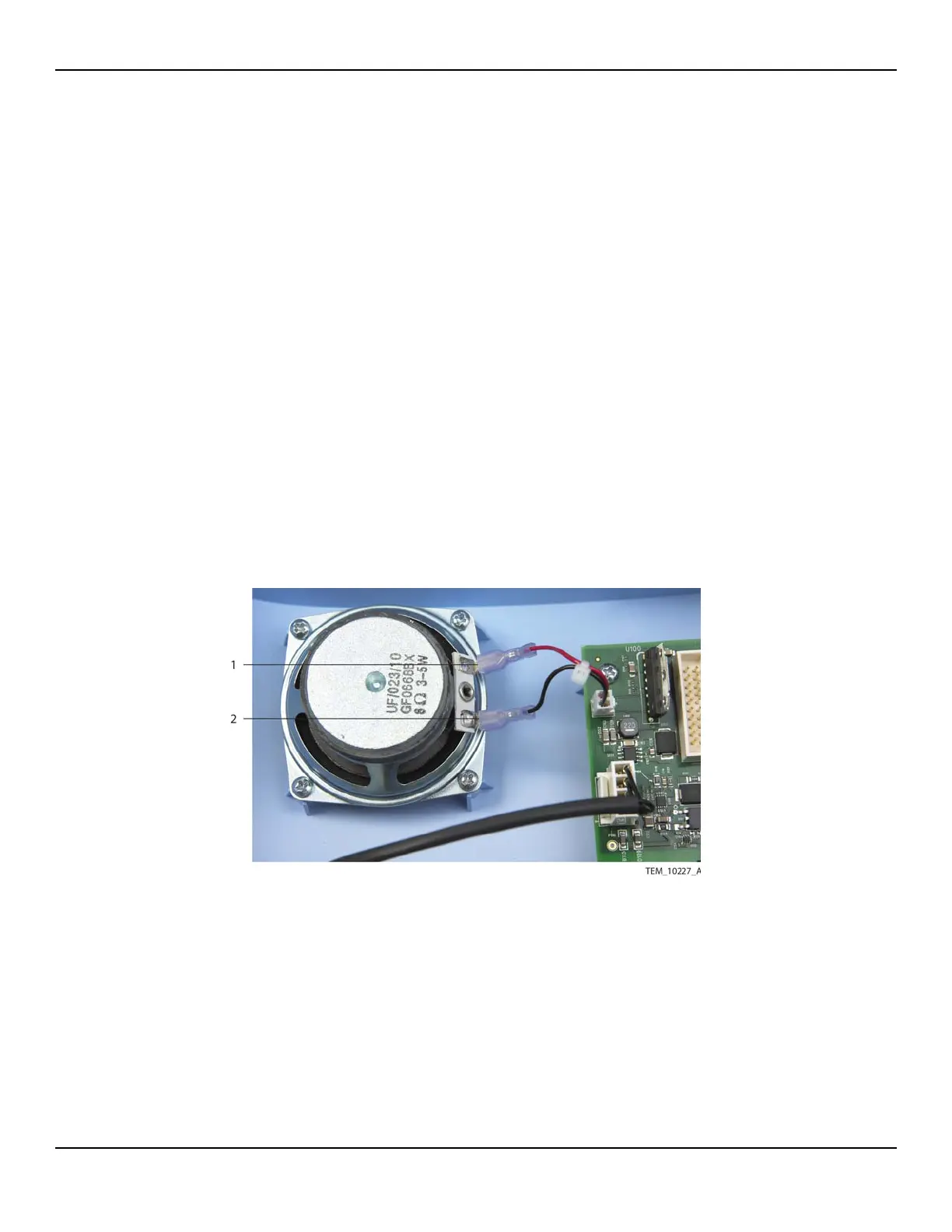
nals towards the Power PCBA (Figure 10-28).
5. Attach the speaker to the mounting bosses with the four screws. Tighten the
screws to 1.1 to 1.5 N-m (9.7 to 13.3 lb-in).
6. Connect the speaker cable to the speaker (Figure 10-28):
• Red wire to the positive (+) terminal
• Black wire to the negative (–) terminal
Figure10-28.Speaker Cable Connections
7. Follow the procedure Rejoining the Front and Rear Enclosures on page 9-5.
1 Positive (+) Terminal
(Red Wire)
2 Negative (–) Terminal
(Black Wire)















 To Next Page