Front Enclosure Replacement
Service Manual 12-9
8. Discard the old front enclosure (with keypad and labels attached).
9. Install the UI PCBA and display in the new front enclosure as follows (Figure 12-7
on page 12-8):
a. Place a nylon spacer on each mounting screw.
b. Check the display window and display for dust, fingerprints, and debris. If nec-
essary, clean the window and display.
c. Holding the display behind the UI PCBA, place the PCBA on the mounting
screws with the USB cable at the top. Position the display so that it is fully
seated in its window. Make sure that the keypad cable is not caught behind
the UI PCBA.
d. Make sure that the shoulder washers are in place in the PCBA mounting holes,
with the bottom of the shoulder against the top surface of the PCBA.
e. Place a lock washer on each mounting screw.
f. Place a nut on each mounting screw. Tighten the nuts to 0.4 to 0.6 N-m (3.5
to 5.3 lb-in).
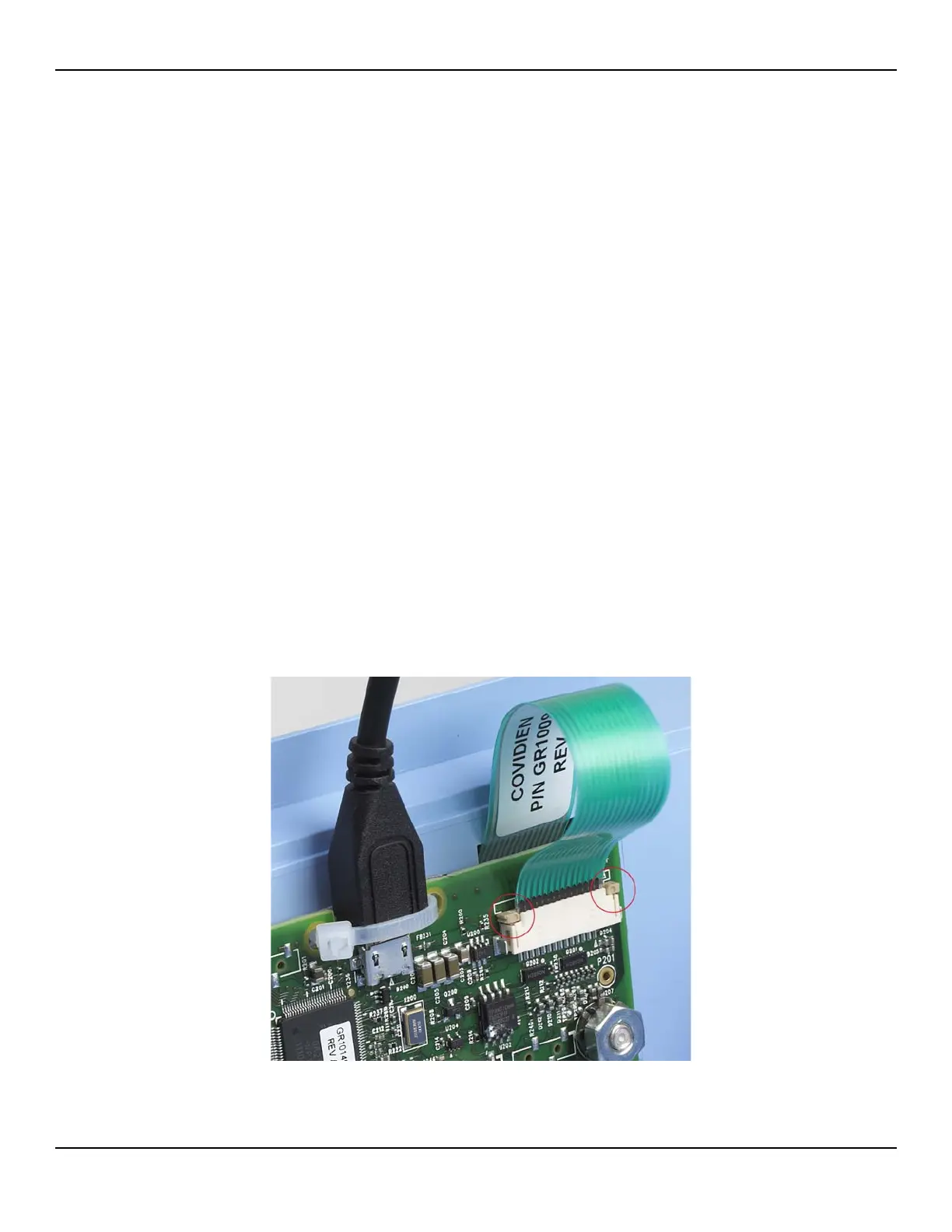
g. Slide the locking bar up from the J204 connector, and slide the keypad cable
completely into the connector in front of the locking bar. Press down on both
sides of the locking bar to secure the cable. The locking bar must be complete-
ly seated on both sides (Figure 12-8).
Figure12-8.Keypad Cable Secured by Locking Bar















 To Next Page